

Whether you're busy cooking or just want to limit the amount of time you spend on a certain task, timers come in handy for all sorts of things. And the quicker you can set a timer, the more time you'll have to tend to whatever it is you're doing.
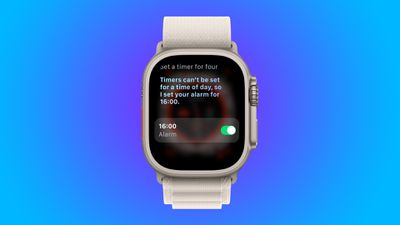
The usual go-to for achieving this on Apple Watch is via Siri. Users can ask Siri to set a timer by holding the watch up to their mouth and making the request. Pressing and holding the Digital Crown will also invoke Siri, and it should be as simple as saying "set a timer for X minutes."
We say should intentionally here, because based on several recent reports from users, Siri is sometimes interpreting the request to set a timer as a request to set an alarm, which is clearly not what users want.
What appears to be happening is that Siri is often failing to hear the full request for a timer. So instead of hearing "Set a timer for four minutes," Siri is only picking up "Set a timer for four." Siri, it seems, is missing the last word.
As a result, the response Siri gives is something like "Timers can't be set for a time of day, so I set your alarm for 4 a.m." In other words, the assistant is creating an alarm instead of a timer and automatically turning it on.
A timer failing to go off can be a genuine problem. But for a user who does not notice Siri's error (especially if they aren't looking at their watch's screen), not only are they not getting the requested timer, they are also likely to be rudely woken in the middle of the night.
How to Avoid Unwanted Alarms
One way to prevent Siri from missing the word "minutes" in your command is to rephrase your request by moving it from the end of the phrase to the middle. So rather than say "Set a timer for four minutes," say "set a four-minute timer" instead. That way, it can't be missed.
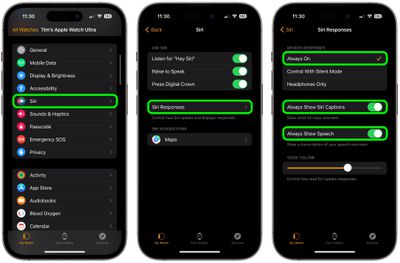
It's also worth turning on Siri's spoken response, captions, and the transcription of your speech.
- Open the Watch app on your iPhone.
- In the My Watch screen, select Siri -> Siri Responses.
- Under "Spoken Responses," tap Always On.
- Toggle on the switch next to Always Show Siri Captions.
- Toggle on the switch next to Always Show Speech.
These options won't stop Siri from misinterpreting your timer requests as alarm commands. But they should help reduce the chance of you missing the assistant's mistakes until Apple can fix them in a future update.



















