

Speed Up iPhone Typing With This Simple Keyboard Trick - MacRumorsOpen MenuShow RoundupsShow Forums menuVisit ForumsOpen Sidebar
Skip to Content

Speed Up iPhone Typing With This Simple Keyboard Trick

by

iPhone users often find themselves toggling between different keyboard layouts to type messages, emails, or fill out forms. This can slow down communication and disrupt your flow. But there are ways to streamline the process. If this quick tip is new to you, it could revolutionize the way you type on your iPhone and save you precious time.

speed up iphone typing trick
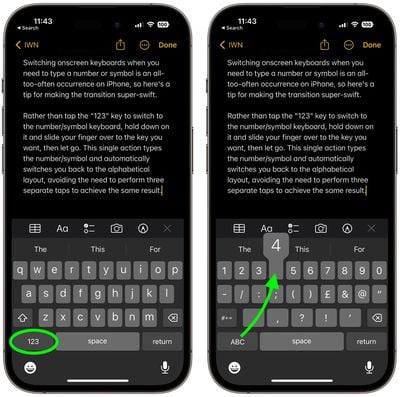
Switching away from the alphabetic keyboard layout when you need to type a number or symbol is an all-too-often occurrence on ‌iPhone‌, so here's a quick tip for making the transition super-swift.

Rather than tap the "123" key in the bottom-left corner to switch to the number/symbol keyboard, hold down on the key and then slide your finger over to the number/symbol that you want to type, then let go.

This single action types the number/symbol and automatically switches you right back into the alphabetical layout, avoiding the need to perform three separate taps to achieve the same result.
notes
So next time you find yourself needing to insert a number or symbol, remember this trick and you can type away without pause.


Top Rated Comments

31 months ago
Today I learned.
Score: 25 Votes (Like | Disagree)
iZac Avatar
31 months ago
If this thread is going to be a keyboard tips-and-tricks compendium then I’ll add something that took me years to learn.

If you hold your thumb on the spacebar it activates the cursor, offset without your finger being in the way of the text block.
Score: 17 Votes (Like | Disagree)
trainwrecka Avatar
31 months ago
I still can’t believe with how much the screen has grown, we still don’t have the number row by default.
Score: 14 Votes (Like | Disagree)
31 months ago

Which key are you talking about? I press the 123 key and the numbers come up. What is more efficient than that?
Your solution:

1 press the 123 key
2 release the 123 key
3 select a number
4 press ABC key
5 release the ABC key

compared to:

1 press and hold the 123 key;
2 slide your finger to desired number;
3 release the numeric key and you are back to the alphabetic keyboard.

technically you save two actions. Whether that makes your day, is up to you. :)
Score: 14 Votes (Like | Disagree)
31 months ago
In notes app on iphone in bullet list you can tap shift+enter to go to the next line without bulleting.
Score: 11 Votes (Like | Disagree)
coffeemilktea Avatar
31 months ago
After years of reading Internet articles, I'm glad I finally found one that offered a genuinely helpful "One Simple Trick™" to improving my life :cool:
Score: 10 Votes (Like | Disagree)

Popular Stories

iOS 27 Next to iPhone

Here's When iOS 27 Rolls Out Today in Every Time Zone [Update: It's Out]

Sunday September 13, 2026 3:00 am PDT by
Update 10:04 a.m.: iOS 27 is rolling out now, though it may take a bit for all users to see it, so keep checking! Apple is about to release iOS 27, which will finally deliver more advanced Siri AI capabilities as well as a variety of other refinements, improvements, and new features to iPhones. It's Apple's biggest software update of the year, and Apple announced at Wednesday's iPhone event...
iOS 27 Icon iPhone

iOS 27 Available Now With These 8 New Features

Monday September 14, 2026 9:00 am PDT by
Update — 10 a.m. Pacific Time: Apple has released iOS 27. During its iPhone 18 Pro and iPhone Duo event last week, Apple announced that iOS 27 will be released widely on Monday, September 14. iOS 27 should be available around 10 a.m. Pacific Time / 1 p.m. Eastern Time today via the Settings app, under General → Software Update. Below, we have highlighted eight new features and...
Apple iCloud Plus expansion hero

iCloud+ Now Includes Apple TV, Apple Arcade, and Curated Apple Music Stations in Over 100 Countries

Tuesday September 15, 2026 1:43 am PDT by
Apple today announced a new subscription initiative that turns paid iCloud+ subscriptions into a broader services bundle in more than 100 countries. In select countries, Apple says every paid iCloud+ plan, including the cheapest 50GB tier, now includes Apple TV and Apple Arcade "at no additional cost," while family sharing extends the storage, TV and Arcade access to up to five people....















