How to Boot in Safe Mode on an Apple Silicon Powered Mac - MacRumorsOpen MenuShow RoundupsShow Forums menuVisit ForumsOpen Sidebar
Skip to Content

How to Boot in Safe Mode on an Apple Silicon Powered Mac

by

Macs introduce a new system for accessing recovery and security options at startup. This article explains how to use the new boot and recovery interface to start up your computer in safe mode.
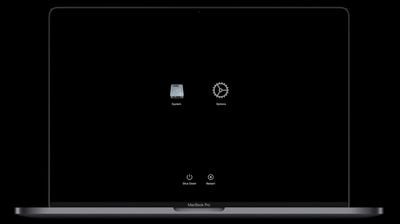
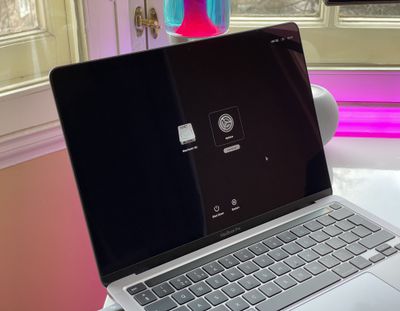
apple silicon mac startup recovery screen

What is Safe Mode?

Starting up your Mac in safe mode can help you determine whether an issue you're experiencing is caused by the software that loads every time your Mac starts up. It does this by preventing your Mac from loading things like login items, non-system fonts, and system extensions, and performing a First Aid check on your startup disk. It also deletes certain caches, including the kernel cache, which are recreated on the fly when needed.

How to Boot into Safe Mode on Apple Silicon Macs

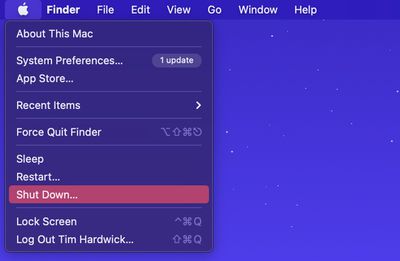
  1. If your Mac is powered on, shut it down ( menu -> Shut Down).
    shutdown menu bar

  2. Turn on your Mac and continue to press and hold the power button until you see the startup options window.
    m1 mac startup options

  3. Select your startup disk.
  4. Press and hold the Shift key, then click Continue in Safe Mode.
    boot

  5. Release the Shift key.
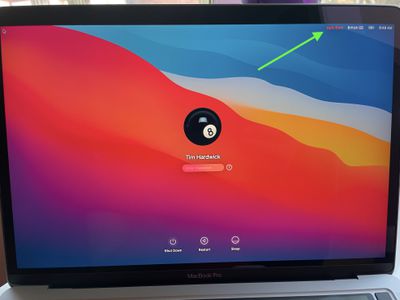
  6. Once your Mac has booted into safe mode (you'll see "Safe Boot" in red in the upper right), log in using your account credentials.
    apple silicon safe boot

If the issue you're experiencing still occurs in safe mode, or your Mac restarts several times and then shuts down, reinstall macOS and double-check that the system software and any third-party apps are up to date.
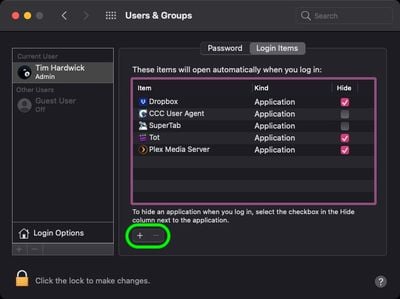
sys-prefs
If the issue you're having doesn't occur in safe mode, that indicates a potential problem with a startup item. In such cases, make a note of the login items listed under your user account in System Preferences -> Users & Groups. Once you've done that, remove them all using the minus (–) button, then add them back and restart your Mac after adding each one. When the issue next occurs again, remove the last login item you added, and that should resolve the problem.


Popular Stories

Apple Card iPhone 16 Pro Feature

Apple Card Promo to Offer Free AirPods Pro 3

Friday May 15, 2026 8:59 am PDT by
Starting as early as next week, customers who sign up for an Apple Card at Apple's retail stores in the U.S. will receive $249 cash back when they purchase AirPods Pro 3, according to Bloomberg's Mark Gurman. The promotion has yet to be officially announced by Apple, so exact terms and conditions are not available at this time. AirPods Pro 3 are priced at $249 in the U.S., so customers who...
Apple WWDC25 iOS 26 CarPlay Light mode 250609

Six Popular iPhone Apps Now Available on CarPlay

Thursday May 14, 2026 9:10 am PDT by
Apple's CarPlay system for accessing iPhone apps on a vehicle's dashboard screen has received six popular apps in recent weeks: ChatGPT, Perplexity, Grok, Google Meet, WhatsApp, and the indie artist streaming platform Audiomack. Make sure you have the latest version of each app and they will automatically appear on CarPlay. ChatGPT Starting with iOS 26.4, CarPlay supports voice-based...
ipad mini 7 blue

OLED iPad Mini: Release Date, Pricing, and What to Expect

Thursday May 14, 2026 5:08 am PDT by
According to the latest rumors, Apple is close to launching its next-generation iPad mini. So what should we expect from the successor to the iPad mini 7 that Apple released over a year ago? Read on to find out. Processor and Performance Apple is working on a next-generation version of the iPad mini (codename J510/J511) that features the A19 Pro chip, according to information found in code...