How to Start Workouts In Apple Fitness+ - MacRumorsOpen MenuShow RoundupsShow Forums menuVisit ForumsOpen Sidebar
Skip to Content

How to Start Workouts In Apple Fitness+

by

Apple Fitness+ is Apple's latest subscription service, offering home workout options for Apple Watch users across a range of different fitness categories like yoga, cycling, running, core, and more.


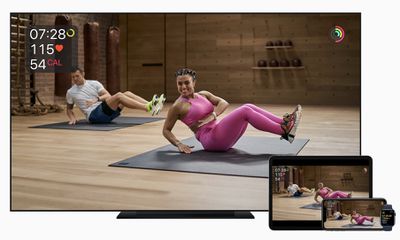
The Fitness+ service is designed to work with an Apple Watch, with videos able to be watched on iPhone, iPad, and Apple TV. Starting a workout is simple, with instructions below.
fitness plus

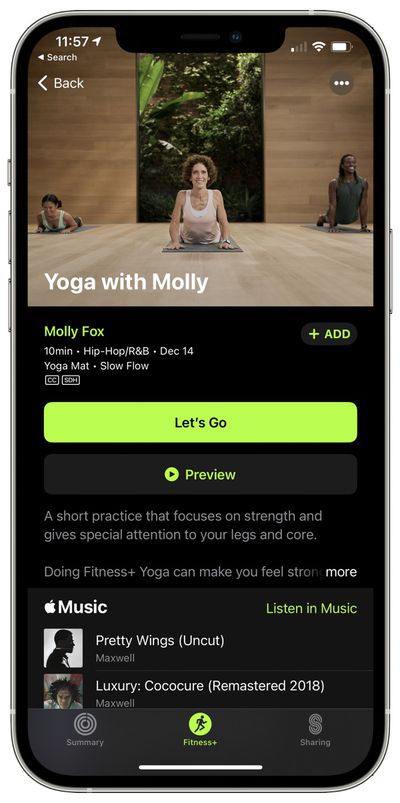
  1. On iPhone, ‌iPad‌, or ‌Apple TV‌, open up the Fitness app and choose the Fitness+ tab. It's installed automatically on iPhone and ‌Apple TV‌, and must be downloaded on ‌iPad‌.
  2. Find a workout that you want to do.
  3. Tap the workout. apple fitness plus workout
  4. Tap on the "Let's Go" button on iPhone, ‌iPad‌, or ‌Apple TV‌, or tap on preview first to see what the workout includes.
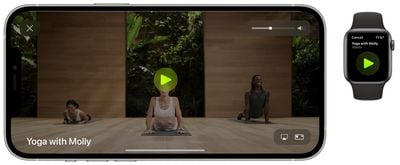
  5. From there, you'll see the workout start on your linked Apple Watch. Tap on the play button on the Apple Watch to launch the workout on your device. apple fitness plus start workout
Note that if this is the first time you're using the ‌Apple TV‌ with your Apple Watch for Fitness+, you will need to tap on the "connect" option and follow the steps. If you're signed into the same Apple ID on all of your devices, starting a workout should be a seamless process, with the Apple Watch metrics showing up right on your device's screen as well as on the wrist.
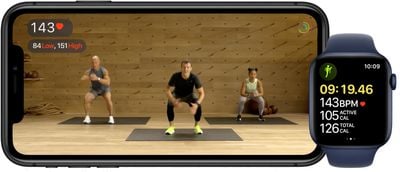
applefitnesswatchandiphone
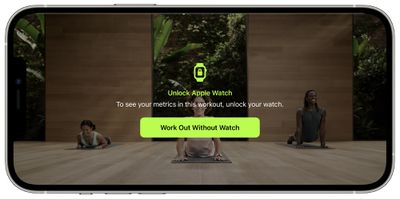
Note that you can choose to do a workout even if your Apple Watch is not available, you just won't see the metrics on the screen. This only works for iPhone and ‌iPad‌, with the ‌Apple TV‌ requiring an Apple Watch.

fitness plus workout without watch
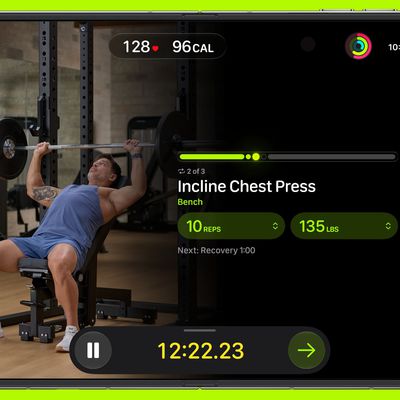
The workout time elapsed, your heart rate, active calories burned, and total calories burned are displayed on the screen, as are any activity milestones that are met.

At the conclusion of a workout, you'll see a complete overview of active and total calories burned, heart rate, and activity ring progress, which can be shared if desired.
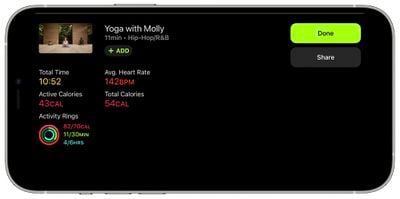
apple fitness workout end metrics
The workout is also then listed in the Fitness app with a specific photo and the title of the workout.
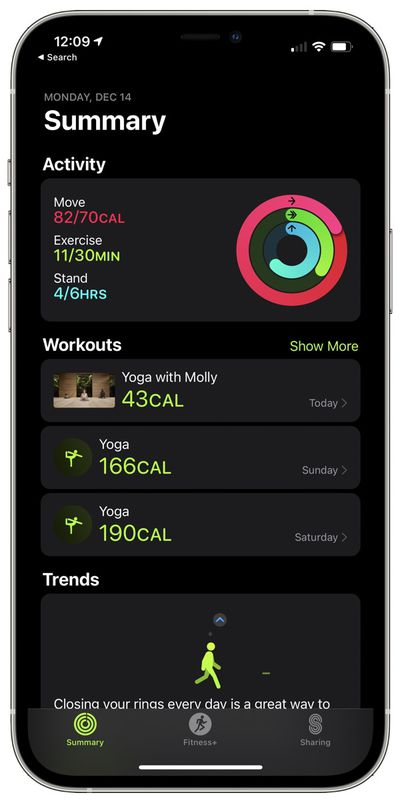
apple fitness plus workout list
Using Fitness+ requires an Apple Watch Series 3 or later with watchOS 7.2 installed along with an iPhone 6s or later with iOS 14.3 or later. It can also be used with the 2014 iPad Air 2 with iPadOS 14.3 or later, and the ‌Apple TV‌ 4K or ‌Apple TV‌ HD with tvOS 14.3 or later.

Top Rated Comments

Apple_Robert Avatar
77 months ago
I appreciate the informative MR articles. However, a video based on how to get started in Fitness+ without Dan doing one of the routines, is a video that is sorely lacking in depth of content. :D

Get with the Fitness+ program, Dan. :P
Score: 5 Votes (Like | Disagree)
77 months ago

-biggest grumbling point? Music selection. I love my metal, maybe a bit of 80s rockers... Don’t bother with hip hop, or most of the seems all ‘rock’ at least on treadmill is neutered. Nickelback, System of a Down, Green Day - all stuff I skip on Apple Music.
It'd be a neat trick if they could replace the music with different genres for different audiences to avoid alienating folk. Can't say I've watched any of the vids, but just looking at the genres would be enough to put me off, I'm sure the tech is there with key matching / beat matching etc. & it's not like apple don't have access to a huge library to test it on. Just think of it as a pick 'n' mix - pick your instructor, your class, your music & you're off.
Score: 2 Votes (Like | Disagree)
77 months ago
From a middle aged guy who never steps in to a gym, or use any other video motivators when I use my treadmill, I find this has some pluses and a few negatives.

-Treadmill instructors will motivate to push to new bests. I’m used to just plopping the treadmill on 10kph, 4% incline for ten minutes at a blank wall, but there gets to be some real push up some inclines and straightaways.
-I really like the exercise countdown, heart rate, where I rank with other users, and progress shown on my rings.
-Worked really well with my iPad, but given the noise from the machine, likely best to use some headphones. I’d expect a phone to be a challenge.

dislikes:
-limited videos right now.
-biggest grumbling point? Music selection. I love my metal, maybe a bit of 80s rockers... Don’t bother with hip hop, or most of the seems all ‘rock’ at least on treadmill is neutered. Nickelback, System of a Down, Green Day - all stuff I skip on Apple Music.
Score: 2 Votes (Like | Disagree)
77 months ago


Oh wait...they are trying to get you to BUY a watch. Silly me...I thought they were worried about my health.
Yup, silly you. It's your doctor that's paid to worry about your health, not Apple. They DO want to sell you a Watch.
Score: 2 Votes (Like | Disagree)
AngstyKylo Avatar
77 months ago

Huh. Why wouldn't they make this stuff also good for people that don't have a watch? They could show a 15sec timer at the beginning, any time you tap a button for it, and at the end of the workout and you just count your own heart rate and type it in. Maybe people can't count that high anymore.

Oh wait...they are trying to get you to BUY a watch. Silly me...I thought they were worried about my health.
As a medical professional, anything that gets people to be more active in a safe way is definitely a positive. I wish Apple had done this a few years back when they first released the watches. The instructors decked out in Nike and Apple gear is kind of hilarious when you're not supposed to be the product or 'influenced' but is pretty much the way the fitness industry is.
Score: 1 Votes (Like | Disagree)
77 months ago

I can’t find the fitness app on my ipad nor in the store. Any ideas?
You need to upgrade to iOS 14.3
Score: 1 Votes (Like | Disagree)

Popular Stories

apple fitness plus strength

Apple Fitness+ Gets Gym Strength Plans in iOS 27.3

Tuesday November 3, 2026 11:35 am PST by
With iOS 27.3, Apple is adding a new Gym Strength workout to Apple Fitness+. It's a custom fitness option that generates a four-week plan based on a user's goals, experience, schedule, and equipment. People of all experience levels can use the feature, selecting workout days, areas of the body to focus on, and session length. Workouts have recommendations for exercises, reps, sets, and...
apple pro tell logo

Apple Launching Five New Products Today

Thursday November 5, 2026 12:59 am PST by
Apple is launching five new products on Friday, November 6, following pre-orders that opened last week, including its first touchscreen MacBook Pro models. The following new products will be available from today: iPad mini with OLED display and A20 Pro chip iMac with M6 chip 14-inch MacBook Pro with M6 chip 14-inch MacBook Pro with OLED touchscreen 16-inch MacBook Pro with OLED...
duo aquarium

More Fun iPhone Duo Apps: 30 New Picks to Try

Friday November 6, 2026 3:27 pm PST by
When the iPhone Duo launched, we shared a list of some of the fun apps developers created for the new form factor. Two weeks out, developers are continuing to come up with fresh ideas, so we thought we'd share some of our favorites. Games Marbles Unhinged ($2.99) - Marbles Unhinged is a marble maze designed for the Duo. When you fold it, the floor turns into a ramp. If you stand the top...


Latest Stories
Siri AI Rumored to Become 'More Like an Agent' as Early as Next Year
5 hours ago
Apple Taking New Approach to Developing iOS 28 and macOS 28
7 hours ago
Early Apple Black Friday Deals on Apple Watch, MacBook Air, and More
1 day ago
'Backglow' Lets You Customize New MacBook Pro's Glowing Apple Logo
1 day ago
Top Stories: Apple Product Launches, iOS 27.3 Beta, and More
1 day ago
More Fun iPhone Duo Apps: 30 New Picks to Try
2 days ago
Hands-On With Apple's New OLED Touchscreen MacBook Pro
2 days ago
Apple Store With All-New Design Opening Soon in Southern California
2 days ago
Control the Glowing Apple Logo on Your New MacBook Pro
2 days ago
Apple Shares New 'Apple Card: Apply and Use in Minutes' Ad
2 days ago
Apple Says More Than 100,000 Apps Optimized for iPhone Duo, Here's What's Still Missing
2 days ago
Early Black Friday Deals Kickoff With Steep Discounts on Apple Watch Ultras and More
2 days ago
The MacRumors Show: iOS 27.3 Looks Like a Huge Update
2 days ago
Best Buy's Black Friday Event Begins With Sitewide Savings on Apple, TVs, More
2 days ago
Apple Releasing Yet Another Two New Products Next Week
2 days ago
MacBook Air Drops to Lowest Price in Months With Amazon's $250 Discount
2 days ago
Apple Rumored to Drop the iPhone's Action Button Next Year
2 days ago
Apple's Extended Return Policy Now in Effect for 2026 Holiday Season
2 days ago
Apple Music Classical Updated With New Icon and Refreshed Design
2 days ago
OLED iPad Mini, M6 iMac, and New MacBook Pros Available From Today
3 days ago
Apple Surveys iPhone Duo Buyers About Crease and Camera
3 days ago
Apple's First Touchscreen Mac is Now Arriving to Customers
3 days ago
Claude Gets Personal Finance Feature With Bank Account Linking
3 days ago
Apple Arcade Adds Crossy Road Rush and NBA 2K27
3 days ago
Apple's New HomeView Smart Home Hub: Here's How Much RAM It Has
3 days ago
iPad Mini vs. iPad Air Buyer's Guide: Now Just $50 Apart
3 days ago
First iOS 27.3 and macOS Golden Gate 27.3 Public Betas Now Available
3 days ago
Apple Announces a New Mac Sales Record
3 days ago
Paid $200 for Logic Pro? Apple Says You Won't Get This New Feature
3 days ago
Instagram's Edits Video Editor is Now Available on Mac
3 days ago