How to Stop Apple TV Keyboard Notifications on iPhone - MacRumorsOpen MenuShow RoundupsShow Forums menuVisit ForumsOpen Sidebar
Skip to Content

How to Stop Apple TV Keyboard Notifications on iPhone

by

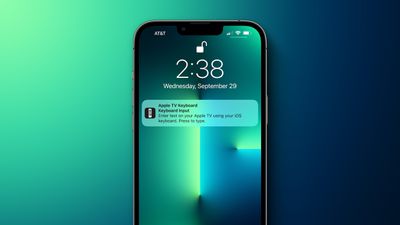
On the Apple TV, if you prefer not to input text using the Siri Remote you can use a nearby iPhone or iPad to type. Whenever a text field appears on the ‌Apple TV‌, a notification appears on the iPhone or ‌iPad‌, and after tapping the notification, you can use the on-screen keyboard on your iOS device to enter text on the ‌Apple TV‌.

apple tv keyboard notification iphone tight
You can disable these notifications on your iPhone or ‌iPad‌ if you find them annoying (and if you have several Apple TVs and kids in the one house, you'll know what we mean). If you're running iOS/iPadOS 15.1 or later, here's how to disable them.

  1. Launch Settings on your iPhone or ‌iPad‌.
  2. Tap Notifications.
  3. Under "Notification Style," select Apple TV Keyboard.
  4. Toggle off the switch next to Allow Notifications.
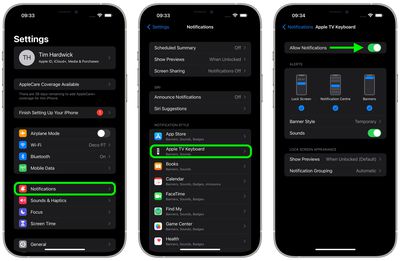
settings

If you don't see the ‌Apple TV‌ Keyboard listed in the Notifications menu, you may need to connect to your ‌Apple TV‌ and select a text field to activate a keyboard input notification, before it will show up there.

Related Roundup: Apple TV
Buyer's Guide: Apple TV (Don't Buy)

Top Rated Comments

bebarhood Avatar
64 months ago
So basically the same way to disable any notification from any app.
Score: 9 Votes (Like | Disagree)
64 months ago

it is not annoying notification, it has a purpose and will prompt if you are in search option in ATV. I have 6 ATV and never touch a stock remote. Always use Siri on my HomePods situated all around the house and use voice command ( spectrum TV) to change the channel without having to scroll via remote app or Stocked remote, but when needing to search something, instead of scrolling through letters via stocked remote, I prefer the notification prompt to type in keywords. By the way with watch OS8 you have remote on your watch automatically appears for you to use it. so I don't need my iPhone remote.
It IS annoying when you're not the one doing the searching.
Score: 4 Votes (Like | Disagree)
64 months ago
I disagree, the notification is not to "get users to use your feature". It's more of a convenience thing to not have to swipe down from the control center and manually activate the keyboard every time. Unless you have an external keyboard (or you're just a masochist who loves struggling typing with the physical remote), it's definitely good to have for most people.

Of course, it may be problematic for some people, especially if multiple people in the house use the same Apple TV, so there definitely should be an option to disable it. But personally I find this notification very useful, as my Apple TV is the only one in the house and only my phone is paired with it.
Score: 4 Votes (Like | Disagree)
64 months ago

On a semi-related note, I keep getting annoying "tips" notifications on my Apple Watch. It's not even a new Watch, but after "up"grading to iOS 15 it keeps sending me tips on how to use the Watch. Any way to disable these??
On iPhone, go to Watch app > Notifications > Tips > Notifications Off
Score: 3 Votes (Like | Disagree)
64 months ago

The feature isn't the problem. It's the annoying notifications.
EXACTLY.

Can we keep the notification but not have my phone vibrate or alert me to it? If I want to type into the TV, I know that I have that option - but it's too cumbersome to go digging for it without the notification.

I think we still need the notification to easily enter text onto the TV. But it shouldn't show up on my phone if I'm already looking at it, and it shouldn't vibrate or alert.
Score: 2 Votes (Like | Disagree)
64 months ago
Yasss! This has been the one thing that's been bugging me about iOS 15, (yeah, I know many are having various issues, but so far I love 15). But every time someone uses the Apple TV, I get slammed with notification after notification and noticed the option to shut it up was gone in 15. Glad to see it's making a return.
Score: 2 Votes (Like | Disagree)

Popular Stories

Apple iCloud Plus expansion hero

iCloud+ Now Includes Apple TV, Apple Arcade, and Curated Apple Music Stations in Over 100 Countries

Tuesday September 15, 2026 1:43 am PDT by
Apple today announced a new subscription initiative that turns paid iCloud+ subscriptions into a broader services bundle in more than 100 countries. In select countries, Apple says every paid iCloud+ plan, including the cheapest 50GB tier, now includes Apple TV and Apple Arcade "at no additional cost," while family sharing extends the storage, TV and Arcade access to up to five people....
Where is the New Apple TV Feature

Next Apple TV's Chip Revealed in Latest Leak

Tuesday September 8, 2026 10:19 am PDT by
The next Apple TV 4K will be equipped with an A19 or A19 Pro chip, according to evidence in Apple's code uncovered by MacRumors contributor Aaron Perris. In particular, the device's model identifier points towards the A19 generation of chips. Accordingly, the next Apple TV would have 8GB or 12GB of RAM, up from 4GB in the current 2022 model with the A15 Bionic chip. Other rumored upgrades for...
iOS 27 Feature Cool

Apple Releases New iOS 27, iPadOS 27, macOS 27, and tvOS 27 Public Betas

Monday August 31, 2026 2:13 pm PDT by
Apple today released the sixth public betas of iOS 27, iPadOS 27, tvOS 27, and macOS Golden Gate, allowing anyone with a compatible device to download and test the new software. The sixth betas come a week after Apple seeded the fifth betas and a few hours after the eighth developer betas. You can get started by signing up on Apple's beta website and then opting in to the public beta by...