

iOS 16: How to Stop Focus Modes From Sharing Your Status - MacRumorsOpen MenuShow RoundupsShow Forums menuVisit ForumsOpen Sidebar
Skip to Content

iOS 16: How to Stop Focus Modes From Sharing Your Status

by

In iOS 16, Apple has made it easier to control whether apps can let people know that you have a Focus mode activated and are silencing notifications. Keep reading to learn how it works.
iOS 16 Focus Feature
Focus mode is an expansion of Do Not Disturb that allows you to set up different permissions for apps, contacts, and more depending on what you're doing. For example, you can have separate focus modes for when you're at work, when you're studying, when you're at home, and so on. It's a handy way to filter out distractions and give all your attention over to something.

With a Focus on, your apps can display to people who message you that you have notifications silenced. Alternatively, you can block a Focus mode from sharing that information, so people won't be informed that your notifications are off if they try to message you. In iOS 16, Apple has made it easier to control which Focus modes are permitted to share this information by bringing the option for individual profiles into a unified menu. Here's how it works.

  1. Launch Settings on your iOS device.
  2. Tap Focus.
  3. Turn on Share Across Devices (required), then tap Focus Status.
  4. If it's not enabled already, turn on Share Focus Status.
  5. Now you can control which Focus profiles are able to share that you have notifications silenced by using the individual switches.
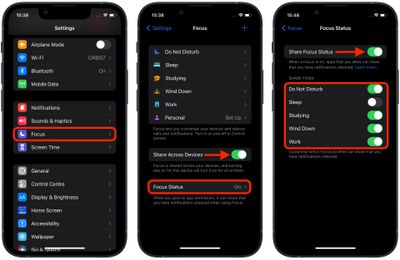
focus

That's all there is to it. Note that the Settings -> Focus -> Focus Status menu shown above replaces the Focus Status control option that appeared in individual Focus profiles in previous versions of iOS.


Popular Stories

Apple Card iPhone 16 Pro Feature

Apple Card Promo to Offer Free AirPods Pro 3

Friday May 15, 2026 8:59 am PDT by
Starting as early as next week, customers who sign up for an Apple Card at Apple's retail stores in the U.S. will receive $249 cash back when they purchase AirPods Pro 3, according to Bloomberg's Mark Gurman. The promotion has yet to be officially announced by Apple, so exact terms and conditions are not available at this time. AirPods Pro 3 are priced at $249 in the U.S., so customers who...
Apple WWDC25 iOS 26 CarPlay Light mode 250609

Six Popular iPhone Apps Now Available on CarPlay

Thursday May 14, 2026 9:10 am PDT by
Apple's CarPlay system for accessing iPhone apps on a vehicle's dashboard screen has received six popular apps in recent weeks: ChatGPT, Perplexity, Grok, Google Meet, WhatsApp, and the indie artist streaming platform Audiomack. Make sure you have the latest version of each app and they will automatically appear on CarPlay. ChatGPT Starting with iOS 26.4, CarPlay supports voice-based...
ipad mini 7 blue

OLED iPad Mini: Release Date, Pricing, and What to Expect

Thursday May 14, 2026 5:08 am PDT by
According to the latest rumors, Apple is close to launching its next-generation iPad mini. So what should we expect from the successor to the iPad mini 7 that Apple released over a year ago? Read on to find out. Processor and Performance Apple is working on a next-generation version of the iPad mini (codename J510/J511) that features the A19 Pro chip, according to information found in code...













