How to Prevent Your iPhone's Low Power Mode From Turning Off - MacRumorsOpen MenuShow RoundupsShow Forums menuVisit ForumsOpen Sidebar
Skip to Content

How to Prevent Your iPhone's Low Power Mode From Turning Off

by

Whether your iPhone or iPad is long overdue a battery replacement, or you just want to get more juice out of a single charge, here's a way to keep your device's Low Power Mode on all the time.
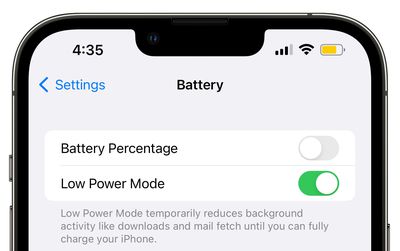
ios 16 battery low power mode beta 6
Most ‌iPhone‌ and iPad users will be familiar with the way their device throws up a prompt to turn on Low Power Mode when the battery falls to 20 percent. The special mode conserves what remaining battery life the device has left by limiting some features, but by default the mode automatically turns off when a charging iPhone or iPad reaches 80 percent. If that irks you, don't worry – there is a solution.

Perhaps you're running the latest version of iOS or iPadOS on an older device and you've found that the battery life is inadequate to get you through the day. Or maybe you just want to reduce the amount of times you have to charge your iPhone or iPad. Either way, you can keep Low Power Mode enabled regardless of the battery level with the help of an automation.

iPhone/iPad Features Disabled by Low Power Mode

Before you follow the steps in this article to create the automation, it's worth highlighting which of the features it disables to reduce your device's power consumption. According to Apple, Low Power Mode turns off the following:

  • 5G (except for video streaming) on iPhone 12 models
  • Auto-Lock (defaults to 30 seconds)
  • Display brightness
  • Display refresh rate (limited up to 60 Hz) on iPhone and iPad models with ProMotion display
  • Some visual effects
  • iCloud Photos (temporarily paused)
  • Automatic downloads
  • Email fetch
  • Background app refresh

If you're happy to live without the above features for as long as Low Power Mode is on, follow the steps below to create your automation.

Creating an Always-On Low Power Mode Automation

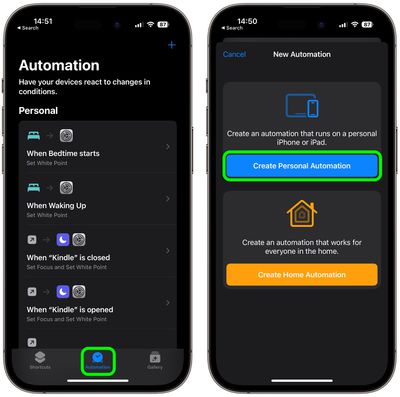
  1. Launch the Shortcuts app on your iPhone, then tap the Automation tab at the bottom.
  2. Tap the + button in the top right, then select Create Personal Automation.
    shortcuts

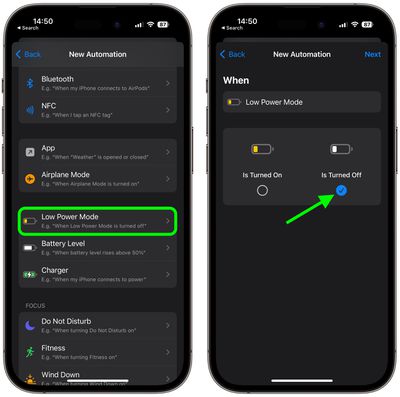
  3. Scroll down and choose Low Power Mode.
  4. Deselect the Is Turned On option and select the Is Turned Off option instead, then tap Next.
    shortcuts

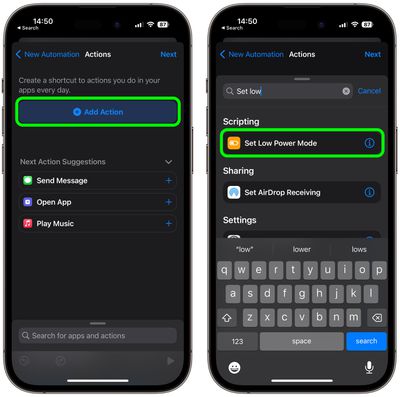
  5. Tap Add Action.
  6. Tap inside the search field and search for the Set Low Power Mode script, then select it below.
    shortcuts

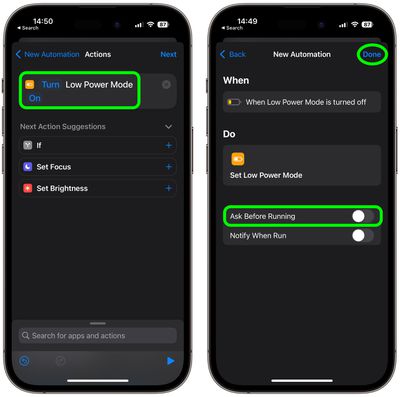
  7. Make sure the Turn and On options in blue are selected, then tap Next.
  8. Toggle off the switch next to Ask Before Running, then tap Don't Ask in the prompt to confirm.
    shortcuts

  9. Tap Done to finish.

Low Power Mode can be turned on and off manually at any time by going to Settings -> Battery and toggling on the switch next to Low Power Mode. Just bear in mind that if you want to turn it off, you'll have to disable your automation. You can do this in Shortcuts by selecting the automation and toggling off the switch next to Enable This Automation.


Top Rated Comments

George Dawes Avatar
44 months ago
This should definitely be an option in the actual os without all this farting about
Score: 27 Votes (Like | Disagree)
TheYayAreaLiving 🎗️ Avatar
44 months ago
Excellent tips! Thank you!!

Question: Is there a way to set Automation feature for the iPhone not to charge pass 80% of the battery life? 🔋🔌
Score: 16 Votes (Like | Disagree)
44 months ago

Genuine question: given that low power mode restricts a lot of the background functions, what good does this do a majority of users that are frequently pulling out their phone to refresh social media?

How much extra time are you really saving?

Note: I'm an outlier, since I never use Low Power Mode, and my 13 mini goes from 100 to 80 typically throughout a work day before I dock it for the night.
I'm an outlier too in that I keep low power mode on all the time and don't use socialist media.
Score: 12 Votes (Like | Disagree)
44 months ago
This might be the greatest tip for iPhones today. Permanent low power mode should be the default.
Score: 8 Votes (Like | Disagree)
BrownyQ Avatar
44 months ago
Genuine question: given that low power mode restricts a lot of the background functions, what good does this do a majority of users that are frequently pulling out their phone to refresh social media?

How much extra time are you really saving?

Note: I'm an outlier, since I never use Low Power Mode, and my 13 mini goes from 100 to 80 typically throughout a work day before I dock it for the night.
Score: 5 Votes (Like | Disagree)
sw1tcher Avatar
44 months ago

Excellent tips! Thank you!!

Question: Is there a way to set Automation feature for the iPhone not to charge pass 80% of the battery life? 🔋🔌
Just tell Siri to set it up for you :D
Score: 4 Votes (Like | Disagree)

Popular Stories

duo aquarium

More Fun iPhone Duo Apps: 30 New Picks to Try

Friday November 6, 2026 3:27 pm PST by
When the iPhone Duo launched, we shared a list of some of the fun apps developers created for the new form factor. Two weeks out, developers are continuing to come up with fresh ideas, so we thought we'd share some of our favorites. Games Marbles Unhinged ($2.99) - Marbles Unhinged is a marble maze designed for the Duo. When you fold it, the floor turns into a ramp. If you stand the top...
apple pro tell logo

Apple Launching Five New Products Today

Thursday November 5, 2026 12:59 am PST by
Apple is launching five new products on Friday, November 6, following pre-orders that opened last week, including its first touchscreen MacBook Pro models. The following new products will be available from today: iPad mini with OLED display and A20 Pro chip iMac with M6 chip 14-inch MacBook Pro with M6 chip 14-inch MacBook Pro with OLED touchscreen 16-inch MacBook Pro with OLED...
iOS 28 AI

Apple Taking New Approach to Developing iOS 28 and macOS 28

Sunday November 8, 2026 7:42 am PST by
Apple has made a change to its development process for iOS 28, macOS 28, and corresponding software updates, according to Bloomberg's Mark Gurman. In his Power On newsletter today, he said Apple separates development of each year's new operating systems into three major stages. Typically, he said each stage consists of four weeks of coding followed by a four-week "convergence" period where...


Latest Stories
Apple Store Subscription Sign-Up Controversy Exposed
4 hours ago
Siri AI Rumored to Become 'More Like an Agent' as Early as Next Year
14 hours ago
Apple Taking New Approach to Developing iOS 28 and macOS 28
16 hours ago
Early Apple Black Friday Deals on Apple Watch, MacBook Air, and More
1 day ago
'Backglow' Lets You Customize New MacBook Pro's Glowing Apple Logo
1 day ago
Top Stories: Apple Product Launches, iOS 27.3 Beta, and More
2 days ago
More Fun iPhone Duo Apps: 30 New Picks to Try
2 days ago
Hands-On With Apple's New OLED Touchscreen MacBook Pro
2 days ago
Apple Store With All-New Design Opening Soon in Southern California
2 days ago
Control the Glowing Apple Logo on Your New MacBook Pro
3 days ago
Apple Shares New 'Apple Card: Apply and Use in Minutes' Ad
3 days ago
Apple Says More Than 100,000 Apps Optimized for iPhone Duo, Here's What's Still Missing
3 days ago
Early Black Friday Deals Kickoff With Steep Discounts on Apple Watch Ultras and More
3 days ago
The MacRumors Show: iOS 27.3 Looks Like a Huge Update
3 days ago
Best Buy's Black Friday Event Begins With Sitewide Savings on Apple, TVs, More
3 days ago
Apple Releasing Yet Another Two New Products Next Week
3 days ago
MacBook Air Drops to Lowest Price in Months With Amazon's $250 Discount
3 days ago
Apple Rumored to Drop the iPhone's Action Button Next Year
3 days ago
Apple's Extended Return Policy Now in Effect for 2026 Holiday Season
3 days ago
Apple Music Classical Updated With New Icon and Refreshed Design
3 days ago
OLED iPad Mini, M6 iMac, and New MacBook Pros Available From Today
3 days ago
Apple Surveys iPhone Duo Buyers About Crease and Camera
3 days ago
Apple's First Touchscreen Mac is Now Arriving to Customers
3 days ago
Claude Gets Personal Finance Feature With Bank Account Linking
3 days ago
Apple Arcade Adds Crossy Road Rush and NBA 2K27
3 days ago
Apple's New HomeView Smart Home Hub: Here's How Much RAM It Has
3 days ago
iPad Mini vs. iPad Air Buyer's Guide: Now Just $50 Apart
3 days ago
First iOS 27.3 and macOS Golden Gate 27.3 Public Betas Now Available
4 days ago
Apple Announces a New Mac Sales Record
4 days ago
Paid $200 for Logic Pro? Apple Says You Won't Get This New Feature
4 days ago