How to Subscribe to Calendars on iPhone and iPad - MacRumorsOpen MenuShow RoundupsShow Forums menuVisit ForumsOpen Sidebar
Skip to Content

How to Subscribe to Calendars on iPhone and iPad

by

Calendar subscriptions offer a convenient way for you to stay up to date with everything from national holidays to the match fixtures for your favorite sports team. In this article, we'll show you how to subscribe to a public calendar on your iPhone or iPad – all you need in advance is the web address of the calendar (ics) file.
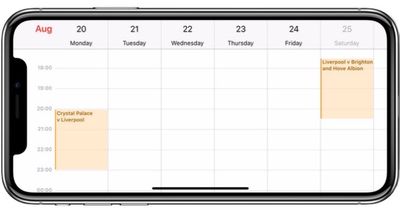
calendar iphone x
Note that if you want a calendar subscription to sync across all devices signed into your iCloud account, you'll need to subscribe to it on your Mac. To do so, open the Calendar app in macOS and select File -> New Calendar Subscription, enter the URL of the calendar to subscribe to, and then select iCloud in the Location menu.

How to Subscribe to a Calendar in iOS 11

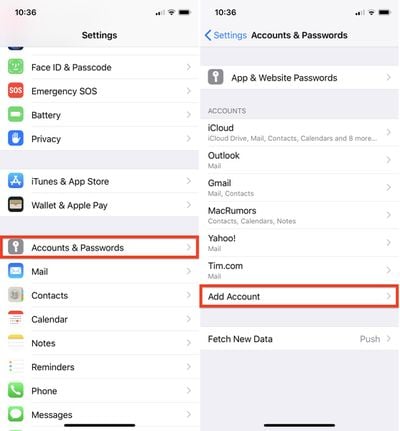
  1. Launch the Settings app on your iPhone or iPad.
  2. Tap Accounts & Passwords.
  3. Under the Accounts section, tap Add Account.
    how to subscribe calendar ios

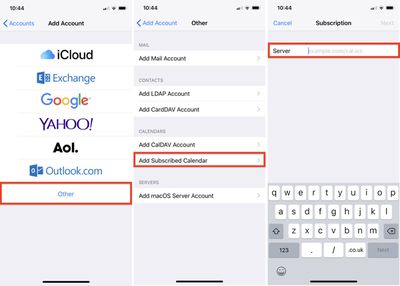
  4. Tap Other.
  5. Under Calendars, tap Add Subscribed Calendar.
  6. Type in your calendar link in the Server field; to paste in a copied link, tap and hold the field and select Paste.
    how to subscribe calendar ios 2

  7. Tap Next.
  8. Use the Description field to give the calendar an easily recognizable name.
  9. Enter a server username and password if required (most users will be able to skip this step).
  10. Tap Save.

How to Remove a Calendar Subscription in iOS 11

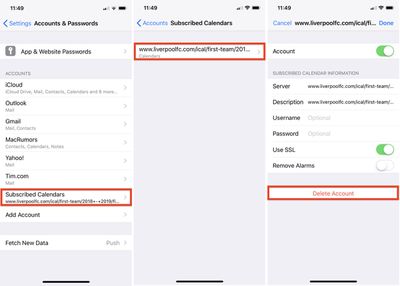
  1. Launch the Settings app on your iPhone or iPad.
  2. Tap Accounts & Passwords.
  3. Tap Subscribed Calendars.
    how to unsubscribe calendar ios

  4. Tap the calendar subscription you want to remove.
  5. Tap Delete Account.

Top Rated Comments

Onexy Avatar
103 months ago
What calendars is everyone subscribing too?
Work calendars for teams.
Score: 1 Votes (Like | Disagree)
103 months ago
Very detailed steps; thank you. Wonder why it is so unintuitive?
Score: 1 Votes (Like | Disagree)

Popular Stories

iCloud iPhone 17 Pro

iPhone Users Who Pay for iCloud Storage Get Two New Perks on iOS 27

Thursday July 2, 2026 6:10 am PDT by
If you pay for certain iCloud+ storage plans beyond the 5GB that Apple offers for free, you will receive two more perks on iOS 27 at no additional cost. A summary of the two new iCloud+ perks on iOS 27:Increased daily usage limits for some new Apple Intelligence features, including image generation in the revamped Image Playground app. HomeKit Secure Video cameras receive generated video...
American Express Gold Apple Pay Feature

American Express Announces New Apple Pay Feature

Tuesday June 30, 2026 10:27 am PDT by
American Express today announced that you can now redeem Membership Rewards points when checking out with Apple Pay on the web and in apps on the iPhone and iPad. When checking out with Apple Pay on iOS 18 or iPadOS 18 or later, tap on your eligible American Express card (Platinum, Gold, Green, and others) and select the Membership Rewards points option. You can use points to cover all or...
series 10 apple watch titanium digital crown

Report: Apple Watch Redesign Coming Next Year With New Band System

Tuesday June 30, 2026 8:45 am PDT by
A "major overhaul" of the Apple Watch's design is due to arrive next year with a new system for connecting bands, according to a known Weibo leaker. In a set of recent posts, the leaker known as "Instant Digital" linked the new claim to older rumors about an "Apple Watch X" model, which was said to introduce a fresh design and break compatibility with the existing watch band system. Citing...