

How to Use the New Camera Lenses on iPhone 11 and iPhone 11 Pro - MacRumorsOpen MenuShow RoundupsShow Forums menuVisit ForumsOpen Sidebar
Skip to Content

How to Use the New Camera Lenses on iPhone 11 and iPhone 11 Pro

by

The headline feature of Apple's 2019 iPhones is undoubtedly the new camera system, with the more affordable iPhone 11 boasting the same high-quality lenses as the iPhone 11 Pro and iPhone 11 Pro Max, with the exception of the third telephoto lens that's exclusive to the Pro models.
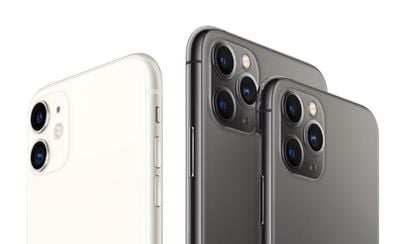
iphone 11 and 11 pro no background
The standard wide camera on the iPhone 11 series offers the same 12 megapixels and f/1.8 aperture as on last year's iPhone XS devices, while the new 12 megapixel ultra-wide camera gets a f/2.4 lens. Apple has also widened the aperture of the telephoto lens on the Pro models to f/2.0 – an improvement over the f/2.4 lens found in the iPhone X and XS – which allows more light to hit the sensor and grab more detail.

Lens-Based Camera App Changes

Apple has also re-designed the camera system from the ground up to make the lenses work seamlessly in concert, and also radically improved the image processing technology. To accommodate these more advanced capabilities, Apple has given the stock Camera app a complete overhaul exclusively for its iPhone 11 series devices.
how to switch iphone 11 lenses1 e1569253109900
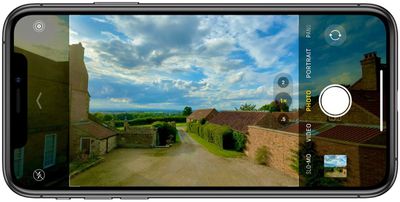
For example, when you shoot with the standard wide lens as shown above, the camera app interface becomes semi-transparent to reveal the ultra-wide camera's larger field of view, giving you a preview of what shooting with it would look like.

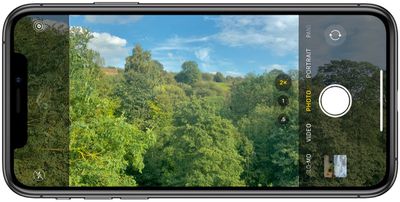
This immersive preview isn't limited to the wide and ultra-wide either: When using the telephoto lens on Pro devices, the Camera app will use the standard wide lens to fill in the additional area of the screen, as shown in the screenshot below. There's even an optional new camera feature that recruits the additional lenses and allows you to fix photo composition in post without having to resort to cropping.
how to switch iphone 11 lenses2

Switching Between Ultra-Wide, Wide, and Telephoto

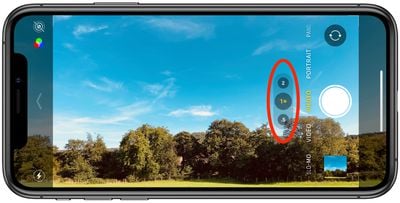
You can choose between the different lenses by tapping the numbered buttons at the bottom of the viewfinder: .5 is the new ultra-wide lens, 1x is the standard wide lens, and 2 is the telephoto lens (iPhone 11 Pro and Pro Max only).
camera
At first glance, it looks as if these lens modes are fixed options. Far from it: If you swipe up on one of the buttons you'll see a radial zoom wheel enabling you to find a transition from camera to camera through a series of fine gradations.
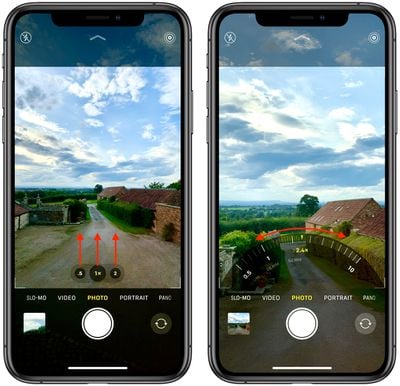
how to switch iphone 11 lenses seamlessly
Along the wheel you'll also see the 35mm equivalent focal length of each lens-sensor combination (the focal length you would need for a 35 mm film camera to obtain the same angle of view). The wheel disappears once you've chosen a custom focal length, and if you decide you want to return to the standard focal length, you can simply tap the center lens button.


Related Forum: iPhone

Top Rated Comments

BWhaler Avatar
87 months ago
Looks like Apple did a great job here. Very impressive.
Score: 3 Votes (Like | Disagree)
87 months ago
In addition to swipe up on the numbers to bring up the wheel, you can just put your finger on the 0.5, 1x 2 area and swipe left and right to adjust zoom quickly.
Score: 3 Votes (Like | Disagree)
adrianlondon Avatar
87 months ago

Unpopular opinion but I think digital zoom is one of the features that Apple should just do away with.
I remember thinking that years ago with a point & shoot camera I had at the time. And to this day I very rarely digitally zoom in using my phone camera. I crop after the shot is taken, which also allows me to change my mind later if I decide not to crop out as much.

However, for fully automatic cameras, digitally zooming in does have one advantage: the sensors (which calculate shutter/aperture, whether to use HDR or flash etc etc) are working solely on the portion of the image you're going to keep.
Score: 2 Votes (Like | Disagree)
Beards Avatar
87 months ago

Unpopular opinion but I think digital zoom is one of the features that Apple should just do away with. No point in using the digital zoom to crop the picture straight away and end up with something blurry, rather than simply taking a quality photo with the 1x or 2x telephoto lens and then using the iPhone's built in tools to crop it after the fact.

I think it would ultimately drive better iPhone photography in general as a result.
Sorry but I would have to disagree. Although I never shoot using digital zoom, I do though use it to reference something (as in just creep in closer to ensure what I will be shooting doesn’t contain anything I don’t want).
There’s also the use as binoculars. Sometimes it comes in handy when you want to check on something in the distance.
Score: 1 Votes (Like | Disagree)
SirithX Avatar
87 months ago
Unpopular opinion but I think digital zoom is one of the features that Apple should just do away with. No point in using the digital zoom to crop the picture straight away and end up with something blurry, rather than simply taking a quality photo with the 1x or 2x telephoto lens and then using the iPhone's built in tools to crop it after the fact.

I think it would ultimately drive better iPhone photography in general as a result.
Score: 1 Votes (Like | Disagree)

Popular Stories

Apple Card iPhone 16 Pro Feature

Apple Card Promo to Offer Free AirPods Pro 3

Friday May 15, 2026 8:59 am PDT by
Starting as early as next week, customers who sign up for an Apple Card at Apple's retail stores in the U.S. will receive $249 cash back when they purchase AirPods Pro 3, according to Bloomberg's Mark Gurman. The promotion has yet to be officially announced by Apple, so exact terms and conditions are not available at this time. AirPods Pro 3 are priced at $249 in the U.S., so customers who...
Apple WWDC25 iOS 26 CarPlay Light mode 250609

Six Popular iPhone Apps Now Available on CarPlay

Thursday May 14, 2026 9:10 am PDT by
Apple's CarPlay system for accessing iPhone apps on a vehicle's dashboard screen has received six popular apps in recent weeks: ChatGPT, Perplexity, Grok, Google Meet, WhatsApp, and the indie artist streaming platform Audiomack. Make sure you have the latest version of each app and they will automatically appear on CarPlay. ChatGPT Starting with iOS 26.4, CarPlay supports voice-based...
ipad mini 7 blue

OLED iPad Mini: Release Date, Pricing, and What to Expect

Thursday May 14, 2026 5:08 am PDT by
According to the latest rumors, Apple is close to launching its next-generation iPad mini. So what should we expect from the successor to the iPad mini 7 that Apple released over a year ago? Read on to find out. Processor and Performance Apple is working on a next-generation version of the iPad mini (codename J510/J511) that features the A19 Pro chip, according to information found in code...













