

How to Improve Photo and Video Composition Without Cropping on iPhone 11 and iPhone 11 Pro - MacRumorsOpen MenuShow RoundupsShow Forums menuVisit ForumsOpen Sidebar
Skip to Content

How to Improve Photo and Video Composition Without Cropping on iPhone 11 and iPhone 11 Pro

by

With the arrival of the iPhone 11, iPhone 11 Pro and iPhone 11 Pro Max, Apple has introduced an optional new camera feature in iOS 13 that's designed to allow you to correct the alignment of photos and videos without having to resort to cropping.
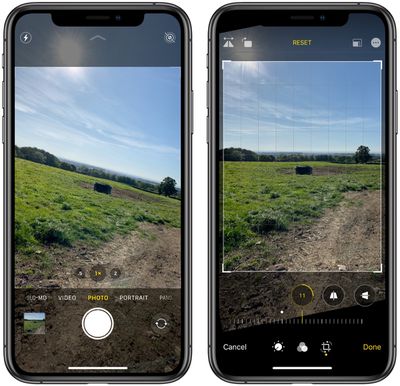
capture shot outside frame iphone 11 camera 2
Basically, when you take pictures or video using either the wide lens or (on the 11 Pro series) the telephoto lens, the camera will simultaneously shoot or record using the next widest sensor. So the wide lens is active when you shoot with the telephoto lens, and the ultra-wide is active when you shoot with the wide.

With the feature enabled, you can take your shot, tap Edit in the preview window, tap the Crop tool, then select Straighten, and you'll be able to use the area captured outside the frame of the photo or video to fix the horizon and improve the composition of the shot without needing to crop it.

The toggle switches that control this behavior can be found in the Settings app, under Camera -> Photos Capture Outside the Frame and Camera -> Videos Capture Outside the Frame.
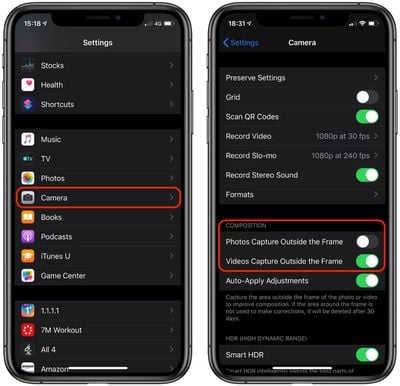
settings
Apple has disabled it by default for photos, so you'll need to turn it on to take advantage of it. Note that it is enabled by default for video, so you may want to disable it if iPhone or iCloud storage space is a concern. That said, if the area around the frame isn't used to make corrections, it will be automatically deleted after 30 days.


Related Forum: iPhone

Top Rated Comments

MrUNIMOG Avatar
88 months ago
This is great. Seemed odd to me they didn't highlight it on stage at the event (like so many things), it's kind of a tentpole feature.
Score: 3 Votes (Like | Disagree)
83 months ago

Why would they do that?! The average user will not know such feature exists or how to turn it on but could greatly benefit from it. Specially since the “unused” wider picture gets deleted after 30 days so unless you are taking a ton of pictures/videos at once, it wouldn’t be an issue with storage.

Edit: a word
It’s disabled by default because Apple’s new Deep Fusion computational AI only works when this setting is toggled off.
Score: 1 Votes (Like | Disagree)
88 months ago

Working here on iPhone Pro Max. Nice feature.

Guessing that’s what the little icon is in the upper right when activated.


Same for me. That icon only appeared after I turned the capture outside the frame off and back on again in camera settings.article says it’s off by default but mine was on. Now icon shows up on all pics taken with wide and tele.

Had same issue with messages in cloud. On by default but not working after 24 hrs. Turned off then back on and all syncd in 5 minutes.
Score: 1 Votes (Like | Disagree)
88 months ago

Yeah not working for me either. Maybe glitch?
One of MANY bugs in iOS 13.
Score: 1 Votes (Like | Disagree)
88 months ago

Why would they do that?! The average user will not know such feature exists or how to turn it on but could greatly benefit from it. Specially since the “unused” wider picture gets deleted after 30 days so unless you are taking a ton of pictures/videos at once, it would be an issue with storage.
Probably an issue with storage. I didn't take a look at the UI if it actually provides a warning but it would be a valid concern.
Score: 1 Votes (Like | Disagree)
Saipher Avatar
88 months ago

Apple has disabled it by default for photos, so you'll need to turn it on to take advantage of it.
Why would they do that?! The average user will not know such feature exists or how to turn it on but could greatly benefit from it. Specially since the “unused” wider picture gets deleted after 30 days so unless you are taking a ton of pictures/videos at once, it wouldn’t be an issue with storage.

Edit: a word
Score: 1 Votes (Like | Disagree)

Popular Stories

macOS 27 on MacBook Pro

Apple Says macOS 27 Won't Be Compatible With These Macs

Wednesday June 3, 2026 8:29 am PDT by
During WWDC 2025, Apple revealed that macOS 26 Tahoe would be the final major macOS version for Intel-based Macs. macOS 27 will be compatible with Apple silicon Macs only, meaning that you will need a Mac with an M-series chip or a MacBook Neo with an A18 Pro chip in order to install the software update. Apple will unveil macOS 27 during its WWDC 2026 keynote this Monday, June 8, and the...
MacBook Neo on Yellow Feature

MacBook Neo is So Popular That Apple Reportedly Doubled Production

Wednesday June 3, 2026 9:24 am PDT by
On an earnings call in late April, Apple's CEO Tim Cook said that customer response to the MacBook Neo was "off the charts," and the popularity of the laptop has reportedly led the company to significantly boost production. Apple supply chain analyst Ming-Chi Kuo this week said he believes that MacBook Neo shipments to Apple were doubled from an initial target of 5 million units to 10...
iphone 18 pro blue%402x

iPhone 18 Pro: Dark Cherry, Light Blue, and Dark Gray Chassis Leaked [Update]

Thursday June 4, 2026 5:18 am PDT by
Update: Since publication, new information has come to light suggesting the images have been AI-manipulated and are not in fact iPhone 18 Pro chassis parts. The original article follows. The color options Apple is reportedly planning for the upcoming iPhone 18 Pro and ‌iPhone 18 Pro‌ Max have appeared online today in the form of images of chassis parts of unknown authenticity....













