

iOS 17: How to Switch Measurement Units in the Weather App - MacRumorsOpen MenuShow RoundupsShow Forums menuVisit ForumsOpen Sidebar
Skip to Content

iOS 17: How to Switch Measurement Units in the Weather App

by

In iOS 17, Apple has made some improvements to its stock Weather app, such as the ability to view the previous day's weather, and a new moon module that talls you the phases of the moon.
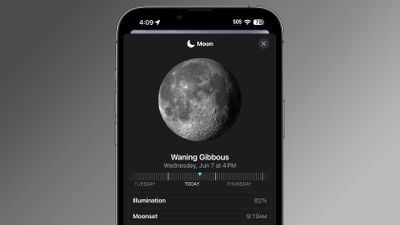
ios 17 weather app moon
In addition to the ability to view temperature in Celsius and Fahrenheit, you can also now change the unit measurements for wind speed, precipitation, pressure, and distance.

The following steps show you how it's done on iPhones running iOS 17.

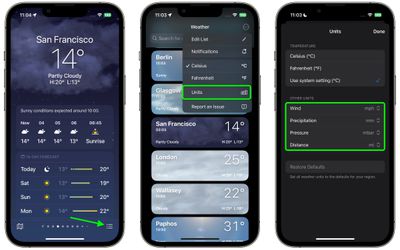
  1. In the Weather forecast view, tap the three-lined icon in the bottom-right corner of the screen.
  2. On the forecast locations screen, tap the circular icon containing three dots in the top-right corner of the screen.
  3. Select Units in the dropdown menu.
  4. Under the "Other Units" section, use the options to choose your unit preferences for Wind, Precipitation, Pressure, and Distance.
weather

That's all there is to it. Your unit preferences will be set for all locations stored in Apple's Weather app, and will be reflected in any Weather widgets you use on your iPhone's Home Screen.

Popular Stories

iOS 27 Weather App Forecast Feature 1

iOS 27's Weather App Has a New Way to View Forecasts

Thursday June 11, 2026 1:10 pm PDT by
Starting with iOS 27, Apple's Weather app offers new hourly and 10-day overviews for precipitation and wind that you can quickly view at a glance. While this sort of information was already accessible elsewhere in the app, you can now quickly tap between conditions, precipitation, and wind overviews. You can view the percentage chance of rain or snow each hour and day, as well as...
iCloud iPhone 17 Pro

iPhone Users Who Pay for iCloud Storage Get Two New Perks on iOS 27

Thursday July 2, 2026 6:10 am PDT by
If you pay for certain iCloud+ storage plans beyond the 5GB that Apple offers for free, you will receive two more perks on iOS 27 at no additional cost. A summary of the two new iCloud+ perks on iOS 27:Increased daily usage limits for some new Apple Intelligence features, including image generation in the revamped Image Playground app. HomeKit Secure Video cameras receive generated video...
iPhone 4 on Black Feature

Apple Facing One of Its Worst Leaks Since the iPhone 4

Thursday July 2, 2026 9:53 am PDT by
Apple supplier Tata Electronics recently suffered a cyberattack that resulted in thousands of confidential files being published on the dark web, and this reportedly included some photos and documents related to the upcoming iPhone 18 Pro. We have elected not to share any of the leaked photos in this story due to the illegal nature in which they were obtained, but they can easily be found...

















