How to Sync Desktop and Documents Folder to iCloud on Mac - MacRumorsOpen MenuShow RoundupsShow Forums menuVisit ForumsOpen Sidebar
Skip to Content

How to Sync Desktop and Documents Folder to iCloud on Mac

by

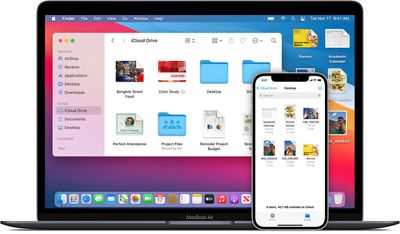
In macOS, you can sync any files on your Mac desktop and in your documents folder to iCloud so that you can access them on any other devices signed in to ‌iCloud‌ with the same Apple ID.

Mac-iphone-icloud
In other words, you can start a document on your Desktop, and you'll be able to work on it later on your iPhone or iPad, or even through a browser on another computer via the ‌iCloud‌ website.

Here's how to turn on Desktop and documents folder syncing in macOS Big Sur.

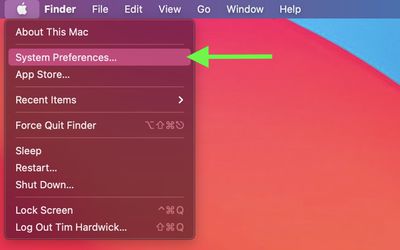
  1. On your Mac, click the Apple symbol () in your menu bar and select System Preferences....
    sys prefs

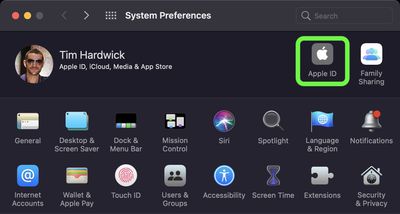
  2. Click Apple ID.sys prefs

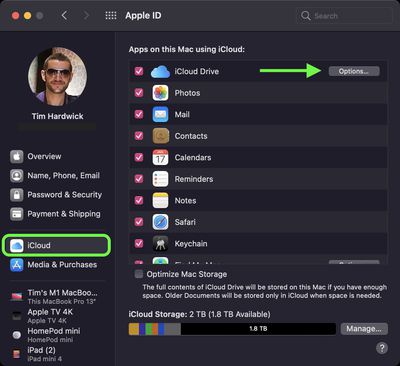
  3. Select iCloud in the side column, and make sure iCloud Drive is turned on (the tick box should be checked), then click Options....
    iCloud

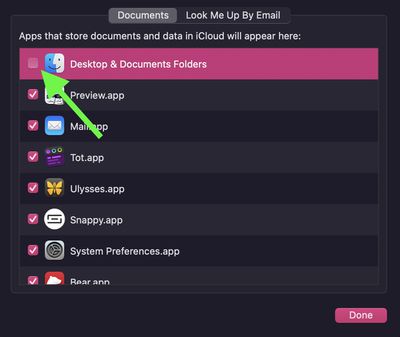
  4. Check the box next to Desktop & Documents Folders to enable it.
    iCloud Drive

  5. Click Done.

If you decide you don't like Desktop and Documents folder syncing in ‌iCloud‌, you can easily stop syncing by following the above steps and unchecking the box next to Desktop & Documents Folder (step 5).

Note that if you disable syncing, Desktop files will no longer appear on the desktop of any other Macs you own, but they'll remain available in a folder on your iCloud Drive, and a new Desktop and Documents folder is created on your Mac in the home folder. You can move files from ‌iCloud Drive‌ to your Mac as you need them, or select all of your files and drag them to the place you want to keep them.


Popular Stories

iPhone 18 Pro and Pro Max Feature

'Apple Upgrade' Program Reportedly Launching Next Week

Tuesday July 21, 2026 8:30 am PDT by
Apple and Klarna are partnering on a new "Apple Upgrade" leasing program set to launch in the U.S. on Tuesday, July 28, according to Bloomberg's Mark Gurman. The program will allow you to finance most iPhone, iPad, Mac, and Apple Watch models, with a 24-month term for iPhones and Apple Watches and a 36-month term for iPads and Macs. Customers will be able to pay off the device early during...
iPhone 18 Pro Deep Red Feature

iPhone 18 Pro Launching in Two Months With These 12 New Features

Friday July 17, 2026 10:39 am PDT by
It is now mid-July, and that means the iPhone 18 Pro and iPhone 18 Pro Max are now just two months away. The devices are expected to look similar to the iPhone 17 Pro and iPhone 17 Pro Max, but there will still be many year-over-year changes, with rumored features including a smaller Dynamic Island, 5G via satellite, and more. Apple is expected to unveil the iPhone 18 Pro, iPhone 18 Pro Max, ...
iPhone 18 Pro Deep Red Feature

iPhone 18 Pro Launching in Two Months With These 12 New Features

Tuesday July 21, 2026 6:22 am PDT by
It is now mid-July, and that means the iPhone 18 Pro and iPhone 18 Pro Max are now just two months away. The devices are expected to look similar to the iPhone 17 Pro and iPhone 17 Pro Max, but there will still be many year-over-year changes, with rumored features including a smaller Dynamic Island, 5G via satellite, and more. Apple is expected to unveil the iPhone 18 Pro, iPhone 18 Pro Max, ...