Top Five Time-Saving iPhone Tips: Searching Web Pages, Swipe to Delete in Calculator, and More - MacRumorsOpen MenuShow RoundupsShow Forums menuVisit ForumsOpen Sidebar
Skip to Content

Top Five Time-Saving iPhone Tips: Searching Web Pages, Swipe to Delete in Calculator, and More

by

If you're looking to cut down on the amount of time you spend performing certain actions on your iPhone, there's usually a solution hidden in Apple's mobile operating system. Here are five quick iOS tips that once you start using will make you a lot more time-efficient in the long run.

This article assumes you're using an iPhone running iOS 11 or later, but some of these tips will work on iPad and earlier versions of Apple's mobile OS. Read on for more.

1. Search a Web Page

In Safari on iOS, there are two ways to search a web page for a specific word or phrase. One method is quicker than the other, although neither is necessarily immediately obvious.
search web page
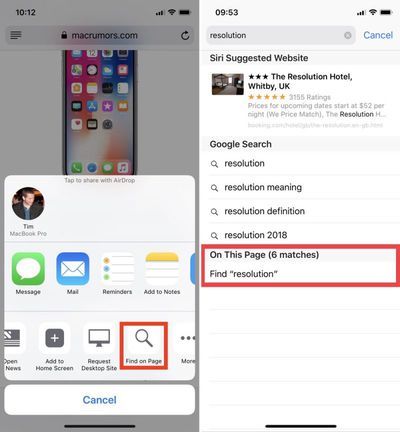
The first way involves tapping the Share icon (the square with an arrow pointing out of it), sliding your finger left along the bottom column, and tapping the Find on Page button, indicated by a magnifying glass. Start typing what you're looking for, and your search results will be returned automatically.

The second, faster method is to type your search term straight into Safari's address bar and then tap the On This Page option at the bottom of the suggestion list, after which you'll be able to tap through each occurrence of the term on the current page.

2. Swipe to Delete in the Calculator
calculator delete to swipe
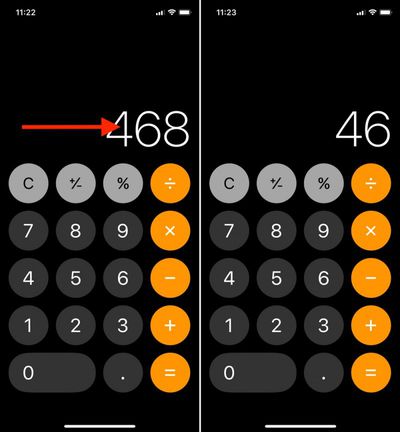
It's a common misconception that if you type the wrong number into the Calculator app, you have to start the whole sum all over again. Happily, that isn't the case: Simply swipe right or left with a finger across the number display to remove the last number you typed, and repeat the action if necessary to remove several numbers.

3. Access Deeper Control Center Options Sans 3D Touch
control center 1
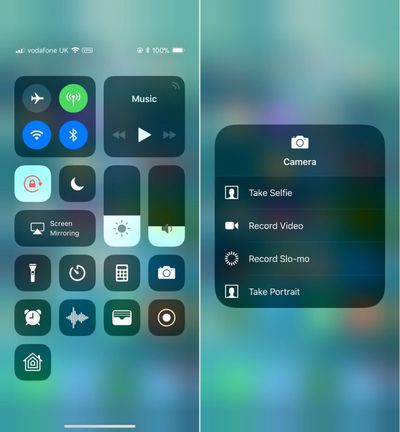
In iOS 11, the Control Center is designed to reveal deeper controls when the user hard-presses to activate 3D Touch – just try it on the camera button, for instance.

If you own an iPhone SE or an older iPhone that doesn't support 3D Touch gestures, it's still possible to access these more granular controls on any button that supports them by using a simple long press instead.

4. Quick-Switch Back From Numbers/Symbols to Letters

Switching onscreen keyboards when you need to type a number or symbol is an all-too-often occurrence on iPhone, so here's a tip for making the transition super-swift.
quick keyboard switch
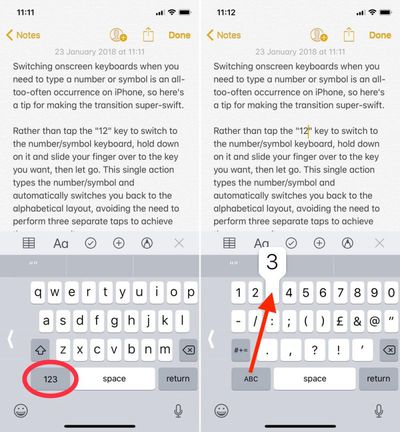
Rather than tap the "123" key to switch to the number/symbol keyboard, hold down on it and slide your finger over to the key you want, then let go. This single action types the number/symbol and automatically switches you back to the alphabetical layout, avoiding the need to perform three separate taps to achieve the same result.

5. Clear All Notifications At Once
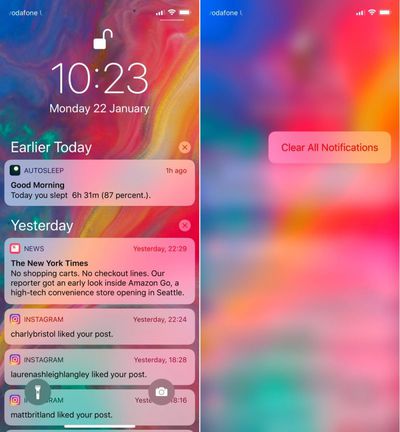
clear notifications 1
If you've got a bunch of notifications from earlier in the day or week that are clogging up your Notifications Screen, don't waste time clearing them one by one. Simply hard press on the first x icon you see on the right of the list. From there, you only need to select the Clear All Notifications 3D Touch option to make them instantly vanish.


Related Forum: iOS 11

Top Rated Comments

115 months ago
Huh.

I knew you could search from the address bar for Find on Page but I had no idea there was a share sheet option. I’ve just moved the icon to the first spot and I actually think I prefer it over typing in the address bar then scrolling down. TIL.

Score: 6 Votes (Like | Disagree)
115 months ago
I didn't know about the calculator trick. Thanks!
Score: 5 Votes (Like | Disagree)
RodThePlod Avatar
115 months ago
I’ve just moved the icon to the first spot and I actually think I prefer it over typing in the address bar then scrolling down. TIL.
Whoa!! I didn’t even realise you could reposition the icons in the share sheet! I’ve just done it now (works in a similar way to rearranging apps on the home screen for those who didn’t know).

Thank YOU anyjungleinguy for the tip.

This thread is full of goodness :)
Score: 3 Votes (Like | Disagree)
macduke Avatar
115 months ago
I search within websites so frequently that I sometimes wish I could add it as a button that is always visible. It would be neat to be able to replace something I use infrequently such as the bookmarks button for search or another shortcut. That would be a cool feature in iOS 12.
Score: 3 Votes (Like | Disagree)
OlliFlamme Avatar
115 months ago
Here’s a couple more..


* Multi-apps drag and drop
* “Hey siri, turn off all alarms”
* 3D touch on keyboard to move cursor freely

Likewise:


* multi-app closing: use two fingers after the tap hold for closing multiple apps.

Which makes me think: I find it pointless of :apple: not to have that action done in a similar way to iOS on iPad’s behaviour... numerous times, I just try to swipe close my apps on my phone, to realise that I need to first tap hold :confused:


* Swipe down on your home screen and calculate there, just as you would on your mac in the siri field. It is perfect for most calculations, and you have a natural typing behaviour. Also, you can check your full calculation query as well.


* Make a pdf of anything printable by giving the print command, force tap the print preview, and saving it...

Great tip on the single number 3 input. Woops
Score: 2 Votes (Like | Disagree)
iFanaddic Avatar
115 months ago
Here’s a couple more..


* Multi-apps drag and drop
* “Hey siri, turn off all alarms”
* 3D touch on keyboard to move cursor freely


Attachment Image

Attachment Image
Score: 2 Votes (Like | Disagree)

Popular Stories

apple pro tell logo

Apple Launching Five New Products Today

Thursday November 5, 2026 12:59 am PST by
Apple is launching five new products on Friday, November 6, following pre-orders that opened last week, including its first touchscreen MacBook Pro models. The following new products will be available from today: iPad mini with OLED display and A20 Pro chip iMac with M6 chip 14-inch MacBook Pro with M6 chip 14-inch MacBook Pro with OLED touchscreen 16-inch MacBook Pro with OLED...
duo aquarium

More Fun iPhone Duo Apps: 30 New Picks to Try

Friday November 6, 2026 3:27 pm PST by
When the iPhone Duo launched, we shared a list of some of the fun apps developers created for the new form factor. Two weeks out, developers are continuing to come up with fresh ideas, so we thought we'd share some of our favorites. Games Marbles Unhinged ($2.99) - Marbles Unhinged is a marble maze designed for the Duo. When you fold it, the floor turns into a ramp. If you stand the top...
silver iphone 18 pro

Apple Rumored to Drop the iPhone's Action Button Next Year

Friday November 6, 2026 6:07 am PST by
Apple plans to merge the iPhone's Action button with the Camera Control starting next year, according to the leaker known as "Instant Digital." In a new post on Weibo, the leaker claimed that a single press of the combined button would open the camera, while a long press would trigger the function assigned to the Action button. They explicitly clarified that the dedicated Action button would ...
Latest Stories
Siri AI Rumored to Become 'More Like an Agent' as Early as Next Year
53 minutes ago
Apple Taking New Approach to Developing iOS 28 and macOS 28
3 hours ago
Early Apple Black Friday Deals on Apple Watch, MacBook Air, and More
21 hours ago
'Backglow' Lets You Customize New MacBook Pro's Glowing Apple Logo
22 hours ago
Top Stories: Apple Product Launches, iOS 27.3 Beta, and More
1 day ago
More Fun iPhone Duo Apps: 30 New Picks to Try
2 days ago
Hands-On With Apple's New OLED Touchscreen MacBook Pro
2 days ago
Apple Store With All-New Design Opening Soon in Southern California
2 days ago
Control the Glowing Apple Logo on Your New MacBook Pro
2 days ago
Apple Shares New 'Apple Card: Apply and Use in Minutes' Ad
2 days ago
Apple Says More Than 100,000 Apps Optimized for iPhone Duo, Here's What's Still Missing
2 days ago
Early Black Friday Deals Kickoff With Steep Discounts on Apple Watch Ultras and More
2 days ago
The MacRumors Show: iOS 27.3 Looks Like a Huge Update
2 days ago
Best Buy's Black Friday Event Begins With Sitewide Savings on Apple, TVs, More
2 days ago
Apple Releasing Yet Another Two New Products Next Week
2 days ago
MacBook Air Drops to Lowest Price in Months With Amazon's $250 Discount
2 days ago
Apple Rumored to Drop the iPhone's Action Button Next Year
2 days ago
Apple's Extended Return Policy Now in Effect for 2026 Holiday Season
2 days ago
Apple Music Classical Updated With New Icon and Refreshed Design
2 days ago
OLED iPad Mini, M6 iMac, and New MacBook Pros Available From Today
2 days ago
Apple Surveys iPhone Duo Buyers About Crease and Camera
3 days ago
Apple's First Touchscreen Mac is Now Arriving to Customers
3 days ago
Claude Gets Personal Finance Feature With Bank Account Linking
3 days ago
Apple Arcade Adds Crossy Road Rush and NBA 2K27
3 days ago
Apple's New HomeView Smart Home Hub: Here's How Much RAM It Has
3 days ago
iPad Mini vs. iPad Air Buyer's Guide: Now Just $50 Apart
3 days ago
First iOS 27.3 and macOS Golden Gate 27.3 Public Betas Now Available
3 days ago
Apple Announces a New Mac Sales Record
3 days ago
Paid $200 for Logic Pro? Apple Says You Won't Get This New Feature
3 days ago
Instagram's Edits Video Editor is Now Available on Mac
3 days ago








































