How to Use Time Travel on Apple Watch in watchOS 2 - MacRumorsOpen MenuShow RoundupsShow Forums menuVisit ForumsOpen Sidebar
Skip to Content

How to Use Time Travel on Apple Watch in watchOS 2

by

With the recent update to watchOS 2, Apple added a new feature called Time Travel, which lets you turn back (or forward) time to display certain information from a different date and time.

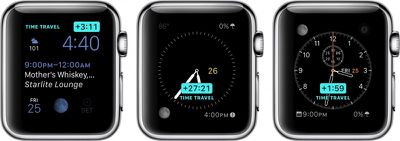
It works with complications on the watch face, like weather, calendar events, sunrise and sunset, stocks, and more. Depending on what you have displayed on your watch face, you'll see different information.

Understanding Time Travel can be a bit confusing for some, so we'll explain it more in detail, with some highlights on what different watch faces can do.
Apple Watch Time Travel Main
Before using Time Travel, be sure to set your complications the way you want them. Now that Apple allows third-party complications, the options are even better.

This feature works best with such watch faces as Utility, Modular, Simple, Color, and Chronograph because those faces have the most customizable complication options.

Once you've set up your watch face with the complications you like, all you have to do to activate Time Travel is rotate the digital crown. Scrolling up will move time forward, and scrolling down will move time backward. When you are done, simply tap the screen to return to the current time.
Apple Watch Time Travel 2
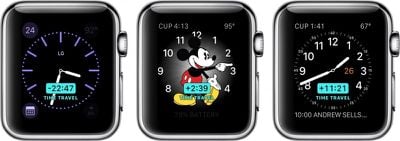
An example of moving forward in Time Travel mode with the Modular watch face might look something like this:

Move time forward three hours. Your calendar changes to show you an event that takes place three hours from now and shows the temperature is predicted to have increased five degrees. Move time forward 10 hours. The temperature drops by 15 degrees. The date changes, and the time of sunrise and sunset changes to reflect the new day.

It's all rather useful, relative to information that is important to you. For example, if you want to know whether it will rain tomorrow at 3:00 p.m. when you have a meeting at a coffee shop downtown, you can scroll forward in time to see what the weather predictions look like.

With Time Travel, you can generally look forward through the remainder of the current day and all of the following day. Looking backward into the past with most watch faces, you can view events and data from earlier in the current day and from all of the previous day, giving a total of a 72-hour window to scroll through. You can exit Time Travel mode and return to the current time at any point by simply pressing the Digital Crown.

Some complications like weather only function when looking forward in time, while others like stocks (unfortunately) only work when looking backward.

Third-party app developers in general seem to still be figuring out the best ways to use complications, although some popular developers have already updated their apps to support complications and in some cases Time Travel. Popular categories include weather apps like Dark Sky and The Weather Channel, health apps like Lifesum, and travel time prediction apps like ETA. You can manage which third-party apps with complications are available to use through the Complications section settings in the Watch app on your iPhone.

Watch Faces Not Compatible With Time Travel

A few of the watch faces don't work with Time Travel. So, if you are using one of the below-listed faces, you wont be able to see the feature.

  • Motion
  • XX-Large
  • Timelapse
  • Photo Album
  • Photo
  • Live Photo

Special Watch Face Features

Some watch faces have additional Time Travel features that provide interesting and unique visual changes.

Astronomy
Apple Watch Time Travel 3
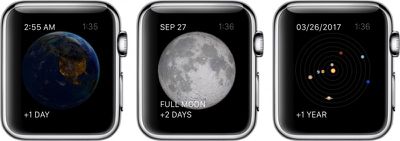
In the Astronomy watch face, you can switch between views of earth, the moon, and the solar system. With Time Travel, you can move through time, watching the sun rise and set above the Earth. You can also see the phases of the moon, and even find out the next time it will be full. With the solar system displayed, you can watch the planets rotate day-by-day for years in the future or past.

Solar
Apple Watch Time Travel 4
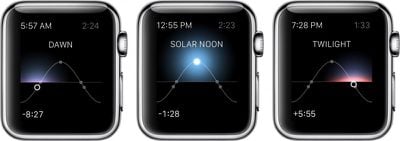
The Solar watch face provides a graph of the sun's position in the sky, limited to the current day. Based on your current location, as well as the time of day, the sun moves along a curve. With Time Travel, you can visually identify dawn, dusk, twilight, and the day's zenith at any time before or after your current.

With Time Travel mode on Apple Watch, you can quickly see what the day has in store for you without even having to open up an app or ask Siri for guidance.


Related Roundup: Apple Watch 12
Buyer's Guide: Apple Watch (Buy Now)
Related Forum: Apple Watch

Top Rated Comments

145 months ago
All this aside, whatever person thought it a good idea to call a feature a "Complication" was an idiot. I don't want to use any kind of mobile device and have the word "Complication" ANYWHERE in the user interface. I'm not 50 or 60, I'm a 23 year old with a strong background in computer science and I don't want that word on my device.


You do realize that the term "Complication" in the watch world is anything else on the timepiece that displays something other then the time. This term has been around for quite awhile and wasn't a feature that Apple decided to name.

Chances are you have been staring at complications on your watch for quite some time.
Score: 8 Votes (Like | Disagree)
oneMadRssn Avatar
145 months ago
ONE POINT TWENTY ONE JIGGAWATTS!

WHAT'S A JIGGAWATT?

MacRumors content image


EDIT: This article would have been really well-timed if posted on October 21, 2015. The actual future day.
Score: 3 Votes (Like | Disagree)
145 months ago
You do realize that the term "Complication" in the watch world is anything else on the timepiece that displays something other then the time. This term has been around for quite awhile and wasn't a feature that Apple decided to name.

Chances are you have been staring at complications on your watch for quite some time.
It's like these people don't care about horology at all!
Score: 2 Votes (Like | Disagree)
iPhysicist Avatar
145 months ago
All this aside, whatever person thought it a good idea to call a feature a "Complication" was an idiot. I don't want to use any kind of mobile device and have the word "Complication" ANYWHERE in the user interface. I'm not 50 or 60, I'm a 23 year old with a strong background in computer science and I don't want that word on my device.
The word complication and its origin can be looked up on Wikipedia. You've got more to learn young Padawan.
Score: 1 Votes (Like | Disagree)
145 months ago
These watches are still a total waste of time until Apple adds GPS and a sim card.
If that was your best comedy attempt, I will not book tickets for your stand up comedy shows.
Score: 1 Votes (Like | Disagree)

Popular Stories

apple watch series 3 design

Apple Offers Steps to Fix Daylight Saving Time Bug on Apple Watch

Sunday November 1, 2026 3:34 am PST by
Apple has published a support document describing what to do if your Apple Watch continues to show time that's off by one hour after daylight savings time changes. "This incorrect time appears only on the Always On display when your wrist is down," says Apple. "When you activate the display by tapping it or raising your wrist, the time changes to the correct hour." To fix the issue, Apple says ...
siri recap live rewind

watchOS 27.3 Brings Live Rewind and Siri Recap to Apple Watch

Tuesday November 3, 2026 10:35 am PST by
With the first beta of watchOS 27.3, Apple is introducing new Audio Intelligence features it previewed for the Apple Watch Series 12 and Ultra 4 earlier this year. Powered by the S11 chip, Audio Intelligence includes Live Rewind, Siri Recap, Sound Recognition, and Shazam Music Recognition. Sound Recognition and Shazam are already on the watch, but Live Rewind and Siri Recap are now available ...
apple watch series 3 design

Apple Watch Users in Europe Report Daylight Saving Glitch

Monday October 26, 2026 5:26 am PDT by
Some Apple Watch users running watchOS 27 are reporting a daylight saving glitch after clocks went back in the UK and Europe on Sunday. In a MacRumors forums thread, five users – several in the UK and central Europe – say their watch shows the correct time when activated, but the Always-On display keeps showing summer time, leaving it an hour fast. The problem has also been reported in...
Latest Stories
Siri AI Rumored to Become 'More Like an Agent' as Early as Next Year
3 hours ago
Apple Taking New Approach to Developing iOS 28 and macOS 28
4 hours ago
Early Apple Black Friday Deals on Apple Watch, MacBook Air, and More
23 hours ago
'Backglow' Lets You Customize New MacBook Pro's Glowing Apple Logo
23 hours ago
Top Stories: Apple Product Launches, iOS 27.3 Beta, and More
1 day ago
More Fun iPhone Duo Apps: 30 New Picks to Try
2 days ago
Hands-On With Apple's New OLED Touchscreen MacBook Pro
2 days ago
Apple Store With All-New Design Opening Soon in Southern California
2 days ago
Control the Glowing Apple Logo on Your New MacBook Pro
2 days ago
Apple Shares New 'Apple Card: Apply and Use in Minutes' Ad
2 days ago
Apple Says More Than 100,000 Apps Optimized for iPhone Duo, Here's What's Still Missing
2 days ago
Early Black Friday Deals Kickoff With Steep Discounts on Apple Watch Ultras and More
2 days ago
The MacRumors Show: iOS 27.3 Looks Like a Huge Update
2 days ago
Best Buy's Black Friday Event Begins With Sitewide Savings on Apple, TVs, More
2 days ago
Apple Releasing Yet Another Two New Products Next Week
2 days ago
MacBook Air Drops to Lowest Price in Months With Amazon's $250 Discount
2 days ago
Apple Rumored to Drop the iPhone's Action Button Next Year
2 days ago
Apple's Extended Return Policy Now in Effect for 2026 Holiday Season
2 days ago
Apple Music Classical Updated With New Icon and Refreshed Design
2 days ago
OLED iPad Mini, M6 iMac, and New MacBook Pros Available From Today
2 days ago
Apple Surveys iPhone Duo Buyers About Crease and Camera
3 days ago
Apple's First Touchscreen Mac is Now Arriving to Customers
3 days ago
Claude Gets Personal Finance Feature With Bank Account Linking
3 days ago
Apple Arcade Adds Crossy Road Rush and NBA 2K27
3 days ago
Apple's New HomeView Smart Home Hub: Here's How Much RAM It Has
3 days ago
iPad Mini vs. iPad Air Buyer's Guide: Now Just $50 Apart
3 days ago
First iOS 27.3 and macOS Golden Gate 27.3 Public Betas Now Available
3 days ago
Apple Announces a New Mac Sales Record
3 days ago
Paid $200 for Logic Pro? Apple Says You Won't Get This New Feature
3 days ago
Instagram's Edits Video Editor is Now Available on Mac
3 days ago






































