iOS 17: How to Track Your Mood With Apple Health - MacRumorsOpen MenuShow RoundupsShow Forums menuVisit ForumsOpen Sidebar
Skip to Content

iOS 17: How to Track Your Mood With Apple Health

by

In iOS 17, Apple in the Health app has added the ability to track your emotions on a daily basis to give you an overall picture of mental wellbeing.
ios 17 beta 6 mood tracking
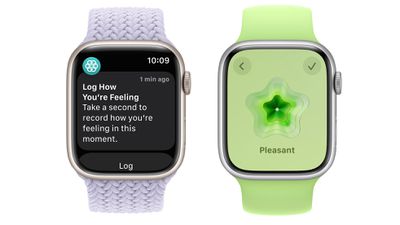
Through Health app notifications or the Apple Watch, you can log your mood at different times throughout the day and input an overall mood for the day.

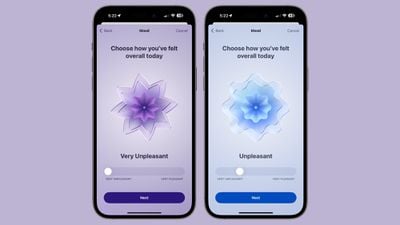
Logging a mood presents a slider bar with options ranging from Very Unpleasant to Neutral to Pleasant. The options are color coded (very unpleasant is purple, neutral is blue, and very pleasant is orange), and the idea is to drag the slider to the closest representation of your current mood.

From there, Apple asks you what best describes the feeling, and presents a list of adjectives related to the mood that you can select from. The "Very Pleasant" mood, for example, has options like Amazed, Peaceful, Joyful, and Calm. The "Very Unpleasant" mood includes Angry, Sad, Drained, and Stressed, while Neutral moods include Peaceful, Indifferent, and Content. You cannot input your own adjective, and must use one of the suggestions from Apple. There are a few dozen total options, so the idea is just to choose the closest match.
watchos 10 mood logging
After you've selected a mood and an accompanying adjective for it, Apple asks what's causing the mood. Options include health, fitness, family, friends, partner, dating, weather, money, and current events, but again, you have to choose from Apple's list. You can, however, add context in this section, so you can write down details on why you've chosen a specific category.

To create your first log of your emotional state or mood in iOS 17, follow the steps below.

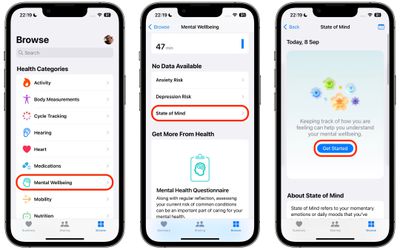
  1. In the Health app, select the Browse tab, then under "Health Categories," tap Mental Wellbeing.
  2. Under "No Data Available," tap State of Mind.
  3. Tap Get Started.
    health

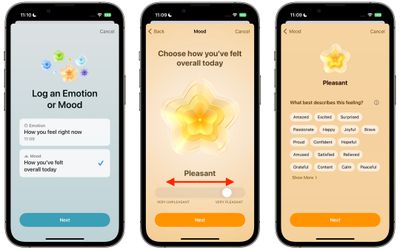
  4. Choose to log How you feel right now, or How you've felt overall today, then tap Next.
  5. Use the slider to log your emotion or mood on a spectrum from Very Unpleasant to Very Pleasant, then tap Next.
  6. Choose a word that best describes this feeling, then tap Next.
  7. Choose from the options what's having the biggest impact on you, then tap Done.health

That's all there it to it. All your logs can be viewed at any time using the State of Mind card in the Mental Wellbeing section of the Health app.

Get Reminders to Log Your State of Mind

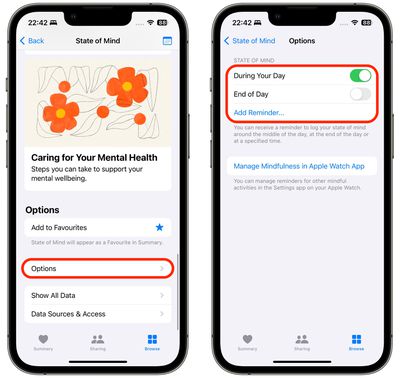
At the bottom of the State of Mind section is an Options menu that includes toggles that you can enable to get reminders to log your emotional state or mood during your day or at the end of the day.
health
For added customization, an Add Reminder... option also lets you add a specific time each day to get your reminder, which is useful if you know when certain triggers tend to occur during your day.


Tag: Health

Popular Stories

duo aquarium

More Fun iPhone Duo Apps: 30 New Picks to Try

Friday November 6, 2026 3:27 pm PST by
When the iPhone Duo launched, we shared a list of some of the fun apps developers created for the new form factor. Two weeks out, developers are continuing to come up with fresh ideas, so we thought we'd share some of our favorites. Games Marbles Unhinged ($2.99) - Marbles Unhinged is a marble maze designed for the Duo. When you fold it, the floor turns into a ramp. If you stand the top...

apple pro tell logo

Apple Launching Five New Products Today

Thursday November 5, 2026 12:59 am PST by
Apple is launching five new products on Friday, November 6, following pre-orders that opened last week, including its first touchscreen MacBook Pro models. The following new products will be available from today: iPad mini with OLED display and A20 Pro chip iMac with M6 chip 14-inch MacBook Pro with M6 chip 14-inch MacBook Pro with OLED touchscreen 16-inch MacBook Pro with OLED...
iOS 28 AI

Apple Taking New Approach to Developing iOS 28 and macOS 28

Sunday November 8, 2026 7:42 am PST by
Apple has made a change to its development process for iOS 28, macOS 28, and corresponding software updates, according to Bloomberg's Mark Gurman. In his Power On newsletter today, he said Apple separates development of each year's new operating systems into three major stages. Typically, he said each stage consists of four weeks of coding followed by a four-week "convergence" period where...
Latest Stories
Apple Store Subscription Sign-Up Controversy Exposed
6 hours ago
Siri AI Rumored to Become 'More Like an Agent' as Early as Next Year
16 hours ago
Apple Taking New Approach to Developing iOS 28 and macOS 28
18 hours ago
Early Apple Black Friday Deals on Apple Watch, MacBook Air, and More
2 days ago
'Backglow' Lets You Customize New MacBook Pro's Glowing Apple Logo
2 days ago
Top Stories: Apple Product Launches, iOS 27.3 Beta, and More
2 days ago
More Fun iPhone Duo Apps: 30 New Picks to Try
2 days ago
Hands-On With Apple's New OLED Touchscreen MacBook Pro
2 days ago
Apple Store With All-New Design Opening Soon in Southern California
2 days ago
Control the Glowing Apple Logo on Your New MacBook Pro
3 days ago
Apple Shares New 'Apple Card: Apply and Use in Minutes' Ad
3 days ago
Apple Says More Than 100,000 Apps Optimized for iPhone Duo, Here's What's Still Missing
3 days ago
Early Black Friday Deals Kickoff With Steep Discounts on Apple Watch Ultras and More
3 days ago
The MacRumors Show: iOS 27.3 Looks Like a Huge Update
3 days ago
Best Buy's Black Friday Event Begins With Sitewide Savings on Apple, TVs, More
3 days ago
Apple Releasing Yet Another Two New Products Next Week
3 days ago
MacBook Air Drops to Lowest Price in Months With Amazon's $250 Discount
3 days ago
Apple Rumored to Drop the iPhone's Action Button Next Year
3 days ago
Apple's Extended Return Policy Now in Effect for 2026 Holiday Season
3 days ago
Apple Music Classical Updated With New Icon and Refreshed Design
3 days ago
OLED iPad Mini, M6 iMac, and New MacBook Pros Available From Today
3 days ago
Apple Surveys iPhone Duo Buyers About Crease and Camera
3 days ago
Apple's First Touchscreen Mac is Now Arriving to Customers
3 days ago
Claude Gets Personal Finance Feature With Bank Account Linking
3 days ago
Apple Arcade Adds Crossy Road Rush and NBA 2K27
3 days ago
Apple's New HomeView Smart Home Hub: Here's How Much RAM It Has
3 days ago
iPad Mini vs. iPad Air Buyer's Guide: Now Just $50 Apart
4 days ago
First iOS 27.3 and macOS Golden Gate 27.3 Public Betas Now Available
4 days ago
Apple Announces a New Mac Sales Record
4 days ago
Paid $200 for Logic Pro? Apple Says You Won't Get This New Feature
4 days ago