How to Transfer All Your Photos and Videos From Facebook to Google Photos - MacRumorsOpen MenuShow RoundupsShow Forums menuVisit ForumsOpen Sidebar
Skip to Content

How to Transfer All Your Photos and Videos From Facebook to Google Photos

by

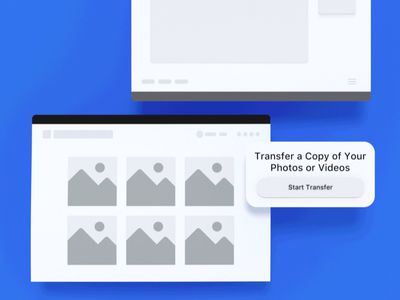
Facebook has just made a photo transfer tool globally available that lets account holders easily download all their pictures and videos from the social network to Google Photos.
facebook photos transfer
Previously, the majority of Facebook users wanting to download their media from the site had to do it manually. From today, however, users with a Google ‌Photos‌ account can automate the job, and Facebook says more cloud services will be supported soon.

Even if you've had enough of Facebook, the built-in tansfer tool is handy if you want to save your media before permanently closing your account. The following steps explain how it works.

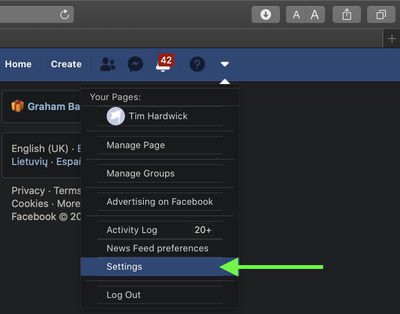
  1. Log into your Facebook account in a web browser, then click the down arrow in the top-right corner of Facebook's menu bar.
    Facebook

  2. Select Settings.
    Facebook

  3. Select Your Facebook information.
    Facebook

  4. Select Transfer a copy of your photos or videos.
    Facebook

  5. Enter your Facebook password if prompted, then click Choose destination and choose Google Photos from the dropdown.
    Facebook

  6. Use the radio buttons to opt to transfer a copy of either your photos or videos you've uploaded to Facebook, then click Next
    Facebook.

  7. Sign into Google ‌Photos‌ and grant Facebook permission to add media to your Google ‌Photos‌ library, then click the Confirm Transfer button on the next screen.

    Facebook

After the transfer is finished, you'll receive an email from Facebook notifying you that the process is complete.

Top Rated Comments

79 months ago
Out of the frying pan and into the fire.
Score: 26 Votes (Like | Disagree)
79 months ago
From an advertisement platform to another... It could be a good idea to change your pimp every now and then... or change the career.
Score: 9 Votes (Like | Disagree)
RammyXX Avatar
79 months ago
Easy fix for the headline to make this article somewhat relevant for MacRumors...

How to Transfer All Your Photos and Videos From Facebook to Google Photos in Safari
Score: 8 Votes (Like | Disagree)
beanbaguk Avatar
79 months ago
Only last week I abandoned Google and switched entirely to iCloud. I actually love the product, but Google chooses to screw over legacy Google Apps accounts. I was paying 10eur for 1TB, yet Google One accounts were offered 2TB for 10eur.

When I contacted Google, they told me to pay an extortionate amount for a Google Suite upgrade losing all my benefits to get 2TB storage.

On that note, I downgraded to 100GB (20eur for the year), and switched to iCloud. 7eur for 2TB.

Job done. Google sucks.
Score: 5 Votes (Like | Disagree)
79 months ago
Why would I tell Facebook what my Google account is?

H.
Score: 2 Votes (Like | Disagree)
bivalvegruff Avatar
79 months ago
How to transfer your photos out of the ashes and into the fire.
Score: 2 Votes (Like | Disagree)

Popular Stories

iCloud iPhone 17 Pro

iPhone Users Who Pay for iCloud Storage Get Two New Perks on iOS 27

Thursday July 2, 2026 6:10 am PDT by
If you pay for certain iCloud+ storage plans beyond the 5GB that Apple offers for free, you will receive two more perks on iOS 27 at no additional cost. A summary of the two new iCloud+ perks on iOS 27:Increased daily usage limits for some new Apple Intelligence features, including image generation in the revamped Image Playground app. HomeKit Secure Video cameras receive generated video...
iPhone 4 on Black Feature

Apple Facing One of Its Worst Leaks Since the iPhone 4

Thursday July 2, 2026 9:53 am PDT by
Apple supplier Tata Electronics recently suffered a cyberattack that resulted in thousands of confidential files being published on the dark web, and this reportedly included some photos and documents related to the upcoming iPhone 18 Pro. We have elected not to share any of the leaked photos in this story due to the illegal nature in which they were obtained, but they can easily be found...
American Express Gold Apple Pay Feature

American Express Announces New Apple Pay Feature

Tuesday June 30, 2026 10:27 am PDT by
American Express today announced that you can now redeem Membership Rewards points when checking out with Apple Pay on the web and in apps on the iPhone and iPad. When checking out with Apple Pay on iOS 18 or iPadOS 18 or later, tap on your eligible American Express card (Platinum, Gold, Green, and others) and select the Membership Rewards points option. You can use points to cover all or...