How to Troubleshoot Apps Overusing Energy in OS X - MacRumorsOpen MenuShow RoundupsShow Forums menuVisit ForumsOpen Sidebar
Skip to Content

How to Troubleshoot Apps Overusing Energy in OS X

by

Even though most developers work their hardest to ensure that the programs you download onto your Mac run smoothly, sometimes, things go wrong. One issue that may arise is an app using an exorbitant amount of energy or memory, causing your Mac to overheat or suffer severe battery drain.

Sometimes, simply closing an app doesn't do the trick. For example, if a program includes a helper tool, that tool may be the culprit. Closing the program may not solve the problem.

We've got a troubleshooting guide for finding out which apps are using the most percentage of processes on your computer.

Check Energy Consuming Apps

If you experience a fast drain on your MacBook's battery, it may be caused by certain programs running in the background. While you may have intended to run something like Spotify, it is possible that you have a program open that you didn't know about.
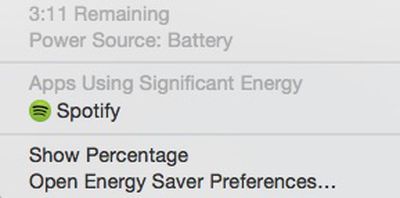
Apps using significant energy
You can quickly check to see which apps are using a significant amount of energy by left clicking on the battery icon in the upper right corner of your laptop's tool bar. From the dropdown list, wait a few seconds until your Mac finishes collecting power usage information. Any apps that are using a lot of energy will be listed.

You can then find the app by searching in Finder and quit the program. Or, you can right click on the app to open Activity Monitor.

Using Activity Monitor

Sometimes, issues causing overheating come from programs that are overusing memory and CPU. The Activity Monitor provides information on how activities are affecting your Mac based on CPU, Memory, Energy, Disk, and Network.

CPU
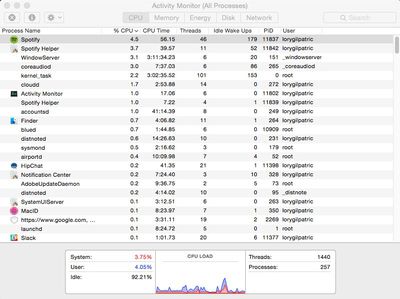
The CPU pane can help you identify processes that affect your Mac's performance, battery, temperature, and fan. Click the "%CPU" column to sort percentages and see which apps are using the highest percentage.
CPU
Individual CPU usage should not be very high. Processes should use less than one percent when not actively in use. Most apps that are in use should not be using more than 10 percent, and that is for such programs as content streaming (like Spotify or Plex). If a program is using a large percentage of your CPU (above 50 or 60 percent) it is probably the culprit.

Memory
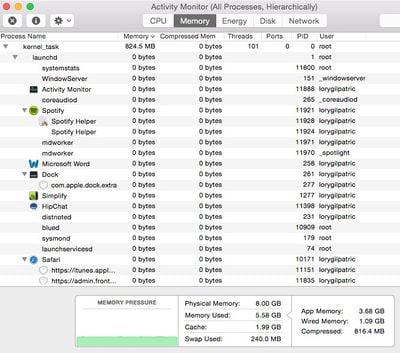
The memory pane shows how memory is being used on your Mac. Apps using a lot of memory will affect your startup drive. Click the "Memory" column to sort memory usage. If a process is using an excessive amount of memory, it might affect the performance of your Mac.
Memory
Energy
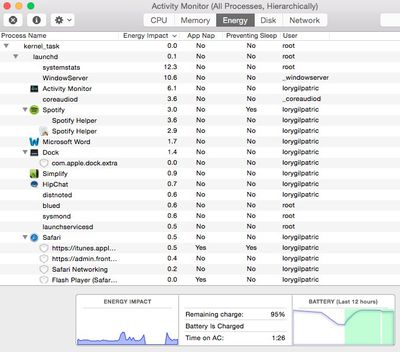
The energy pane shows how much energy is being used altogether, and by individual processes. Click the "Energy Impact" column to sort energy consumption. Processes at the top of the list are using the most energy. If a process seems to be gobbling up more energy than you think they should, even when it is closed, there may be a problem with the program.
Energy
Disk
The disk pan shows the amount of data being written to and read by your disk. It also provides information on the amount of times your Mac accesses the disk to read and write data.
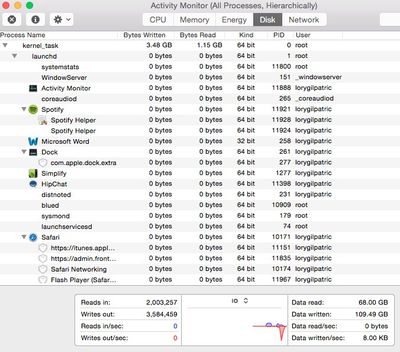
Disk
Network
The network pane shows how much data your Mac is sending or receiving over your network. You can check which processes are sending or receiving the most data from this view.
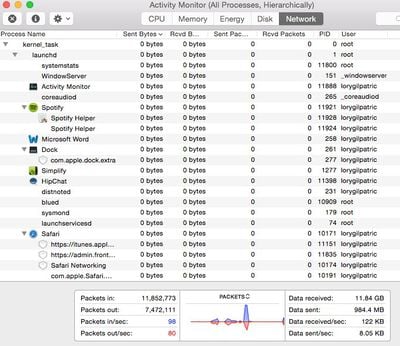
Network

Quitting a Process

If you've discovered the process that is overworking your Mac, you can quit it from Activity Monitor. Highlight the item by selecting it. Then, click on the X in the upper left corner of the screen.
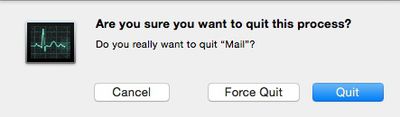
Activity Monitor
You will be provided with the option to quit the process, force quit, or cancel the action. If you quit a process that that could cause data loss or is being used by another process, it won't quit. Nothing will happen.
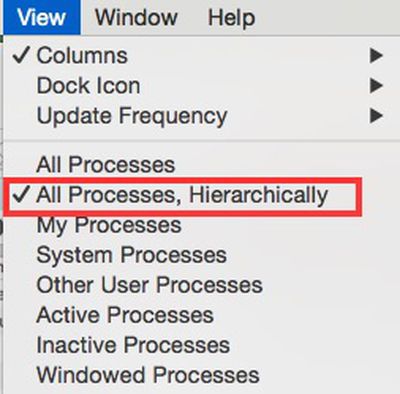
Switch Views in Activity Monitor
If you force quit a process that is being used by another application, it may cause a problem with its performance. You can check to see if a process is being used by another program by changing the window view. Select View from the tool bar. Then select "All Processes, Hierarchically" from the dropdown menu. This will repopulate the processes by their main program.

If there's a process that's overusing your Mac's CPU, memory, or energy and you can't quit it without possibly affecting the performance of the main program it is being used with, the best option is to contact the app's developer.

If you experience an unusual amount of overheating and your Mac's fan starts running continuously, or if your battery is suffering an unusual amount of drainage, troubleshoot the problem by checking the Activity Monitor and shutting down processes that are not in use.


Top Rated Comments

AlecZ Avatar
148 months ago
"sudo killall Chrome" is a good way.

Score: 8 Votes (Like | Disagree)

Popular Stories

duo aquarium

More Fun iPhone Duo Apps: 30 New Picks to Try

Friday November 6, 2026 3:27 pm PST by
When the iPhone Duo launched, we shared a list of some of the fun apps developers created for the new form factor. Two weeks out, developers are continuing to come up with fresh ideas, so we thought we'd share some of our favorites. Games Marbles Unhinged ($2.99) - Marbles Unhinged is a marble maze designed for the Duo. When you fold it, the floor turns into a ramp. If you stand the top...
apple pro tell logo

Apple Launching Five New Products Today

Thursday November 5, 2026 12:59 am PST by
Apple is launching five new products on Friday, November 6, following pre-orders that opened last week, including its first touchscreen MacBook Pro models. The following new products will be available from today: iPad mini with OLED display and A20 Pro chip iMac with M6 chip 14-inch MacBook Pro with M6 chip 14-inch MacBook Pro with OLED touchscreen 16-inch MacBook Pro with OLED...
iOS 28 AI

Apple Taking New Approach to Developing iOS 28 and macOS 28

Sunday November 8, 2026 7:42 am PST by
Apple has made a change to its development process for iOS 28, macOS 28, and corresponding software updates, according to Bloomberg's Mark Gurman. In his Power On newsletter today, he said Apple separates development of each year's new operating systems into three major stages. Typically, he said each stage consists of four weeks of coding followed by a four-week "convergence" period where...
Latest Stories
Apple Store Subscription Sign-Up Controversy Exposed
2 hours ago
Siri AI Rumored to Become 'More Like an Agent' as Early as Next Year
12 hours ago
Apple Taking New Approach to Developing iOS 28 and macOS 28
14 hours ago
Early Apple Black Friday Deals on Apple Watch, MacBook Air, and More
1 day ago
'Backglow' Lets You Customize New MacBook Pro's Glowing Apple Logo
1 day ago
Top Stories: Apple Product Launches, iOS 27.3 Beta, and More
2 days ago
More Fun iPhone Duo Apps: 30 New Picks to Try
2 days ago
Hands-On With Apple's New OLED Touchscreen MacBook Pro
2 days ago
Apple Store With All-New Design Opening Soon in Southern California
2 days ago
Control the Glowing Apple Logo on Your New MacBook Pro
2 days ago
Apple Shares New 'Apple Card: Apply and Use in Minutes' Ad
3 days ago
Apple Says More Than 100,000 Apps Optimized for iPhone Duo, Here's What's Still Missing
3 days ago
Early Black Friday Deals Kickoff With Steep Discounts on Apple Watch Ultras and More
3 days ago
The MacRumors Show: iOS 27.3 Looks Like a Huge Update
3 days ago
Best Buy's Black Friday Event Begins With Sitewide Savings on Apple, TVs, More
3 days ago
Apple Releasing Yet Another Two New Products Next Week
3 days ago
MacBook Air Drops to Lowest Price in Months With Amazon's $250 Discount
3 days ago
Apple Rumored to Drop the iPhone's Action Button Next Year
3 days ago
Apple's Extended Return Policy Now in Effect for 2026 Holiday Season
3 days ago
Apple Music Classical Updated With New Icon and Refreshed Design
3 days ago
OLED iPad Mini, M6 iMac, and New MacBook Pros Available From Today
3 days ago
Apple Surveys iPhone Duo Buyers About Crease and Camera
3 days ago
Apple's First Touchscreen Mac is Now Arriving to Customers
3 days ago
Claude Gets Personal Finance Feature With Bank Account Linking
3 days ago
Apple Arcade Adds Crossy Road Rush and NBA 2K27
3 days ago
Apple's New HomeView Smart Home Hub: Here's How Much RAM It Has
3 days ago
iPad Mini vs. iPad Air Buyer's Guide: Now Just $50 Apart
3 days ago
First iOS 27.3 and macOS Golden Gate 27.3 Public Betas Now Available
3 days ago
Apple Announces a New Mac Sales Record
3 days ago
Paid $200 for Logic Pro? Apple Says You Won't Get This New Feature
4 days ago









































