

How to Turn Off AirPods Max - MacRumorsOpen MenuShow RoundupsShow Forums menuVisit ForumsOpen Sidebar
Skip to Content

How to Turn Off AirPods Max

by

If you recently acquired a pair of AirPods Max, you probably know that they have a battery life of up to 20 hours, but you may have looked at the physical controls and been left wondering how to turn off the headphones in order to preserve battery when they're not in use.
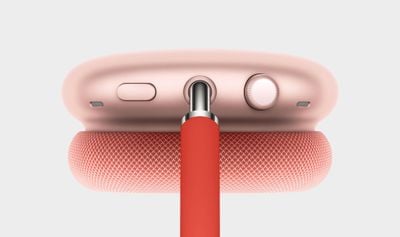
airpods max digital crown
Well, the truth is that the title of this article is a bit of a misnomer, because Apple hasn't included an on/off function by design. That's right – you can't manually switch off AirPods Max. Instead, Apple has built an "ultralow power state" into the headphones that automatically activates under certain conditions. So how does it work?

There are two ways that you can enable this automated power-down feature. One is to use the slim Smart Case that comes with your AirPods Max. Like Apple's Smart Cover for iPads, the AirPods Max case includes an integrated magnet, which when detected by the headphones, automatically puts them in their ultralow power state to help to preserve charge when they're not in use.

For this reason, it's a good idea to keep the Smart Case with you when you're using the headphones out and about. If you forget the case though, all is not lost.
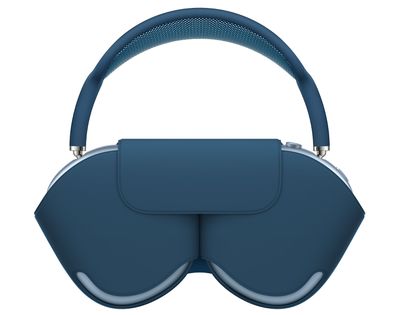
airpods max in case
The second way to enable the down-regulated energy mode is to take the headphones off and set them down somewhere where they won't be moved. If you set your ‌AirPods Max‌ down and leave them stationary for 5 minutes, they go into low power mode. After 72 stationary hours out of the Smart Case, your ‌AirPods Max‌ go into a lower power mode that turns off Bluetooth and ‌Find My‌ to preserve battery charge further.

AirPods Max have the optional Automatic Head Detection feature enabled by default, which helps them recognize when they're being worn, so it's probably a good idea to keep this setting enabled so that they power down quicker when you're not using them.


Related Roundup: AirPods Max 2
Buyer's Guide: AirPods Max (Buy Now)
Related Forum: AirPods

Popular Stories

iphone 18 pro blue%402x

iPhone 18 Pro: Dark Cherry, Light Blue, and Dark Gray Chassis Leaked [Update]

Thursday June 4, 2026 5:18 am PDT by
Update: Since publication, new information has come to light suggesting the images have been AI-manipulated and are not in fact iPhone 18 Pro chassis parts. The original article follows. The color options Apple is reportedly planning for the upcoming iPhone 18 Pro and ‌iPhone 18 Pro‌ Max have appeared online today in the form of images of chassis parts of unknown authenticity....
Aston Martin CarPlay Ultra Screen

Apple Says CarPlay Ultra is Coming to These Vehicle Brands

Thursday May 21, 2026 11:53 am PDT by
Last year, Apple launched CarPlay Ultra, the long-awaited next-generation version of its CarPlay software system for vehicles. Nearly a year later, CarPlay Ultra is still limited to Aston Martin's latest luxury vehicles, but that should change fairly soon. In May 2025, Apple said many other vehicle brands planned to offer CarPlay Ultra, including Hyundai, Kia, and Genesis. CarPlay Ultra...
iOS 27 All the New App Features

iOS 27: All the Rumored App Features

Wednesday June 3, 2026 3:48 pm PDT by
Siri is getting a major overhaul in iOS 27, but Apple also has some big updates planned for apps like Camera, Photos, and Wallet. There are multiple new AI features in the works, plus some non-AI upgrades. Camera Apple is moving Visual Intelligence from the Camera Control button to the Camera app in iOS 27, according to Bloomberg. There will be a Siri mode that will be available alongside...













