How to Turn Off Parental Controls for a macOS User Account - MacRumorsOpen MenuShow RoundupsShow Forums menuVisit ForumsOpen Sidebar
Skip to Content

How to Turn Off Parental Controls for a macOS User Account

by

parental controls macAs the admin account holder on a Mac, you have the ability to create and manage other user accounts including whether they have restrictions imposed via parental controls. The following steps show you how to disable parental controls for an existing account.

Note that by turning off parental controls you are essentially allowing the person with access to that account to use your Mac without restrictions, so they'll be able to browse any website, use any apps, and change settings for things like scanners and printers, for example. With that in mind, here's how it's done.

How to Disable Parental Controls

  1. Click the Apple () symbol in the top left corner of your Mac's screen and select System Preferences....
    how to disable parental controls for an account 1

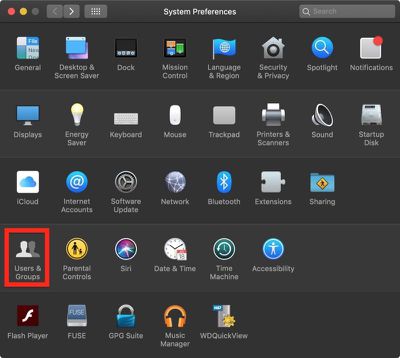
  2. Click Users & Groups.
    how to disable parental controls for an account 2

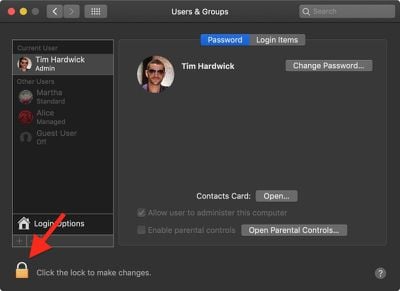
  3. Click the lock in the lower left corner of the window.
    how to disable parental controls for an account 3

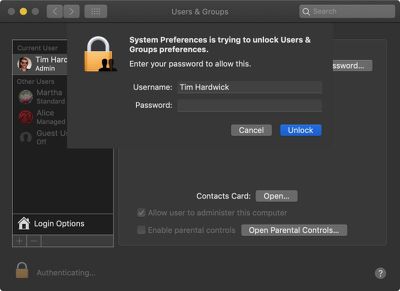
  4. Type in your admin password if prompted.
  5. Click Unlock.
    how to disable parental controls for an account 4

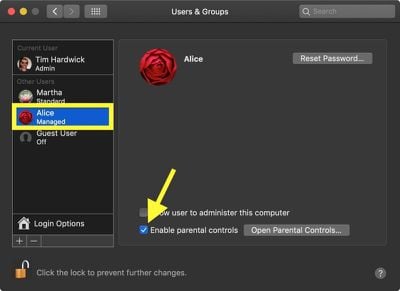
  6. Select an account in the column on the left.
  7. Click the box next to Enable parental controls to uncheck it.
  8. Click the lock in the lower left corner of the window to secure your changes and finish.
If you want to enable parental controls, or turn them back on, make sure to check out our how to that walks you through enabling them.


Popular Stories

iOS 27 Next to iPhone

Here's When iOS 27 Rolls Out Today in Every Time Zone [Update: It's Out]

Sunday September 13, 2026 3:00 am PDT by
Update 10:04 a.m.: iOS 27 is rolling out now, though it may take a bit for all users to see it, so keep checking! Apple is about to release iOS 27, which will finally deliver more advanced Siri AI capabilities as well as a variety of other refinements, improvements, and new features to iPhones. It's Apple's biggest software update of the year, and Apple announced at Wednesday's iPhone event...
iOS 27 Icon iPhone

iOS 27 Available Now With These 8 New Features

Monday September 14, 2026 9:00 am PDT by
Update — 10 a.m. Pacific Time: Apple has released iOS 27. During its iPhone 18 Pro and iPhone Duo event last week, Apple announced that iOS 27 will be released widely on Monday, September 14. iOS 27 should be available around 10 a.m. Pacific Time / 1 p.m. Eastern Time today via the Settings app, under General → Software Update. Below, we have highlighted eight new features and...
Apple iCloud Plus expansion hero

iCloud+ Now Includes Apple TV, Apple Arcade, and Curated Apple Music Stations in Over 100 Countries

Tuesday September 15, 2026 1:43 am PDT by
Apple today announced a new subscription initiative that turns paid iCloud+ subscriptions into a broader services bundle in more than 100 countries. In select countries, Apple says every paid iCloud+ plan, including the cheapest 50GB tier, now includes Apple TV and Apple Arcade "at no additional cost," while family sharing extends the storage, TV and Arcade access to up to five people....