

If you have an aging Mac lying around that struggles to run the latest macOS and has stopped receiving security updates from Apple, it's possible to give it a secure second life by installing software that essentially turns it into a Chromebook.
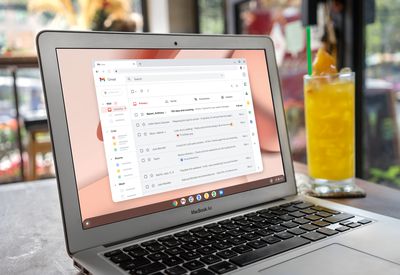
That's because Google has released an early access version of Chrome OS Flex, which offers a way to replace the operating system on older PCs and Macs so that they can tap into a way of computing that is almost entirely managed in the cloud. Installing the cloud-first OS means using your Mac will stay secure with regular updates, it should boot fast, it and won't slow down over time.
Chrome OS Flex is the result of Google's 2020 purchase of Neverware, a company that offered an app called CloudReady that allows users to convert old PCs into Chrome OS machines.
Chrome OS Flex has the same look and feel as Chrome OS, which is shipped with every Chromebook, as it's built on the same code base and includes Google Assistant, the Chrome browser, and Nearby Sharing. However, it's worth noting that there's currently no Google Play Store, and Google has outlined some other, mainly system-level limitations of OS Flex that distinguish it from Chrome OS on native Google devices.
What You'll Need
- Mac released after 2010 with 16GB of free storage.
- Chrome browser installed on your Mac
- USB drive with 8GB or more of storage space.
Installing Chrome OS Flex
Note that use of OS Flex is free for individuals, but schools and businesses who are using CloudReady will continue to be charged a fee and subscription rate, respectively.
Also bear in mind that this is an early access version, so expect some bugs (the OS can also be booted directly from a USB stick if you don't want to commit to installation). A stable version of the OS is expected to launch in the coming months.
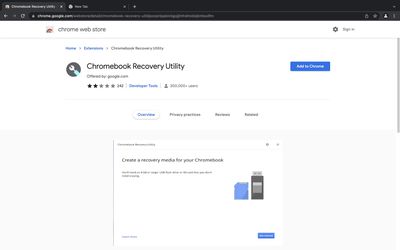
- Open Chrome browser on your Mac and select the Chromebook Recovery Utility in the Chrome web store.
- At the top right, click Add to Chrome.

- When prompted, click Add extension.
- At the top-right of your Chrome browser window, click Extensions -> Manage extensions, and next to Chromebook Recovery Utility, toggle the switch to the right to turn it on.
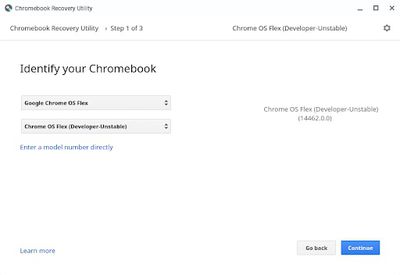
- Launch the Chrome Recovery Utility extension and identify your Chromebook as Google Chrome OS Flex, then click Continue.
- When prompted, insert your USB drive, select it from the dropdown menu and click Continue, then click Create Now.
- When it says the media is ready, remove the USB drive.
- Now shut down the Mac you want to run Chrome OS Flex on and reinsert the USB drive.
- Power on the Mac again while holding the Option key.
- Select the USB drive from the boot menu and hit Enter.
After you have successfully booted Chrome OS Flex from your USB installer, you can permanently install Chrome OS Flex, erasing the device's existing OS and replacing it with Chrome OS Flex.
If you're not yet ready to install Chrome OS Flex on devices, you can temporarily run it using the USB installer. That way, you can test and verify that device functionality, such as networking and input tools, works as expected. For more help on the installation and configuration process, consult the Chrome OS Flex installation guide.



















