How to Turn on Automatic Software Updates on Your iPhone or iPad - MacRumorsOpen MenuShow RoundupsShow Forums menuVisit ForumsOpen Sidebar
Skip to Content

How to Turn on Automatic Software Updates on Your iPhone or iPad

by

If you don't want your iPhone or iPad to bug you about Apple's frequent software updates but want your software to stay up to date, there's an option on the iPhone or the iPad to enable automatic software updates. Apple first enabled this change in iOS 12.
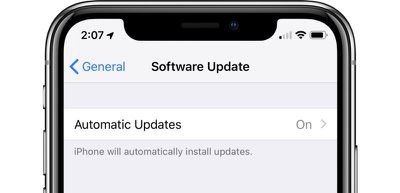
ios12automaticupdates
With this feature turned on, when a new version of iOS is released, your iPhone or iPad will be updated automatically

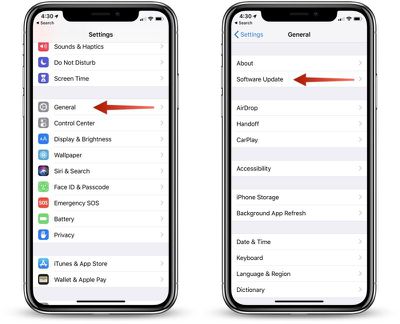
  1. Open the Settings app,
  2. Choose "General."
  3. Select "Software Update." ios12softwareupdate
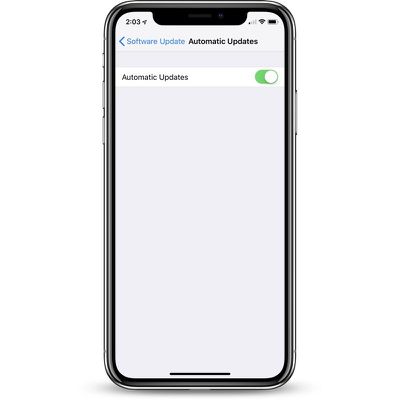
  4. Tap on "Automatic Updates."
  5. Toggle the option from off to on. automaticsoftwareupdates

Automatic updates are turned off by default, so the default behavior of software updates hasn't changed. Unless this is turned on, your iOS device will wait for you to manually tap the install button when an update is released, though it will continue to download new updates in the background.

To turn off automatic updates, follow the same steps, toggling the update from on to off.

Related Forum: iOS 12

Top Rated Comments

TMRJIJ Avatar
103 months ago
TLDR; Go to Software Update > Turn on Automatic Updates.

These tutorials are getting better..*facepalm*
Tutorial too confusing.... Got my phone stuck on the roof.....
Score: 6 Votes (Like | Disagree)
-BigMac- Avatar
103 months ago
TLDR; Go to Software Update > Turn on Automatic Updates.

These tutorials are getting better..*facepalm*
Score: 6 Votes (Like | Disagree)
Kaibelf Avatar
103 months ago
I want to turn it OFF: when I'm at my parents on vacation, I don't have Internet. So I bring my access Point which includes a 3G card. Overnight, as soon as our devices (2 iPads + 2 iPhones) see the WiFi, they start downloading several GB's of updates - and I reach my data cap in less than a week.

gees thanks! How difficult is it to be able to turn off updates depending on network ?
Or, just turn it off when you are experiencing your incredibly narrow use case instead of over complicating it for everyone else?
Score: 4 Votes (Like | Disagree)
103 months ago
I can’t agree more. All these ‘howto’s’ MR is posting seems to be an effort to simply add content, much of which is useless to anyone with half a brain.
I love them because my parents and some friends are really, really bad with technology so these articles break it down for them farther than I do.
Score: 3 Votes (Like | Disagree)
Juicy Box Avatar
103 months ago
If you don't want your iPhone or iPad to bug you about Apple's frequent software updates but want your software to stay up to date, there's a new option in iOS 12 to enable automatic software updates.
What if you want your iDevice to bug you about Apple's frequent software updates but want your software to stay where it is?

I can’t agree more. All these ‘howto’s’ MR is posting seems to be an effort to simply add content, much of which is useless to anyone with half a brain.
I don't mind these how-tos, it is not like you have to read them.

Over the past 5 years, the iOS has gotten a lot more complex and unintuitive when it comes to the settings. I am not saying that this how-to is complex, but many things that used to be really simple, are now moved, and hard to find.

I find myself having to do a something-search for where to find settings on Apple devices a lot more often than I used to. So, I appreciate how-tos like this one.
Score: 2 Votes (Like | Disagree)
jclo Avatar
103 months ago
I can’t agree more. All these ‘howto’s’ MR is posting seems to be an effort to simply add content, much of which is useless to anyone with half a brain.
Oftentimes with simpler how tos like these, the point is to serve as a reminder that a feature exists in the first place rather than as a walkthrough on how to do it. This is the case with automatic software updates. You might not even realize it's a thing, just because there's so much else going on in the beta.
Score: 2 Votes (Like | Disagree)

Popular Stories

Apple Card iPhone 16 Pro Feature

Apple Card Promo to Offer Free AirPods Pro 3

Friday May 15, 2026 8:59 am PDT by
Starting as early as next week, customers who sign up for an Apple Card at Apple's retail stores in the U.S. will receive $249 cash back when they purchase AirPods Pro 3, according to Bloomberg's Mark Gurman. The promotion has yet to be officially announced by Apple, so exact terms and conditions are not available at this time. AirPods Pro 3 are priced at $249 in the U.S., so customers who...
Apple WWDC25 iOS 26 CarPlay Light mode 250609

Six Popular iPhone Apps Now Available on CarPlay

Thursday May 14, 2026 9:10 am PDT by
Apple's CarPlay system for accessing iPhone apps on a vehicle's dashboard screen has received six popular apps in recent weeks: ChatGPT, Perplexity, Grok, Google Meet, WhatsApp, and the indie artist streaming platform Audiomack. Make sure you have the latest version of each app and they will automatically appear on CarPlay. ChatGPT Starting with iOS 26.4, CarPlay supports voice-based...
ipad mini 7 blue

OLED iPad Mini: Release Date, Pricing, and What to Expect

Thursday May 14, 2026 5:08 am PDT by
According to the latest rumors, Apple is close to launching its next-generation iPad mini. So what should we expect from the successor to the iPad mini 7 that Apple released over a year ago? Read on to find out. Processor and Performance Apple is working on a next-generation version of the iPad mini (codename J510/J511) that features the A19 Pro chip, according to information found in code...