FaceTime is great for when you want to stay in touch with friends and family, but it's also good at dealing with contacts that you don't want to hear from.
If you've blocked someone from calling you on FaceTime and you've since changed your mind, follow the steps in this article to unblock them. The first set of steps are for iOS devices, while the second relate to FaceTime on Mac.
How to Unblock FaceTime Callers on Your iPhone or iPad
- Launch the FaceTime app on your iOS device.
- Tap the Info (the encircled "i" icon) button next to the name of the contact that you want to unblock.

- Tap Unblock this Caller at the bottom of the screen.
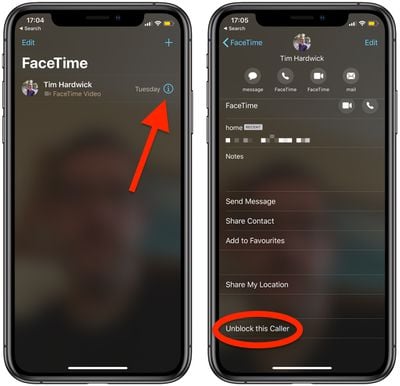
The name, number, and email addresses associated with the contact will be removed from your block list.
How to Unblock FaceTime Callers on Mac
- Launch the FaceTime app from your Mac's Applications folder.
- Find the caller you want to unblock in the sidebar menu.
- Right-click (or Ctrl-click) on the contact and select Unblock this caller from the dropdown menu.

The name, number, and email addresses associated with the contact will be removed from your block list.
Tag: FaceTime Guide