

iOS 16: How to Unsend Emails in Apple Mail - MacRumorsOpen MenuShow RoundupsShow Forums menuVisit ForumsOpen Sidebar
Skip to Content

iOS 16: How to Unsend Emails in Apple Mail

by

Apple in iOS 16 and iPadOS 16 has made several improvements to its stock Mail app to put it on a similar standing to rival email apps. One of the new features is an undo send option. Keep reading to learn how it works.
iOS 16 Mail Guide Feature
Have you ever sent an email in haste, only to immediately regret it or realize you've said completely the wrong thing? Apparently enough of us have to make Apple add a new Undo Send feature to its Mail app in iOS 16 and iPadOS 16.

Now after you send an email, Mail will give you a 10-second period in which you can unsend the email if you made a mistake. That's a shorter amount of time than, say, Gmail gives you (30 seconds), but 10 seconds is better than nothing, and it might just save you from inconvenience or even embarrassment.

Here's how to unsend a sent email in the Apple Mail app in iOS 16 and iPadOS 16.

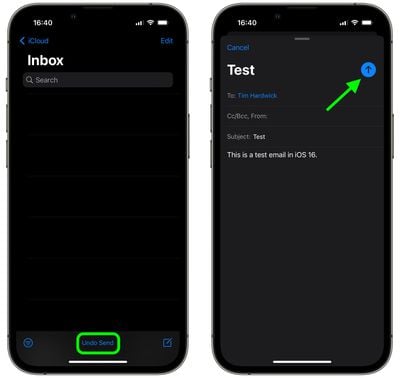
  1. In the Mail app, if you've just sent an email, tap the Undo Send option displayed in blue text at the bottom of your inbox. (If you don't see the option, your 10-second time window for unsending the email has elapsed.
  2. You should be taken back to the email compose interface, where you can correct any errors in the original email.
  3. Tap the blue arrow when you're done to send the email.
mail

That's all there is to it. Note that once you've hit the Undo Send option, you can take all the time you need in the compose screen to edit your email before sending it proper, because the message has already been unsent.


Popular Stories

General macOS Mail Feature

Apple Hide My Email Vulnerability Exposes Real Email Addresses

Wednesday July 1, 2026 6:20 am PDT by
A flaw in Apple's Hide My Email service can reportedly allow almost anyone to uncover the real email address behind a generated alias, and Apple has failed to address it for more than a year since it was first reported. 404 Media is withholding the technical specifics of the vulnerability because it remains exploitable, but the publication verified the issue this week using one of its own...
iCloud iPhone 17 Pro

iPhone Users Who Pay for iCloud Storage Get Two New Perks on iOS 27

Thursday July 2, 2026 6:10 am PDT by
If you pay for certain iCloud+ storage plans beyond the 5GB that Apple offers for free, you will receive two more perks on iOS 27 at no additional cost. A summary of the two new iCloud+ perks on iOS 27:Increased daily usage limits for some new Apple Intelligence features, including image generation in the revamped Image Playground app. HomeKit Secure Video cameras receive generated video...
American Express Gold Apple Pay Feature

American Express Announces New Apple Pay Feature

Tuesday June 30, 2026 10:27 am PDT by
American Express today announced that you can now redeem Membership Rewards points when checking out with Apple Pay on the web and in apps on the iPhone and iPad. When checking out with Apple Pay on iOS 18 or iPadOS 18 or later, tap on your eligible American Express card (Platinum, Gold, Green, and others) and select the Membership Rewards points option. You can use points to cover all or...













