Apple occasionally releases firmware updates for its AirPods and AirPods Pro wireless earphones that can include performance improvements, feature tweaks, and bug fixes.
If you're having a particular issue with your AirPods or AirPods Pro, or if you just want to make sure they're up to date with the latest software, the following steps show you how to update their firmware. You can check which firmware version they are currently using by following the second set of steps in this article.
Updating Your AirPods
- Make sure that your AirPods are in Bluetooth range of your iPhone, iPad, or Mac, and that your device is connected to Wi-Fi.
- Put your AirPods in their charging case and close the lid.
- Plug the charging cable into your charging case, then plug the other end of the cable into a USB charger or port.
- Keep the lid of the charging case closed, and wait at least 30 minutes for the firmware to update.
- Open the lid of the charging case to reconnect your AirPods to your iPhone, iPad, or Mac.
- Check the firmware version (see the steps below).
That's all there is to it. After a short while, any available software updates should be automatically downloaded and installed. If you're having trouble updating your AirPods, make sure the charging case is fully charged. You can also try resetting the AirPods.
Check Your AirPods' Firmware Version
To check the version of the firmware that you have installed to make sure it's up to date, follow these steps:
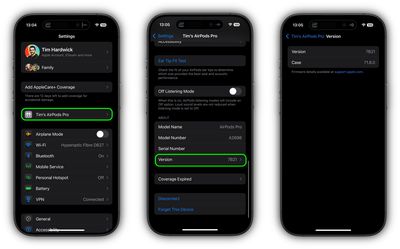
- With your AirPods connected, launch the Settings app on your iOS device.
- Tap the name of your AirPods below your Apple Account banner.
- Scroll down to the "About" section and tap Version.
- Check the numbers shown beside Version and Case.
Firmware updates for the AirPods don't come out very often, so don't be surprised if the version stays the same for a while.