

iOS 15: How to Use Apple's New Weather Maps - MacRumorsOpen MenuShow RoundupsShow Forums menuVisit ForumsOpen Sidebar
Skip to Content

iOS 15: How to Use Apple's New Weather Maps

by

In iOS 15, Apple's stock Weather app received a major design overhaul, in part thanks to a number of features brought over from the popular weather app Dark Sky, which Apple acquired in 2020. One of those features is the inclusion of weather maps, and this article explains what they are and how to use them.
iOS 15 Weather Feature
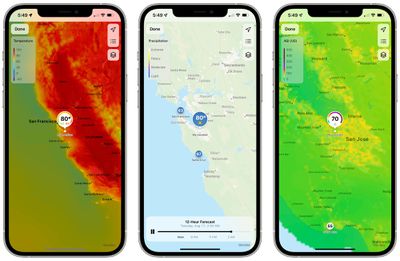
There are three full-screen weather maps available in Apple's native Weather app. They offer a bird's eye view of forecasts for local precipitation, air quality, and temperature. Note that air quality information is limited to Canada, China mainland, Germany, France, India, Italy, Mexico, Netherlands, South Korea, Spain, UK, and the United States.
weather
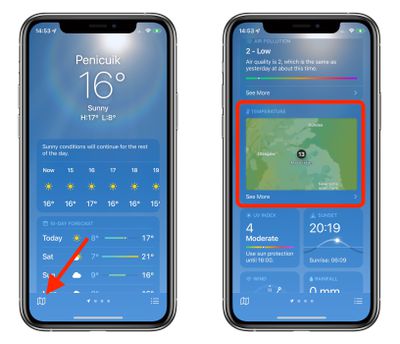
You can access the maps by tapping the small folded map icon in the bottom-left corner of the Weather app, or by scrolling down on a forecast screen, tapping on the default temperature map, and then tapping on the stack to change the view to precipitation or air quality.
weather maps ios 15
The precipitation maps are animated and show the path of incoming storms and the intensity of rain and snow. The progress bar at the bottom shows you the 12-hour forecast, which you can pause using the Pause button or scrub through by dragging the progress dot with your finger.

The stack icon in the upper right corner can be tapped to switch to the air quality or temperature maps, which likewise give you a view the conditions in your area and the surrounding areas. The icon above it lets you switch between geographical regions in your forecast list, while the top icon zooms you in to your chosen area.
weather map ios 15 zoom in out
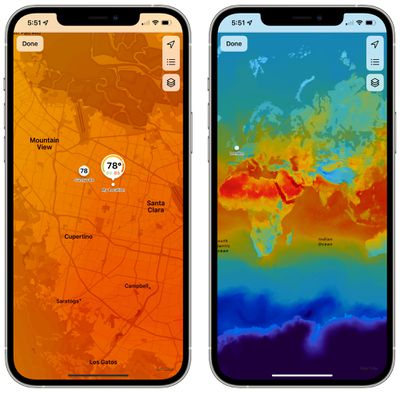
Note that you can zoom in or out as far as you want on any of the maps to get an overview of the chosen weather data.


Related Forum: iOS 15

Popular Stories

iOS 27 Weather App Forecast Feature 1

iOS 27's Weather App Has a New Way to View Forecasts

Thursday June 11, 2026 1:10 pm PDT by
Starting with iOS 27, Apple's Weather app offers new hourly and 10-day overviews for precipitation and wind that you can quickly view at a glance. While this sort of information was already accessible elsewhere in the app, you can now quickly tap between conditions, precipitation, and wind overviews. You can view the percentage chance of rain or snow each hour and day, as well as...
iCloud iPhone 17 Pro

iPhone Users Who Pay for iCloud Storage Get Two New Perks on iOS 27

Thursday July 2, 2026 6:10 am PDT by
If you pay for certain iCloud+ storage plans beyond the 5GB that Apple offers for free, you will receive two more perks on iOS 27 at no additional cost. A summary of the two new iCloud+ perks on iOS 27:Increased daily usage limits for some new Apple Intelligence features, including image generation in the revamped Image Playground app. HomeKit Secure Video cameras receive generated video...
iPhone 4 on Black Feature

Apple Facing One of Its Worst Leaks Since the iPhone 4

Thursday July 2, 2026 9:53 am PDT by
Apple supplier Tata Electronics recently suffered a cyberattack that resulted in thousands of confidential files being published on the dark web, and this reportedly included some photos and documents related to the upcoming iPhone 18 Pro. We have elected not to share any of the leaked photos in this story due to the illegal nature in which they were obtained, but they can easily be found...













