Apple Reference Image on iPhone 18 Pro: What It Does and How to Use It - MacRumorsOpen MenuShow RoundupsShow Forums menuVisit ForumsOpen Sidebar
Skip to Content

Apple Reference Image on iPhone 18 Pro: What It Does and How to Use It

by

Apple's latest iPhone 18 Pro models support something called Apple Reference Image – a way to verify that a photo was taken with an iPhone and hasn't been edited. The method can be used to prove that something actually happened and wasn't AI-generated. Apple likens the feature to a digital film negative.
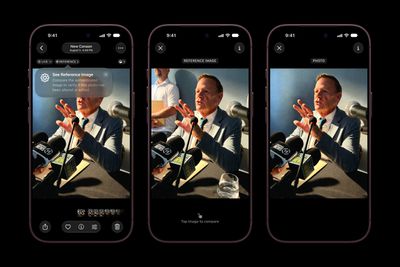
Apple iPhone 18 Pro Photos app Apple Reference Image 260909 scaled
You can use Apple Reference Image to save and share additional data to verify the authenticity of a photo, or to take a photo and also capture the original data from the sensor in the Main camera.

How it Works

Apple Reference Image boots the camera sensor into a specialized reference mode, and the mode instructs the sensor to cryptographically sign pixel data immediately after capture. The sensor firmware is prevented from modifying the data. Other authentication systems don't sign images until the end of the software processing pipeline, which Apple says leaves images vulnerable to tampering attacks.

The resulting "secure digital negative" is protected from software compromise alongside a standard editable photo. The negative is stored on-device and includes pixel data, sensor metadata, and cryptographic timestamps with lower and upper bounds. When a user decides to "develop" the negative for verification, it is sent unprocessed to Private Cloud Compute. Private Cloud Compute runs the steps needed to render the image in a secure, private, and verifiable environment.

Enabling Apple Reference Image on iPhone 18 Pro

You can enable Apple Reference in the Settings app, and you only have to do it once.

  1. Open the Settings app on your iPhone 18 Pro.
  2. Tap Camera.
  3. Tap Reference Image.
  4. Tap Add Reference Mode, then follow the on-screen instructions.
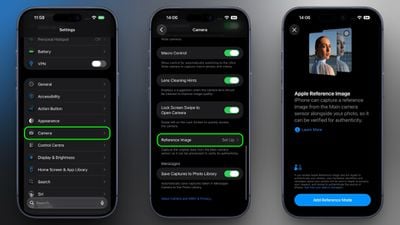
set up reference image iphone 18 pro

After you have added Reference Mode, the Reference Image settings screen will reveal two new options. When sharing photos, toggling on Share Reference Image ensures that the reference image data is always included. Toggling on Transfer Reference Image automatically includes the reference image data when you transfer photos to a Mac or PC.

How to Take a Photo With a Reference Image

  1. Open the Camera app on your iPhone.
  2. Swipe along the carousel at the bottom of the screen and select Reference.
  3. Tap the shutter button to take a photo.

Note that a reference image contains the full image frame regardless of the zoom level. Apple says it uses around 10MB to 35MB of storage, depending on the capture settings.

View a Reference Image in Photos

When you capture a reference image, your iPhone will also capture the original, signed data from the sensor in the Main camera, allowing you to develop and view a reference image in Photos.

  1. Open the Photos app on your iPhone.
  2. Tap Reference in the upper left corner of the screen.
  3. View the reference image, and tap to compare it and verify if the photo has been edited or altered.
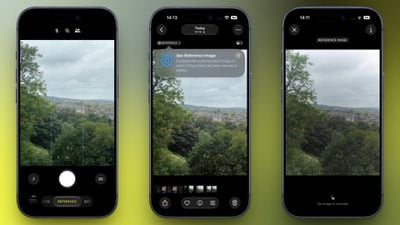
view reference image iphone 18 pro

Apple says the feature resists data injection attacks, compromised operating systems, hardware attacks, and cryptographic attacks.

Apple believes Apple Reference Image is the only image provenance system with quantum-secure defenses. In case the system is breached, there is also a revocation option. Private Cloud Compute calculates a confidence score for each image, and Apple can revoke individual photos or an entire sensor if fraud is detected.

To safeguard photographers, Apple Reference Image avoids using an explicit, public credential for photographers, and it prevents public association between different photos taken by the same sensor. The confidentiality of the image is protected, including from Apple.

More information on Apple Reference Image can be found in Apple's blog post.
Related Roundup: iPhone 18 Pro
Related Forum: iPhone

Popular Stories

iPhone 18 Pro Burgundy Feature

MKBHD Switches Back to iPhone 18 Pro After Testing iPhone Duo

Tuesday November 3, 2026 5:10 am PST by
YouTuber Marques Brownlee has switched back to the iPhone 18 Pro after spending more than two weeks with the iPhone Duo. On the latest episode of the "Waveform" podcast, Brownlee said he missed the Pro's cameras and Face ID. He added that he would miss opening the iPhone Duo, using it in portrait, and reading on the larger screen. Despite strong initial demand for Apple's first foldable...

iPhone 18 Pro Pre Orders Feature Sans Text

iPhone 18 Pro Sales Surge in China, Offsetting Decline in U.S. and Japan

Friday October 30, 2026 10:55 pm PDT by
China is doing much of the heavy lifting for Apple's iPhone 18 Pro launch, with a 29% sales increase helping offset declines in the U.S. and Japan, according to Counterpoint Research. Combined global sales of the iPhone 18 Pro and iPhone 18 Pro Max rose 3.1% during their first three weeks of availability compared with the equivalent launch period last year. U.S. sales fell 4%, while Japan...
iPhone 18 Pro Pre Orders Feature Sans Text

Apple Now Sells DIY Repair Parts for iPhone 18 Pro and Two New Macs

Tuesday October 20, 2026 7:00 am PDT by
As reported by 9to5Mac, Apple is now selling parts for the iPhone 18 Pro, iPhone 18 Pro Max, new Mac mini with M6 and M5 Pro chips, and new Mac Studio with M5 Max and M5 Ultra chips on its self-service repair store in the U.S., Canada, and Europe. After ordering parts and tools, customers with the know-how can follow the steps in Apple's repair manuals for each of these devices, allowing them...
Latest Stories
Siri AI Rumored to Become 'More Like an Agent' as Early as Next Year
4 hours ago
Apple Taking New Approach to Developing iOS 28 and macOS 28
5 hours ago
Early Apple Black Friday Deals on Apple Watch, MacBook Air, and More
1 day ago
'Backglow' Lets You Customize New MacBook Pro's Glowing Apple Logo
1 day ago
Top Stories: Apple Product Launches, iOS 27.3 Beta, and More
1 day ago
More Fun iPhone Duo Apps: 30 New Picks to Try
2 days ago
Hands-On With Apple's New OLED Touchscreen MacBook Pro
2 days ago
Apple Store With All-New Design Opening Soon in Southern California
2 days ago
Control the Glowing Apple Logo on Your New MacBook Pro
2 days ago
Apple Shares New 'Apple Card: Apply and Use in Minutes' Ad
2 days ago
Apple Says More Than 100,000 Apps Optimized for iPhone Duo, Here's What's Still Missing
2 days ago
Early Black Friday Deals Kickoff With Steep Discounts on Apple Watch Ultras and More
2 days ago
The MacRumors Show: iOS 27.3 Looks Like a Huge Update
2 days ago
Best Buy's Black Friday Event Begins With Sitewide Savings on Apple, TVs, More
2 days ago
Apple Releasing Yet Another Two New Products Next Week
2 days ago
MacBook Air Drops to Lowest Price in Months With Amazon's $250 Discount
2 days ago
Apple Rumored to Drop the iPhone's Action Button Next Year
2 days ago
Apple's Extended Return Policy Now in Effect for 2026 Holiday Season
2 days ago
Apple Music Classical Updated With New Icon and Refreshed Design
2 days ago
OLED iPad Mini, M6 iMac, and New MacBook Pros Available From Today
2 days ago
Apple Surveys iPhone Duo Buyers About Crease and Camera
3 days ago
Apple's First Touchscreen Mac is Now Arriving to Customers
3 days ago
Claude Gets Personal Finance Feature With Bank Account Linking
3 days ago
Apple Arcade Adds Crossy Road Rush and NBA 2K27
3 days ago
Apple's New HomeView Smart Home Hub: Here's How Much RAM It Has
3 days ago
iPad Mini vs. iPad Air Buyer's Guide: Now Just $50 Apart
3 days ago
First iOS 27.3 and macOS Golden Gate 27.3 Public Betas Now Available
3 days ago
Apple Announces a New Mac Sales Record
3 days ago
Paid $200 for Logic Pro? Apple Says You Won't Get This New Feature
3 days ago
Instagram's Edits Video Editor is Now Available on Mac
3 days ago