

How to Enable and Disable Automatic Workout Detection in watchOS 5 - MacRumorsOpen MenuShow RoundupsShow Forums menuVisit ForumsOpen Sidebar
Skip to Content

How to Enable and Disable Automatic Workout Detection in watchOS 5

by

Apple's watchOS 5 update includes a new automatic workout detection feature, which is designed to make sure you never miss out on getting credit for one of your workouts.

Automatic workout detection is a setting that's enabled by default once you upgrade to watchOS 5, but if you don't want the feature, it can be turned off using the Apple Watch app on the iPhone or on the Apple Watch itself.
autodetectworkout

Enabling/Disabling Automatic Workouts on Apple Watch

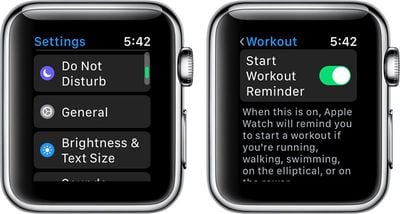
  1. Open the Settings app on Apple Watch.
  2. Choose General.
  3. Select "Workout."
  4. Scroll down to "Start Workout Reminder" and "End Workout Reminder." workoutstartreminder
  5. Set the toggles to your personal preferences.
Enabling/Disabling Automatic Workouts on iPhone

  1. Open up the Watch app on the iPhone.
  2. Choose "Workout" to access the settings for the Workout app.
  3. Scroll down to "Start Workout Reminder" and "End Workout Reminder." automaticworkoutdetection
  4. Set the toggles to your personal preferences.
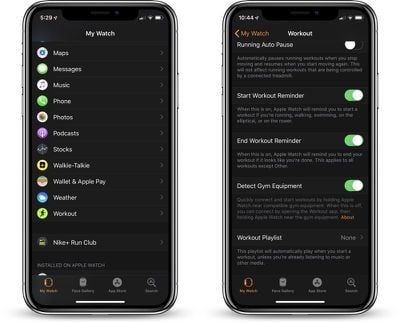
Automatic workout detection for starting a workout and ending a workout are two separate settings, so you can control them individually if so desired.

Start Workout Reminder

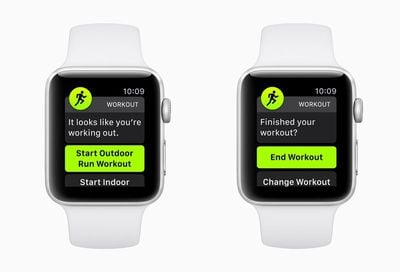
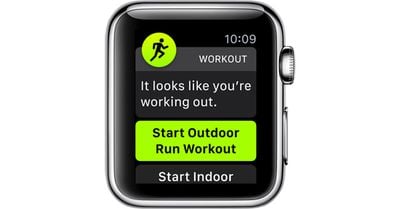
Automatic workout detection is designed to let the Apple Watch remind you to start a workout if you forget to do so, which it will do through a notification that pops up on the Apple Watch asking if you want to begin a workout.
watchos5automaticworkoutdetection
Automatic detection when your workout starts is compatible with running, walking, swimming, elliptical workouts, or rower workouts.

Even if you initially forget to start a workout in watchOS 5, this new workout detection feature will give you credit for the exercise you've already done.

End Workout Reminder

With automatic detection for when a workout ends, which is labeled as "End Workout Reminder" the Apple Watch will remind you to end a workout if it looks like you've finished up. This too works through a notification that directs you to the workout app.

Unlike automatic workout detection for starting a workout, automatic detection for ending one works with all workouts aside from those in the "Other" category.

Related Roundup: Apple Watch 11

Top Rated Comments

102 months ago
My guess? Apple is stuck on their "baby steps" implementing model and those were the only workout types the developers cared about. Next year, if the public seems to like these, they'll add another couple of workout types. Or they'll eliminate the feature completely.
FWIW, I turned this off. I found it turning itself on while I was walking to work, which would be OK, but I generally have at least one hand full of stuff and responding to the alert has an annoyance value that exceeds my interest in recording a walking workout.

Maybe a good feature add would be enabling workouts on a single type basis. For example, yes to running, no for walking.
Score: 3 Votes (Like | Disagree)
102 months ago
I’m so disappointed with this feature. It was probably my most anticipated feature in watchOS 5 but it just doesn’t work well enough. It’s baffeling considering Fitbit has been able to do this with ease for years. Come on, Apple
Score: 2 Votes (Like | Disagree)
inkhorn Avatar
105 months ago
What would be great would be a stop workout on pairing with car Bluetooth / CarPlay, so I don't forget and log vehicle miles onto the route of my workout if I'm driving home.

Especially as there's no way to easily trim the start or end of workouts. :(
Score: 2 Votes (Like | Disagree)
JRobinsonJr Avatar
102 months ago
I wonder why automatic workout startup is limited to these modes...
My guess? Apple is stuck on their "baby steps" implementing model and those were the only workout types the developers cared about. Next year, if the public seems to like these, they'll add another couple of workout types. Or they'll eliminate the feature completely.
Score: 1 Votes (Like | Disagree)
daflowerz Avatar
105 months ago
PLUS... auto-pause/resume should apply to virtually all exercise types. Right now - best I can figure out - it only applies to running. My knees can't handle running so I walk... a lot. IMO it just makes sense to pause a workout when you stop the associated movement regardless of the type.
I totally agree. Just works for running now. I really need it for bicycling when stopped at lights, etc..
Score: 1 Votes (Like | Disagree)
pat500000 Avatar
105 months ago
We need a new update that erases everything on the watch except a clock mode.
Score: 1 Votes (Like | Disagree)

Popular Stories

watchos 27

watchOS 27 Is Wiping Four Apps From Your Apple Watch

Monday June 22, 2026 8:17 am PDT by
Apple's watchOS 27, previewed at this month's WWDC, removes four built-in apps from all supported Apple Watch models, folding three of them into a single Find My app and dropping Walkie-Talkie entirely, based on the first developer beta released this month. The largest change affects Find My. watchOS 27 developer beta 1 replaces the separate Find Devices, Find People, and Find Items apps...
apple world surf league video

Apple Shares Video on How Pro Surfers Use Apple Watch During Competition

Tuesday June 23, 2026 9:57 am PDT by
Apple today shared a video showing off the Apple Watch in use at the World Surf League Championship Tour, with surfers describing how they use the watch when competing. Surfers can be hundreds of meters away from the beach during competitions and can't hear announcements over the sound of the water and the wind. The World Surf League has adopted the Apple Watch to solve the problem, linking...
series 10 apple watch titanium digital crown

Report: Apple Watch Redesign Coming Next Year With New Band System

Tuesday June 30, 2026 8:45 am PDT by
A "major overhaul" of the Apple Watch's design is due to arrive next year with a new system for connecting bands, according to a known Weibo leaker. In a set of recent posts, the leaker known as "Instant Digital" linked the new claim to older rumors about an "Apple Watch X" model, which was said to introduce a fresh design and break compatibility with the existing watch band system. Citing...















