How to Use a Bluetooth Mouse or Trackpad With Your iPad - MacRumorsOpen MenuShow RoundupsShow Forums menuVisit ForumsOpen Sidebar
Skip to Content

How to Use a Bluetooth Mouse or Trackpad With Your iPad

by

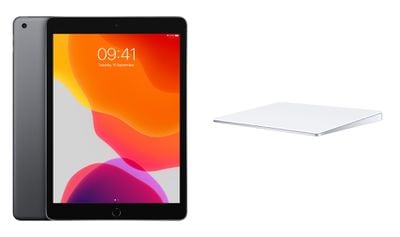
With the release of iPadOS 13.4, Apple brought official Bluetooth mouse and trackpad support to its iPads. This article explains how to use your chosen input device with your iPad. To learn how to connect a mouse or trackpad to ‌iPad‌, click here.

ipad trackpad
Navigating and controlling your ‌iPad‌ with a Bluetooth mouse or trackpad is similar to using one on a desktop or notebook computer. However, there are a few differences you should be aware of.

The Round Cursor

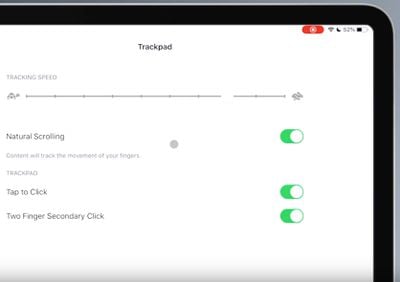
When using a Bluetooth mouse or trackpad on your ‌iPad‌, a circular cursor resembling a finger tip appears on the display instead of a traditional arrow pointer.

The round cursor changes shape or shifts out the way as it moves across different interactive elements on the screen. For example, hovering the cursor over an app on the Home screen causes the app icon to pop out a little to let you know you can select it.
trackpadcursor

The circle in the screenshot is the cursor

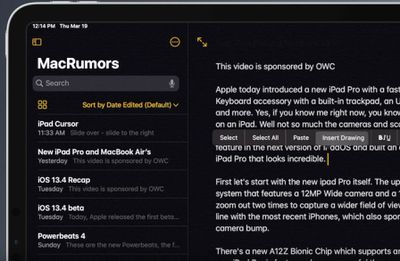
The cursor will also turn into an "I-beam" over text, indicating that you can insert it into a text document for the purpose of editing, or to highlight and copy words from a web page.

The cursor disappears after a few seconds of inactivity. Just move the mouse or touch the trackpad to make it appear again.

iPad Cursor Actions

Apple has designed mouse and trackpad support so that several gestures activate different ‌iPadOS‌ functions.

For example, moving the cursor into the top-right corner of the ‌display‌ and tapping brings up the Control Center. You can also interact with all the Control Center's elements using clicks and long presses.

Similarly, move the cursor over to the date and time in the top-left corner of the screen and this will bring up the Notification Center.
settings
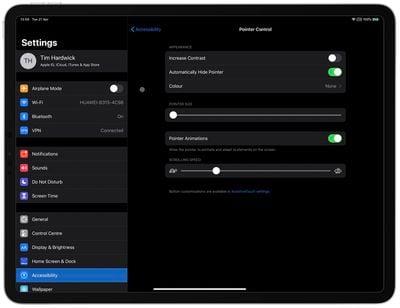
You can change how the cursor looks and how it works in iPadOS. Options include making the cursor darker, changing its color, making it bigger or smaller, and disabling the auto-hide after inactivity. These settings can be found in the Settings app under Accessibility -> Pointer Control.

Trackpad Gestures

Apple has included gesture support for trackpad users. For example, you can enter the Slide Over multitasking interface with a trackpad by moving the cursor over to the right side of the screen or dragging an app over from the Dock. Apple has also added support for multi-touch gestures, including:

Three fingers: If you're using a trackpad, you can swipe downwards with three fingers to access the Home screen from anywhere.

A three-finger swipe up opens up the multitasking interface. Swiping to the left or the right with three fingers also swaps between apps.

Two fingers: A two-finger swipe downwards on your trackpad will bring up Spotlight search. You can also use two fingers to scroll up or down when navigating a web page in Safari.
cursorandtexteditingtrackpad
Elsewhere, two-finger tap gestures in a text editing app will bring up Cut, Copy, and Paste options, and there's a right-click gesture to bring up menu bars in most apps.

You can also make a two-finger click or tap behave as a secondary click in the trackpad settings (see below). Note that a secondary trackpad click acts like a long press on the ‌iPad‌ touchscreen, or a Control-click (or right-click) on a Mac. For example, when you use a secondary trackpad click on an ‌iPad‌ app icon, its contextual menu appears.

How to Adjust Trackpad Settings on iPad

There are some useful trackpad settings in iPadOS that you can change to suit your preferences. The following options can be found in the Settings app under General -> Trackpad.

  • Tracking Speed slider – adjusts how quickly the cursor moves across the screen.

  • Natural Scrolling switch – makes content track the movement of your fingers when you scroll.

  • Tap to Click – makes a tap on the trackpad register as a click.

  • Two Finger Secondary Click – makes a two-finger click or tap function as a secondary click.

Note that you can also perform a secondary click on ‌iPad‌ with any pointing device by holding the Control key as you click.
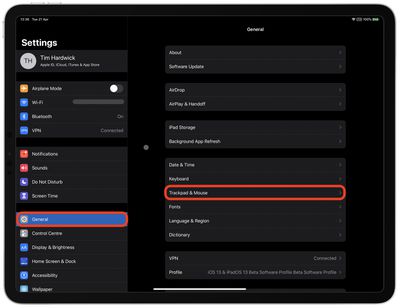
ipad trackpad mouse settings

How to Adjust Mouse Settings on iPad

There are also several mouse settings in iPadOS that you can change to suit your preferences. The following options can be found in the Settings app under General -> Trackpad & Mouse.

  • Tracking Speed slider – adjusts how quickly the cursor moves on the screen.
  • Natural Scrolling switch – makes content track the movement of your fingers when you scroll.
  • Secondary Click – lets you choose whether you want a secondary click to happen when you click on the left or right side of your mouse, or not at all.

Final tip: If you've lost the on-screen keyboard since you connected a Bluetooth mouse or trackpad, tap and hold down the arrow key in the shortcuts bar in the bottom-right corner of the screen until the virtual keyboard re-appears.


Popular Stories

apple pro tell logo

Apple Launching Five New Products Today

Thursday November 5, 2026 12:59 am PST by
Apple is launching five new products on Friday, November 6, following pre-orders that opened last week, including its first touchscreen MacBook Pro models. The following new products will be available from today: iPad mini with OLED display and A20 Pro chip iMac with M6 chip 14-inch MacBook Pro with M6 chip 14-inch MacBook Pro with OLED touchscreen 16-inch MacBook Pro with OLED...


duo aquarium

More Fun iPhone Duo Apps: 30 New Picks to Try

Friday November 6, 2026 3:27 pm PST by
When the iPhone Duo launched, we shared a list of some of the fun apps developers created for the new form factor. Two weeks out, developers are continuing to come up with fresh ideas, so we thought we'd share some of our favorites. Games Marbles Unhinged ($2.99) - Marbles Unhinged is a marble maze designed for the Duo. When you fold it, the floor turns into a ramp. If you stand the top...
silver iphone 18 pro

Apple Rumored to Drop the iPhone's Action Button Next Year

Friday November 6, 2026 6:07 am PST by
Apple plans to merge the iPhone's Action button with the Camera Control starting next year, according to the leaker known as "Instant Digital." In a new post on Weibo, the leaker claimed that a single press of the combined button would open the camera, while a long press would trigger the function assigned to the Action button. They explicitly clarified that the dedicated Action button would ...
Latest Stories
Siri AI Rumored to Become 'More Like an Agent' as Early as Next Year
2 hours ago
Apple Taking New Approach to Developing iOS 28 and macOS 28
4 hours ago
Early Apple Black Friday Deals on Apple Watch, MacBook Air, and More
23 hours ago
'Backglow' Lets You Customize New MacBook Pro's Glowing Apple Logo
23 hours ago
Top Stories: Apple Product Launches, iOS 27.3 Beta, and More
1 day ago
More Fun iPhone Duo Apps: 30 New Picks to Try
2 days ago
Hands-On With Apple's New OLED Touchscreen MacBook Pro
2 days ago
Apple Store With All-New Design Opening Soon in Southern California
2 days ago
Control the Glowing Apple Logo on Your New MacBook Pro
2 days ago
Apple Shares New 'Apple Card: Apply and Use in Minutes' Ad
2 days ago
Apple Says More Than 100,000 Apps Optimized for iPhone Duo, Here's What's Still Missing
2 days ago
Early Black Friday Deals Kickoff With Steep Discounts on Apple Watch Ultras and More
2 days ago
The MacRumors Show: iOS 27.3 Looks Like a Huge Update
2 days ago
Best Buy's Black Friday Event Begins With Sitewide Savings on Apple, TVs, More
2 days ago
Apple Releasing Yet Another Two New Products Next Week
2 days ago
MacBook Air Drops to Lowest Price in Months With Amazon's $250 Discount
2 days ago
Apple Rumored to Drop the iPhone's Action Button Next Year
2 days ago
Apple's Extended Return Policy Now in Effect for 2026 Holiday Season
2 days ago
Apple Music Classical Updated With New Icon and Refreshed Design
2 days ago
OLED iPad Mini, M6 iMac, and New MacBook Pros Available From Today
2 days ago
Apple Surveys iPhone Duo Buyers About Crease and Camera
3 days ago
Apple's First Touchscreen Mac is Now Arriving to Customers
3 days ago
Claude Gets Personal Finance Feature With Bank Account Linking
3 days ago
Apple Arcade Adds Crossy Road Rush and NBA 2K27
3 days ago
Apple's New HomeView Smart Home Hub: Here's How Much RAM It Has
3 days ago
iPad Mini vs. iPad Air Buyer's Guide: Now Just $50 Apart
3 days ago
First iOS 27.3 and macOS Golden Gate 27.3 Public Betas Now Available
3 days ago
Apple Announces a New Mac Sales Record
3 days ago
Paid $200 for Logic Pro? Apple Says You Won't Get This New Feature
3 days ago
Instagram's Edits Video Editor is Now Available on Mac
3 days ago