

If you have macOS 13.0 or later installed on your Mac, you can use your nearby iPhone as your computer's webcam. Keep reading to learn how it works.
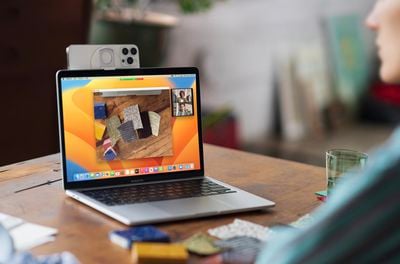
With macOS Ventura, Apple introduced a completely new take on its Continuity Camera feature, which now lets you use your iPhone's camera as a webcam for your Mac.
Continuity Camera works wirelessly or wired in FaceTime, Zoom, and other apps, and delivers video directly from a user's nearby iPhone camera, which has significantly better quality than the built-in camera on Macs.
In addition, Continuity Camera also allows you to use the following video effects supported by modern iPhones:
- Center Stage (iPhone 11 and later)
- Studio Light (iPhone 12 and later)
- Portrait mode (iPhone XR and later)
- Desk View (iPhone 11 and later).
To attach your iPhone to a MacBook, you can purchase a Belkin iPhone mount, which fits on the top bezel of your Mac. The mount retails for $29.95 and is available on Apple's online store. It can be used in landscape or portrait orientation, with portrait showing a bit less of the background behind you. It's the only official Continuity Camera mount so far, though you can find some knockoffs and other versions on Amazon.
What You'll Need
To use Continuity Camera, here's a rundown of what you'll need:
- iPhone running iOS 16.0 or later
- Mac running macOS Ventura or later
- Belkin iPhone mount ($29.95)
- iPhone and Mac signed into the same Apple ID with two-factor authentication enabled
- Bluetooth and Wi-Fi enabled on both devices
How to Use Continuity Camera
Fortunately, getting Continuity Camera up and running is simple. With your iPhone attached to your Mac using the Belkin mount, open up FaceTime, and your iPhone's camera will activate automatically. Your nearby iPhone will ping with a sound and show a "Connected to..." Screen indicating that it has successfully connected.
To enable any of the video effects listed above, open Control Center from your Mac's menu bar, then click Video Effects to switch between the different modes.
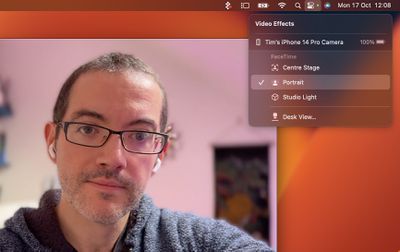
Center Stage keeps you in frame if you move around, Portrait Mode blurs the background, Studio Light focuses the light on you, and Desk View shows what's on your desktop by taking advantage of the Ultra Wide camera.
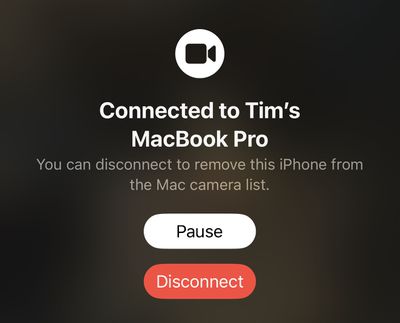
You can pause Continuity Camera at any time using the Pause button on your iPhone's display. When you're finished, simply tap the red Disconnect button on your iPhone's screen.



















