How to Access Control Center and Home Screen in iOS 12 With the iPad's New Gestures - MacRumorsOpen MenuShow RoundupsShow Forums menuVisit ForumsOpen Sidebar
Skip to Content

How to Access Control Center and Home Screen in iOS 12 With the iPad's New Gestures

by

Apple in iOS 11 revamped the iPad's interface and changed the way we interact with the tablet through a new Dock, a revamped App Switcher, and Drag and Drop, and with iOS 12, further iPad changes have been implemented.

There are new gestures to learn for accessing the Home screen, App Switcher, and the Control Center, along with a new status bar.
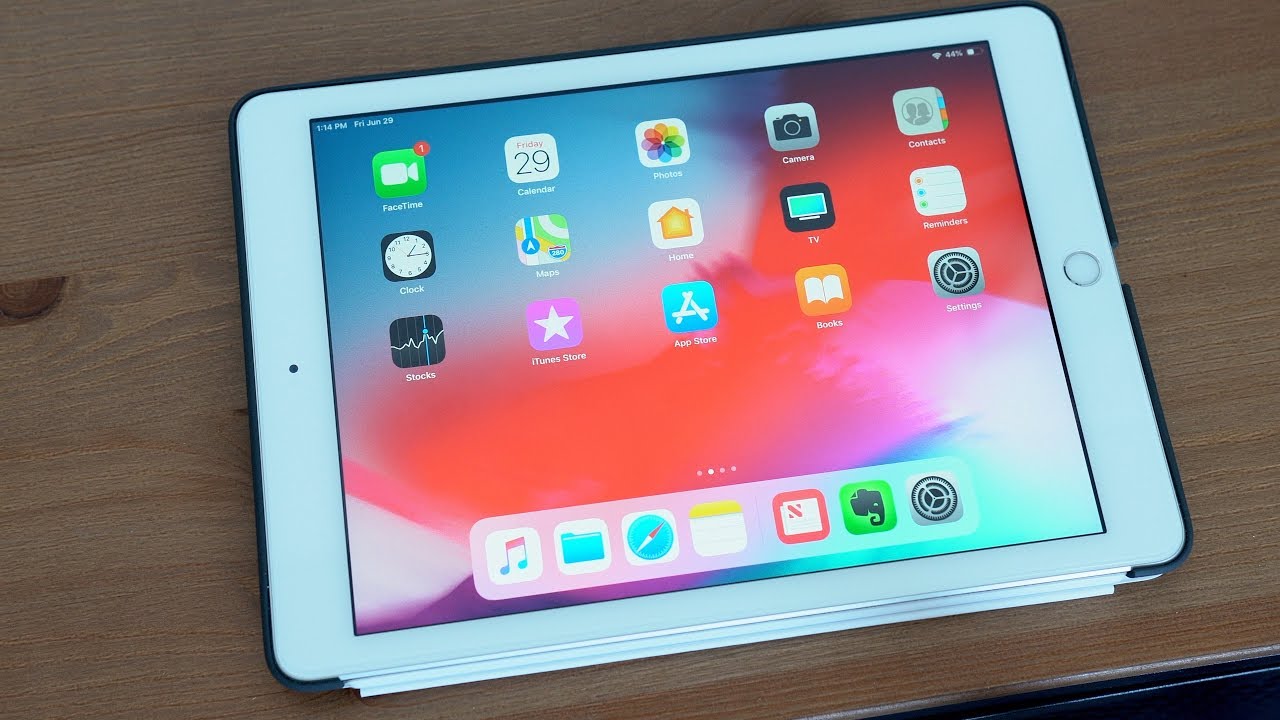

The new iPad gestures are identical to the gestures on the iPhone XS, with Apple preparing us for the elimination of the Home button in future iPad models. Rumors suggest upcoming iPad Pro models will feature a TrueDepth camera system and Face ID rather than a traditional Touch ID Home button.

If you use an iPhone X, XS, or XR, the new iPad gestures will be familiar to you, but if you don't, it could take a bit of time to get used to.

Dock Changes: Getting to the Home Screen and App Switcher

In iOS 11, when you wanted to access the Home screen from within an app, you would press the Touch ID Home button. That's still true, but you can also now get to the Home screen when you swipe up from the bottom of the display, as demoed in the video above.

When in an app, swiping up from the bottom of the screen takes you right to the Home screen rather than just bringing up the iPad Dock within an app.
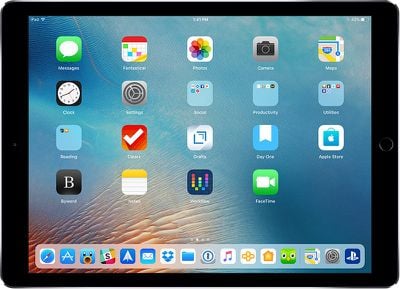
ios11dock

The iPad's Home screen. Get here with one quick swipe on the Dock.

To get to the Dock to open more than one app for multitasking purposes, you need to do a swipe and a slight hold hold rather than just a swipe at the bottom inch of the screen while you have an app open already.
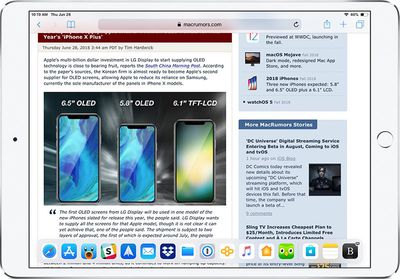
ipadprodockios12inapp

The iPad Dock in an app. A quick swipe brings you to the Home screen, but a swipe and a hold brings up the Dock in an app.

If you swipe and hold a bit higher on the screen, you can access the App Switcher on the iPad for quickly swapping between apps or closing apps, which is done with a swipe upwards on an app card. This gesture works both within apps and at the Home screen.
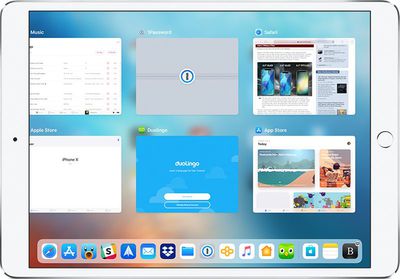
ipadproappswitcherios12

The iOS 12 iPad App Switcher, accessible with a longer swipe and hold on the Dock, either at the Home screen or within an app.

Getting to Control Center

Control Center in iOS 11 was paired with the App Switcher and was accessible by swiping up on the Dock, but that gesture now opens the App Switcher alone without providing access to Control Center.

Getting to Control Center is now done by swiping downwards from the right portion of the status bar, where it displays your battery life and Wi-Fi/Cellular connection.
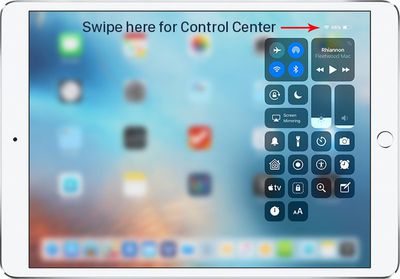
ipadprocontrolcenterios12
All other gestures on the iPad remain the same, such as a swipe downwards from the top middle of the display to bring up your notifications and a swipe to the right to get to the Today section for widget access, but there are other iPad improvements worth noting in iOS 12.

iPad Status Bar

The iPad's status bar has been redesigned in iOS 12, and it now resembles the status bar of the iPhone XS. The date and time are listed on the left hand side of the status bar, while battery life and Wi-Fi/Cellular signal and connection are displayed on the right hand side.

ipadmenubar
The middle of the display, where the date was previously shown, is left open, perhaps for a future notch. Prior to iOS 12, the iPad's status bar did not show the date, so that's also a new addition.

Spacebar Trackpad

When typing on the iPad, if you press and hold with one finger on the space bar, it turns the keyboard into a trackpad to make it easier to navigate through a document and move the cursor.

ipadios12spacebartrackpad
This is a feature that has been available on iPhones with 3D Touch and on the iPad with two fingers, but in iOS 12, it's simpler to use. A two finger touch also continues to work.


Related Forum: iOS 12

Top Rated Comments

Janichsan Avatar
109 months ago
All of these gestures are actually pretty intuitive…
You guys keep using that word, but it does not mean what you think it does.

"Intuitive" is something when you can grasp it without having to actually put in any thought about it. You get it simply by intuition, without the need for an explanation.

Tapping an icon on a screen with the finger is intuitive. Scrolling the screen content by pushing it in the direction you want it move is intuitive. Enlarging or shrinking something on screen by dragging its corners outwards or pinching them together is intuitive. Even using the home button to get back to the home screen is somewhat intuitive as you can understand it with a single exploratory press on the single large, conspicuous button on the front of the device.

Having to swipe down from one specific unmarked corner to pull down one overlay, while having to swipe down from the unmarked other corner to get another overlay, or making a weird swipe-partway-up-but-not-too-far gesture to get the app switcher is not intuitive.

These things might be easy to learn, but nothing of this is anything you would automatically do out of a purely intuition based expectation about how things work.

[doublepost=1530347008][/doublepost]
I’m so glad the gestures have changed to match iPhone X. Going back and forth from my iPhone X to iPad Pro is always a bit annoying. No more!

So now it's annoying for anyone going back and forth between an iPad and any other iPhone. But hey, good for you.
Score: 15 Votes (Like | Disagree)
JosephAW Avatar
109 months ago
My friend with Parkinson's really struggles with all these swipe and press swipe gestutures. Fortunately he can still operate the home button most of the time. I feel sorry for those who will not have a home button on future devices.
Score: 5 Votes (Like | Disagree)
Detektiv-Pinky Avatar
109 months ago
<snip>
Edit: All of these gestures are actually pretty intuitive and simple, so if anything it's an improvement. But it is a bit of an adjustment to swipe to exit out of an app.
Maybe these gestures feel intuitive if you frequently use the darn thing. For casual users or actual newbies it becomes horrible very quickly. :(

Try to hand an iPad to somebody who has never used one and the person will be utterly lost. Things will feel pretty random to them. I have an original iPad with IOS 5 somewhere in the house. You could give this to a toddler and it would be able to make sense of it.
Score: 5 Votes (Like | Disagree)
pat500000 Avatar
109 months ago
These days ios are cluttery mess with complexity.
Score: 5 Votes (Like | Disagree)
quietstormSD Avatar
109 months ago
I don't think they should have the same gestures on all iPads. For iPads with a home button, they should keep the iOS 11 gestures, and for the upcoming iPad with no home button use the iPhone X gestures.
Score: 4 Votes (Like | Disagree)
jclo Avatar
109 months ago
So how do I easily get to the control center from any app, so I can change the brightness, then return to the app?

I used to be able to just double click on the home button, change the brightness, then click the app.

Now it looks like I need to click the home button, swipe down from the top right, change the brightness, click on the home button, then click on the app.
You can swipe from the right in an app, so you don't need to go to the Home screen first. Then you just swipe back up to close it. Same as iPhone X.

Edit: All of these gestures are actually pretty intuitive and simple, so if anything it's an improvement. But it is a bit of an adjustment to swipe to exit out of an app.
Score: 4 Votes (Like | Disagree)

Popular Stories

apple pro tell logo

Apple Launching Five New Products Today

Thursday November 5, 2026 12:59 am PST by
Apple is launching five new products on Friday, November 6, following pre-orders that opened last week, including its first touchscreen MacBook Pro models. The following new products will be available from today: iPad mini with OLED display and A20 Pro chip iMac with M6 chip 14-inch MacBook Pro with M6 chip 14-inch MacBook Pro with OLED touchscreen 16-inch MacBook Pro with OLED...
duo aquarium

More Fun iPhone Duo Apps: 30 New Picks to Try

Friday November 6, 2026 3:27 pm PST by
When the iPhone Duo launched, we shared a list of some of the fun apps developers created for the new form factor. Two weeks out, developers are continuing to come up with fresh ideas, so we thought we'd share some of our favorites. Games Marbles Unhinged ($2.99) - Marbles Unhinged is a marble maze designed for the Duo. When you fold it, the floor turns into a ramp. If you stand the top...
silver iphone 18 pro

Apple Rumored to Drop the iPhone's Action Button Next Year

Friday November 6, 2026 6:07 am PST by
Apple plans to merge the iPhone's Action button with the Camera Control starting next year, according to the leaker known as "Instant Digital." In a new post on Weibo, the leaker claimed that a single press of the combined button would open the camera, while a long press would trigger the function assigned to the Action button. They explicitly clarified that the dedicated Action button would ...
Latest Stories
Apple Taking New Approach to Developing iOS 28 and macOS 28
4 minutes ago
Early Apple Black Friday Deals on Apple Watch, MacBook Air, and More
19 hours ago
'Backglow' Lets You Customize New MacBook Pro's Glowing Apple Logo
19 hours ago
Top Stories: Apple Product Launches, iOS 27.3 Beta, and More
1 day ago
More Fun iPhone Duo Apps: 30 New Picks to Try
2 days ago
Hands-On With Apple's New OLED Touchscreen MacBook Pro
2 days ago
Apple Store With All-New Design Opening Soon in Southern California
2 days ago
Control the Glowing Apple Logo on Your New MacBook Pro
2 days ago
Apple Shares New 'Apple Card: Apply and Use in Minutes' Ad
2 days ago
Apple Says More Than 100,000 Apps Optimized for iPhone Duo, Here's What's Still Missing
2 days ago
Early Black Friday Deals Kickoff With Steep Discounts on Apple Watch Ultras and More
2 days ago
The MacRumors Show: iOS 27.3 Looks Like a Huge Update
2 days ago
Best Buy's Black Friday Event Begins With Sitewide Savings on Apple, TVs, More
2 days ago
Apple Releasing Yet Another Two New Products Next Week
2 days ago
MacBook Air Drops to Lowest Price in Months With Amazon's $250 Discount
2 days ago
Apple Rumored to Drop the iPhone's Action Button Next Year
2 days ago
Apple's Extended Return Policy Now in Effect for 2026 Holiday Season
2 days ago
Apple Music Classical Updated With New Icon and Refreshed Design
2 days ago
OLED iPad Mini, M6 iMac, and New MacBook Pros Available From Today
2 days ago
Apple Surveys iPhone Duo Buyers About Crease and Camera
3 days ago
Apple's First Touchscreen Mac is Now Arriving to Customers
3 days ago
Claude Gets Personal Finance Feature With Bank Account Linking
3 days ago
Apple Arcade Adds Crossy Road Rush and NBA 2K27
3 days ago
Apple's New HomeView Smart Home Hub: Here's How Much RAM It Has
3 days ago
iPad Mini vs. iPad Air Buyer's Guide: Now Just $50 Apart
3 days ago
First iOS 27.3 and macOS Golden Gate 27.3 Public Betas Now Available
3 days ago
Apple Announces a New Mac Sales Record
3 days ago
Paid $200 for Logic Pro? Apple Says You Won't Get This New Feature
3 days ago
Instagram's Edits Video Editor is Now Available on Mac
3 days ago
Prevent Siri and Search From Accessing Specific iPhone Apps
3 days ago








































