

iOS 17: How to Set and Label Multiple Timers - MacRumorsOpen MenuShow RoundupsShow Forums menuVisit ForumsOpen Sidebar
Skip to Content

iOS 17: How to Set and Label Multiple Timers

by

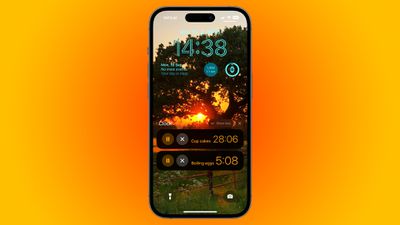
It's taken this long, but in iOS 17, Apple has added support for multiple timers, and has also made it easy to manage several timers on iPhone with the introduction of labels.
timers
That's right. Believe it or not, iPhones have not included the ability to set multiple ongoing timers until now. In iOS 17, the Clock app finally enables several timers to be set that will run down at the same time, allowing you to keep track of more than one thing, which is handy when cooking a meal that includes several dishes, for example.

Not only can you have several timers counting down at the same time, you can also label timers, which helps you identify each one in your timer list. That way, you'll always know which timer relates to what, and you can save custom timers without having to remember what they were set up for.
siri
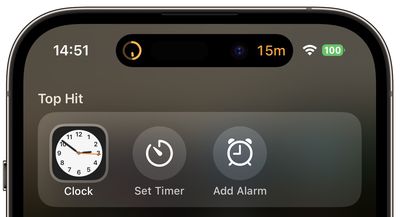
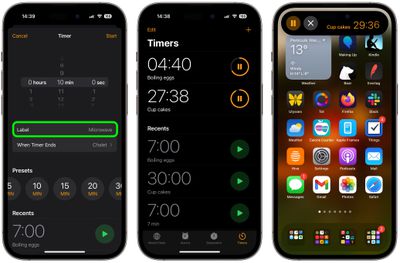
To quickly set a timer on iPhone, swipe down on the Home screen, search "timer," and tap the Siri Suggestion, or to set a timer with a name, say "‌Siri‌, set a timer called [name] for [duration]." Alternatively, open the Clock app and tap the Timers tab. In the timer setup options, select a duration, then tap the Label field and type in what you want to call it.

Choose a distinct alert for the timer if it helps you recognize it. Note that in iOS 17, you also have the option of selecting one of several preset durations in the setup screen. When a timer is set, it will be added to your editable list of timers. For added convenience, the list will also include any recently completed timers that you used.
set multiple timers
If your iPhone has a Dynamic Island, the last timer you set will appear inside it when you are doing other things on your device. The most recently set timer will also appear as a Live Activity on the Lock Screen, and you can tap to expand it and see any other timers that are running concurrently.


Top Rated Comments

timmyh Avatar
37 months ago

I would really like that wallpaper
Near Sutton Bank, North Yorkshire 😊

Attachment Image
Score: 9 Votes (Like | Disagree)
kerr Avatar
37 months ago
The number one thing I want with Timers is to be able to set a countdown to a specific day/time. Such as, rather than timer starts now, I want to set a timer that ends at 8PM.
Score: 9 Votes (Like | Disagree)
alexandr Avatar
37 months ago

The number one thing I want with Timers is to be able to set a countdown to a specific day/time. Such as, rather than timer starts now, I want to set a timer that ends at 8PM.
It's called an alarm! Or a reminder, if it's for a different day.
Score: 8 Votes (Like | Disagree)
37 months ago
I would like a life expectancy timer. Maybe in the Health app in iOS18! :)
Score: 6 Votes (Like | Disagree)
cjkastoun Avatar
37 months ago
Awesome. Now I can create the "soft boiled egg" permanent timer I always craved (it's 3min15sec for the curious ones).

Now what I really really want is the ability to set the sound volume of my wakeup alarms so I don't wake up the whole neighborhood if I forget to turn down the volume before going to sleep. How hard that is?
Score: 5 Votes (Like | Disagree)
Asthmatic Kitty Avatar
37 months ago
Multiple timers. What a time to be alive.
Score: 5 Votes (Like | Disagree)

Popular Stories

iCloud iPhone 17 Pro

iPhone Users Who Pay for iCloud Storage Get Two New Perks on iOS 27

Thursday July 2, 2026 6:10 am PDT by
If you pay for certain iCloud+ storage plans beyond the 5GB that Apple offers for free, you will receive two more perks on iOS 27 at no additional cost. A summary of the two new iCloud+ perks on iOS 27:Increased daily usage limits for some new Apple Intelligence features, including image generation in the revamped Image Playground app. HomeKit Secure Video cameras receive generated video...
American Express Gold Apple Pay Feature

American Express Announces New Apple Pay Feature

Tuesday June 30, 2026 10:27 am PDT by
American Express today announced that you can now redeem Membership Rewards points when checking out with Apple Pay on the web and in apps on the iPhone and iPad. When checking out with Apple Pay on iOS 18 or iPadOS 18 or later, tap on your eligible American Express card (Platinum, Gold, Green, and others) and select the Membership Rewards points option. You can use points to cover all or...
series 10 apple watch titanium digital crown

Report: Apple Watch Redesign Coming Next Year With New Band System

Tuesday June 30, 2026 8:45 am PDT by
A "major overhaul" of the Apple Watch's design is due to arrive next year with a new system for connecting bands, according to a known Weibo leaker. In a set of recent posts, the leaker known as "Instant Digital" linked the new claim to older rumors about an "Apple Watch X" model, which was said to introduce a fresh design and break compatibility with the existing watch band system. Citing...















