How to Use Apple's Live Listen Feature With AirPods - MacRumorsOpen MenuShow RoundupsShow Forums menuVisit ForumsOpen Sidebar
Skip to Content

How to Use Apple's Live Listen Feature With AirPods

by

Since 2014, Apple has included a feature in iOS called Live Listen that allows an iPhone or iPad to serve as a remote microphone for an MFI-compatible hearing aid.

When Apple released iOS 12, it added Live Listen support for AirPods and AirPods 2, making it possible to use your iOS device as a directional mic and have the audio relayed to Apple's wireless earphones.
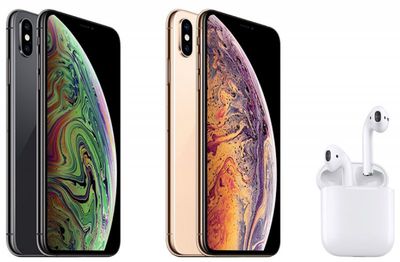
iphone xs and airpods
As an accessibility feature, the idea behind Live Listen is for it to be used by people who are hard of hearing or need extra help separating voices in a loud environment, but it can be useful in other ways, too.

If you're on a family vacation, for instance, you could use your iPhone or ‌iPad‌ as a makeshift baby monitor for when the baby's napping and you're in another room with the TV on. All you'd need to do is put the iOS device near the baby's crib and wear a single AirPod, which should have a strong enough Bluetooth range to allow you to listen in from afar.

Live Listen will work even when other audio is being played on your iPhone or ‌iPad‌ – so you could listen to a podcast, say, and still be keeping tabs on the baby. Just note that whatever it is that you're listening to will switch to mono output to match the Live Listen stream, and the AirPods' tap gestures will be disabled for as long as the feature is active.

Live Listen is easy to set up and use once you know how. The following steps show you how it's done on an iPhone or ‌iPad‌ running iOS 12 or later.

How to Set Up Live Listen on iPhone and iPad

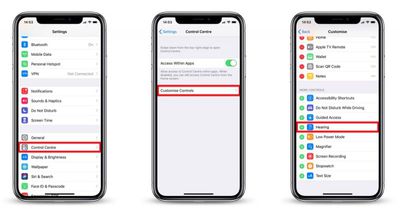
  1. Launch the Settings app on your iPhone or ‌iPad‌.
  2. Tap Control Center.
    how to set up live listen with airpods

  3. Tap Customize Controls.
  4. Scroll down and tap the green plus (+) button next to Hearing.
How to Use Live Listen on iPhone and iPad

  1. Put your AirPods in and connect them to your iPhone or ‌iPad‌ in the usual way.
  2. Launch Control Center on your iOS device: On an ‌iPad‌ with a Home button, double-tap the Home button; on iPhone 8 or earlier, swipe up from the bottom of the screen; and on a 2018 iPad Pro or iPhone R/X/XS/XS Max, swipe down from the upper right of the screen.
    how to use live listen with airpods

  3. Tap the Hearing icon.
  4. Tap Live Listen.
  5. Place your iPhone or ‌iPad‌ close to the person you want to hear, preferably in front of them.
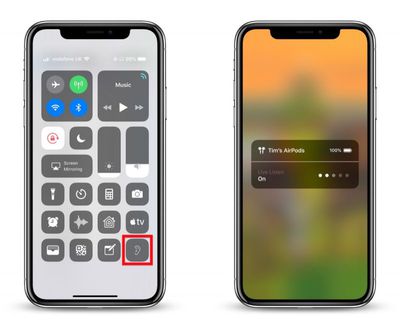
If the output to your AirPods is too quiet or too loud, use the volume buttons on your iPhone or ‌iPad‌ to adjust the volume level.

live listen not working airpods
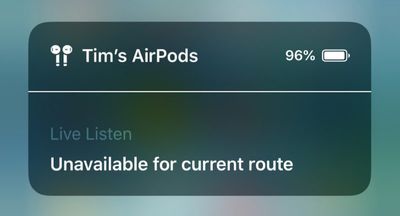
If you see the message "Unavailable for current route" when you try to turn on Live Listen, restarting your iOS device and then forgetting and re-connecting your AirPods in the Settings app's Bluetooth menu should fix the issue.

Related Roundup: AirPods 4
Buyer's Guide: AirPods (Caution)
Related Forum: AirPods

Top Rated Comments

100 months ago
Wow I knew nothing of this. Is it just me or do apple do a terrible job these days of actually telling users about features? I remember when the iPhone / iPod came out, for years almost every feature was explained and used in marketing on the website, i have literally found features on my phone by accident since getting a new iPhone8 that I didn’t even knew it had or how they worked. And I used to be a developer for 3 years, I can’t image how older users like my parents would even know how to use some thing or if they were even there in the first place. Apple is really doing a lousy job especially in the last 2-3 years in this regard (yes sales are through the roof but I’m specifically talking about informing users about great little features, and that silly tips app is a joke). It’s now more of an ‘object’, who cares what it does just look how pretty it is. A far cry from the jobs days.
Score: 7 Votes (Like | Disagree)
FloatingBones Avatar
100 months ago
Wow I knew nothing of this. Is it just me or do apple do a terrible job these days of actually telling users about features?
The Apple Store's Today at Apple ('https://www.apple.com/today/') sessions are an excellent way to find out about how to do things. I recently attended four of these sessions with a friend for learning iPad skills. This was an excellent way for my non-techie friend to get up to speed on iOS/iPad, but the bonus was how much I learned during the process.

I couldn’t agree more. Perhaps Apple has gotten “too big for its britches.”
Have either of you attended any TaA sessions? Apple's instructors will cover the material for a particular session, plus questions/issues that students have. It kept some of the best features of the old One to One ('https://en.wikipedia.org/wiki/One_to_One_(Apple)') product: anyone can ask anything in the sessions, and the instructors will work hard to address those questions with the student -- either during the session or in a few minutes afterwards.
Score: 1 Votes (Like | Disagree)
100 months ago
Wow I knew nothing of this. Is it just me or do apple do a terrible job these days of actually telling users about features? I remember when the iPhone / iPod came out, for years almost every feature was explained and used in marketing on the website, i have literally found features on my phone by accident since getting a new iPhone8 that I didn’t even knew it had or how they worked. And I used to be a developer for 3 years, I can’t image how older users like my parents would even know how to use some thing or if they were even there in the first place. Apple is really doing a lousy job especially in the last 2-3 years in this regard (yes sales are through the roof but I’m specifically talking about informing users about great little features, and that silly tips app is a joke). It’s now more of an ‘object’, who cares what it does just look how pretty it is. A far cry from the jobs days.
I couldn’t agree more. Perhaps Apple has gotten “too big for its britches.”
[doublepost=1541422111][/doublepost
Score: 1 Votes (Like | Disagree)
sunapple Avatar
100 months ago
Wow I knew nothing of this. Is it just me or do apple do a terrible job these days of actually telling users about features? I remember when the iPhone / iPod came out, for years almost every feature was explained and used in marketing on the website, i have literally found features on my phone by accident since getting a new iPhone8 that I didn’t even knew it had or how they worked. And I used to be a developer for 3 years, I can’t image how older users like my parents would even know how to use some thing or if they were even there in the first place. Apple is really doing a lousy job especially in the last 2-3 years in this regard (yes sales are through the roof but I’m specifically talking about informing users about great little features, and that silly tips app is a joke). It’s now more of an ‘object’, who cares what it does just look how pretty it is. A far cry from the jobs days.
I'm sorry, but nowadays there're just a lot more features than five years ago and finding those features, the important ones, is still very easy. This has zero to do with Jobs.

https://www.apple.com/accessibility/
Score: 1 Votes (Like | Disagree)

Popular Stories

airpods eq

Apple to Bring Custom EQ to AirPods

Monday June 8, 2026 10:29 am PDT by
Apple today announced that AirPods will gain a custom EQ (equalizer) feature, allowing users to further personalize how their AirPods sound. The new capability is part of Apple's next-generation software platform updates, which the company unveiled today. Custom EQ lets listeners adjust audio output to match their personal preferences, going beyond the fixed audio profiles AirPods have...
airpods pro 3 orange

iOS 27 Introduces Overhauled AirPods Settings Menu

Tuesday June 9, 2026 5:45 am PDT by
When AirPods owners connect to their iPhone running iOS 27, they'll see a completely revamped settings menu for their earbuds that does a better job at organizing all of the feature options that Apple has added over the last few years. In the first iOS 27 developer beta, released on Monday, the new settings menu can be accessed in the same way as the old one – i.e. by appearing only when...
AirPods Pro Beta Firmware 2

Apple Releases New AirPods Beta Firmware With iOS 27 Features

Tuesday June 9, 2026 11:31 am PDT by
Apple today released new beta firmware for the AirPods 4, AirPods Pro 2, and AirPods Pro 3. The firmware is limited to developers at the current time, and it has a build number of 9A5292e. In iOS 27, iPadOS 27, and macOS Golden Gate, Apple is adding a new AirPods interface and support for custom EQ. AirPods are also compatible with the new Siri AI. With iOS 26, iPadOS 26, and macOS Tahoe, ...