How to Set a Memoji or Animoji as Your Watch Face on Apple Watch - MacRumorsOpen MenuShow RoundupsShow Forums menuVisit ForumsOpen Sidebar
Skip to Content

How to Set a Memoji or Animoji as Your Watch Face on Apple Watch

by

Apple in watchOS 7 introduced a new Memoji and Animoji watch face that lets you display an Animoji or custom-created Memoji on your wrist.
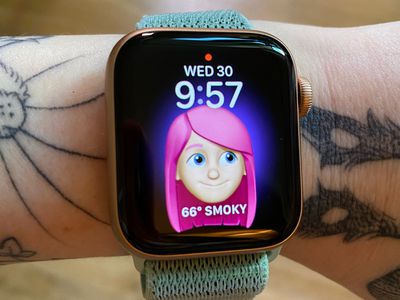
applewatchmemojiface
The Memoji watch face is available on the Apple Watch Series 4 and later.

Enable the Memoji Watch Face on Apple Watch

  1. Long press on the display of the Apple Watch.
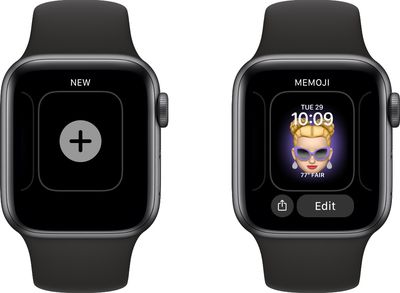
  2. Scroll all the way to the left and tap on the "+" button to add a new watch face. addmemojiwatchface
  3. Use the Digital Crown or a swipe gesture to scroll down until you get to the Memoji watch face.
  4. Tap it to enable it.
  5. Long press on the display of the Apple Watch again.
  6. Tap Edit.
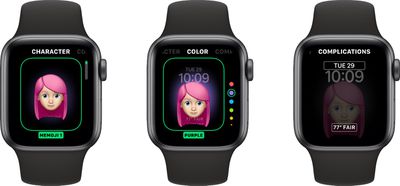
  7. Use the Digital Crown to select a pre-created Memoji or one of the available Animoji options. memojiwatchfaceoptions
  8. Swipe to the left to change the background color.
  9. Swipe to the left again to select your complications.
  10. Tap on the Digital Crown when done, then the watch face to clear the Edit menu.
Note that you can create Memoji on the Apple Watch using the Memoji app, or you can create them through the Messages app on iPhone or iPad.

For Animoji, Apple offers an option to choose a single Animoji character or multiples. If you choose the multiple Animoji option, the watch face will cycle between all of the available Animoji characters.
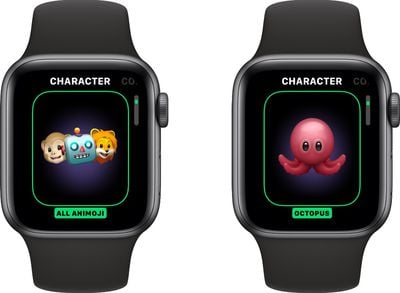
animojiwatchface
If you've created multiple Memoji, you can do the same thing with your Memoji characters, but there's no option to mix Animoji and Memoji.

Memoji and Animoji characters will animate when you raise your wrist or when you tap on the watch face.

Enable the Memoji Watch Face on iPhone

  1. Open the Apple Watch app on iPhone.
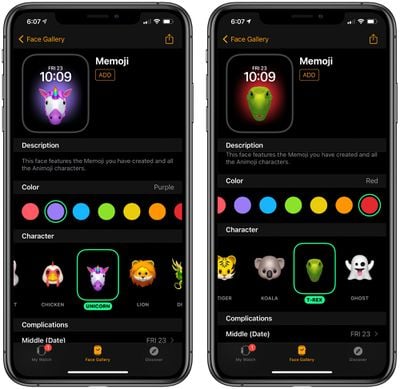
  2. Tap the Face Gallery icon at the bottom of the app. memojifacegalleryiphone
  3. Scroll down to Memoji and tap it.
  4. Choose a background color, a Memoji or Animoji character and set your complications. memojiwatchfaceiphone
  5. When finished, tap "Add" to add it to your watch face as the active face.
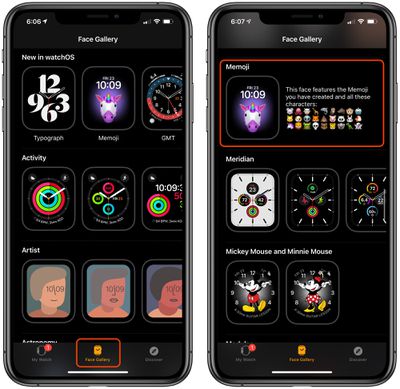
To edit any of the options you created in the Face Gallery, just tap on the watch face under "My Faces" and it will open up an interface with all of the available options.

If you want to learn how to create a Memoji right on Apple Watch, make sure to check out our how to on the new Memoji app.

Related Roundups: watchOS 26, watchOS 27
Related Forum: Apple Watch

Popular Stories

General visionOS watchOS and tvOS Betas Feature Redux

Apple Releases Second watchOS 26.6, tvOS 26.6 and visionOS 26.6 Betas

Monday June 15, 2026 10:06 am PDT by
Apple today provided developers with the second betas of upcoming watchOS 26.6, tvOS 26.6, and visionOS 26.6 betas for testing purposes. The software comes three weeks after Apple seeded the first betas. The software updates are available through the Settings app on each device, and because these are developer betas, a free developer account is required. There's no word on what's in the...
f 5d631a2d7714517b0b0137e38aadf744d175cb3e

Apple Releases First iOS 27, iPadOS 27, and macOS 27 Betas to Developers

Monday June 8, 2026 11:40 am PDT by
Following the WWDC 2026 keynote event, Apple has seeded the first betas of iOS 27, iPadOS 27, macOS 27, watchOS 27, tvOS 27, and visionOS 27 to developers for testing purposes. Registered developers can opt in to betas and download the software through the Settings app on each device. The software includes many of the new features that were shown off earlier today, though some of what...
Apple Watch Series 9 Pink Aluminum Feature

watchOS 27 Drops Support for Apple Watch Series 8, Ultra 1, SE 2, and Older

Monday June 8, 2026 11:37 am PDT by
Apple today confirmed that watchOS 27 will not support the Apple Watch Series 8, Apple Watch Ultra (first generation), or Apple Watch SE (second generation), effectively drawing a line at devices equipped with the S9 or S10 chip. The only Apple Watch models compatible with watchOS 27 are the Apple Watch Series 9, Series 10, Series 11, Ultra 2, Ultra 3, and SE 3. The cuts are the biggest...