iOS 15: How to Enhance Photos App Memories With 'Memory Looks' - MacRumorsOpen MenuShow RoundupsShow Forums menuVisit ForumsOpen Sidebar
Skip to Content

iOS 15: How to Enhance Photos App Memories With 'Memory Looks'

by

In iOS 15, Apple's native Photos app features a considerable update to Memories, including a new design, integration with Apple Music, a more interactive interface, and "Memory Looks." This article explains what Memory Looks are and how you can apply them to your own Memories in the ‌Photos‌ app.

iOs 15 Photos Feature
In the latest version of the ‌Photos‌ app, Apple has added the ability for users to customize the look of photos and videos that feature in its auto-generated Memories. These "Memory Looks" are basically photo/video filter and can add a particular mood to the content of Memories.

There are 12 Memory Looks that you can choose from. Each one works by analyzing each photo and video, and applying the correct amount of contrast and color adjustment for a consistent look. Here's how you can add them to your Memories in iOS 15.

  1. Launch the Photos app on your iPhone or iPad.
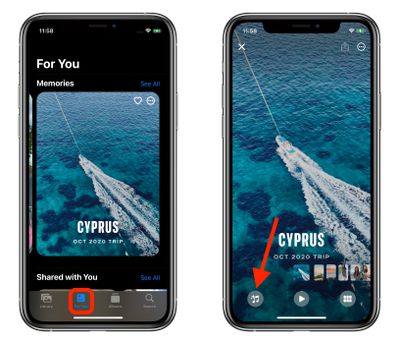
  2. Tap the For You tab.
  3. Under the Memories section, select a Memory you want to edit.
  4. Tap the playing Memory and pause it, then tap the Memory Mixes icon in the lower left corner (it looks like a musical note with stars).
    photos

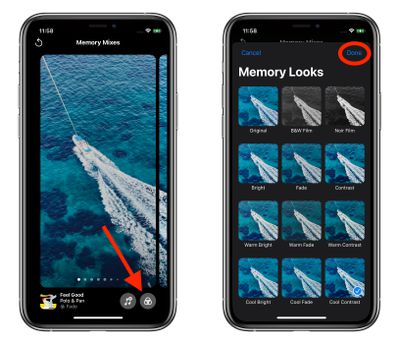
  5. Tap the Memory Looks icon in the lower right corner (it looks like three overlapping circles or a Venn diagram).

  6. Tap a Memory Look thumbnail preview to select it.
  7. Tap Done in the upper right corner to apply your selection.photos

Tip: On the Memory Mixes screen, if you swipe left or right, the ‌Photos‌ app will use machine learning to marry suggested music tracks from ‌Apple Music‌ with different Memory Looks that may go together.

Related Forum: iOS 15

Popular Stories

google photos wardrobe

Google Photos to Get AI 'Wardrobe' Feature

Wednesday April 29, 2026 3:50 pm PDT by
Google Photos is getting a new wardrobe planning feature that will help you decide what to wear. AI will pull in images of clothing from the Google Photos library, organizing clothing items into a digital closet. You will be able to put items together to create outfits, and even virtually try them with a digital avatar on to see how they'll look. The Google Photos app will show all items of...
meta instants

Meta Launches 'Instants' App for Sharing Disappearing Photos on Instagram

Wednesday May 13, 2026 11:32 am PDT by
Meta today announced the launch of Instants, a new image sharing option on the Instagram social network. Instants are ephemeral photos that disappear from Instagram after they're viewed by a user's friends or after a 24-hour period. Reactions and replies to Instants images show up in DMs instead of on the post. Instants photos are only displayed for a short period, but they are saved to a...
Apple Card iPhone 16 Pro Feature

Apple Card Promo to Offer Free AirPods Pro 3

Friday May 15, 2026 8:59 am PDT by
Starting as early as next week, customers who sign up for an Apple Card at Apple's retail stores in the U.S. will receive $249 cash back when they purchase AirPods Pro 3, according to Bloomberg's Mark Gurman. The promotion has yet to be officially announced by Apple, so exact terms and conditions are not available at this time. AirPods Pro 3 are priced at $249 in the U.S., so customers who...