How to Use Safari's Built-in 2FA Code Generator - MacRumorsOpen MenuShow RoundupsShow Forums menuVisit ForumsOpen Sidebar
Skip to Content

How to Use Safari's Built-in 2FA Code Generator

by

With online account hacking becoming increasingly widespread, Mac users should make sure they're taking every security measure available to them. In other words, consider using Apple verification codes to protect your accounts. Keep reading to learn how it works.
iPhone 13 Security
One of the best ways to protect any online account is by using two-factor authentication (2FA). 2FA offers hardened security during login attempts by requesting that the user provides an extra piece of information only they would know, such as a randomly generated code from a third-party.

In macOS Monterey and later versions of its Mac operating system software, Apple's Safari browser (version 15 and later) includes a built-in two-factor authenticator that can generate verification codes for additional sign-in security. This means if a site offers 2FA, you can set up verification codes for it without downloading a third-party app.

Verification codes are backed up via iCloud, and once set up, the codes will autofill when you sign into the site using any Apple device linked to your Apple ID. This makes using 2FA on iPhone and iPad much more streamlined.

Enabling 2FA on the Account or Service

First, make sure you have the latest version of Safari (Safari 17). Once you've done that, you'll need to enable the use of a 2FA app on whichever website or service you are trying to secure. Note that if you've already enrolled an account with 2FA on a mobile app, you'll either have to unenroll from 2FA or use the current 2FA code from your mobile app.
twitter 2fa
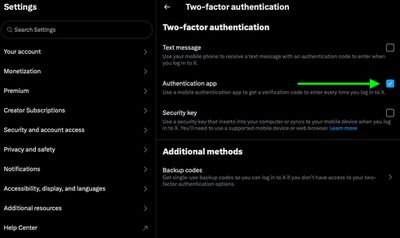
You may need to explore the security or privacy settings of the site to enable the use of an authenticator app. On X (formerly Twitter) accounts, for example, the 2FA option is found under Settings and privacy -> security and account access -> Security.

Using Setup Keys

Once you've enabled 2FA on the account or service in question, you'll be asked to either enter a setup key on your device or scan a QR code using your device's camera. Note that you'll need to ensure that Safari's AutoFill feature is enabled (Safari ➝ Settings ➝ AutoFill) and the website's login credentials are saved in Safari for the 2FA code generator to work properly.

  1. Open Safari, then select Safari ➝ Settings... from the menu bar.
  2. Choose the Passwords tab, then either type your user password or use Touch ID to authenticate.
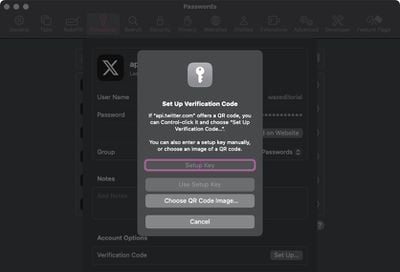
  3. Find and open the entry for the site you want to add 2FA to, then click Set Up next to "Verification Code," under Account Options.
  4. If the site offers a setup key, enter it in the Setup Key field. If it offers a QR code, Control-click it and choose "Set Up Verification Code". (Alternatively, you can download the QR code image and choose it using the option.)
safari verification codes

Using Safari's Generated 2FA Code

  1. Open Safari and navigate to the website that requires two-factor authentication (2FA).
  2. Enter your username and password for the website as usual.
  3. When the site asks for a 2FA code, look for Safari's built-in suggestion that appears above the input field.
  4. Click on the 2FA code suggestion. Safari will automatically generate and fill in a 2FA code.
  5. Complete the login process by verifying the 2FA code, and you're done.

In future, when you come to log in to the site or service and you're prompted for a verification code, Safari will automatically display the latest code as an AutoFill option – all you need to do is click the code to enter it into the input field, and away you go.

Popular Stories

Switch to Safari

Apple Explains Why Chrome Users Should 'Switch to Safari'

Tuesday October 13, 2026 5:29 am PDT by
Apple has launched a new "Switch to Safari" marketing campaign that encourages Chrome users to switch to Safari as their web browser of choice on the Mac. "Safari is a more powerful and private browser than Chrome," says Apple. Apple has a new "Switch to Safari" page on its website that outlines more than 10 reasons that Chrome users should switch to Safari, including faster performance...

safari iphone duo webkit

Apple Wants to Fix Safari's Cramped Layout on iPhone Duo

Saturday October 24, 2026 9:58 pm PDT by
Apple is considering changes to Safari on the iPhone Duo that would give websites access to more of the outer display, although the company has yet to settle on an approach. The challenge is allowing pages to occupy the area beneath Safari's side-mounted controls without making parts of a website inaccessible. In an Friday, October 23 WebKit post, Apple's Jen Simmons explained that an...
Switch to Safari

Apple Addresses Web Security Threat, Working on macOS Update With Additional Fix

Sunday October 25, 2026 4:07 pm PDT by
Earlier this month, a security researcher discovered that private cryptographic keys associated with eight of Indian company eMudhra's intermediate certificate authority (CA) certificates were weak. The compromised keys could have allowed attackers to impersonate legitimate websites, potentially putting users' sensitive information at risk. However, there is currently no evidence that the keys...
Latest Stories
Apple Store Subscription Sign-Up Controversy Exposed
5 hours ago
Siri AI Rumored to Become 'More Like an Agent' as Early as Next Year
15 hours ago
Apple Taking New Approach to Developing iOS 28 and macOS 28
16 hours ago
Early Apple Black Friday Deals on Apple Watch, MacBook Air, and More
1 day ago
'Backglow' Lets You Customize New MacBook Pro's Glowing Apple Logo
1 day ago
Top Stories: Apple Product Launches, iOS 27.3 Beta, and More
2 days ago
More Fun iPhone Duo Apps: 30 New Picks to Try
2 days ago
Hands-On With Apple's New OLED Touchscreen MacBook Pro
2 days ago
Apple Store With All-New Design Opening Soon in Southern California
2 days ago
Control the Glowing Apple Logo on Your New MacBook Pro
3 days ago
Apple Shares New 'Apple Card: Apply and Use in Minutes' Ad
3 days ago
Apple Says More Than 100,000 Apps Optimized for iPhone Duo, Here's What's Still Missing
3 days ago
Early Black Friday Deals Kickoff With Steep Discounts on Apple Watch Ultras and More
3 days ago
The MacRumors Show: iOS 27.3 Looks Like a Huge Update
3 days ago
Best Buy's Black Friday Event Begins With Sitewide Savings on Apple, TVs, More
3 days ago
Apple Releasing Yet Another Two New Products Next Week
3 days ago
MacBook Air Drops to Lowest Price in Months With Amazon's $250 Discount
3 days ago
Apple Rumored to Drop the iPhone's Action Button Next Year
3 days ago
Apple's Extended Return Policy Now in Effect for 2026 Holiday Season
3 days ago
Apple Music Classical Updated With New Icon and Refreshed Design
3 days ago
OLED iPad Mini, M6 iMac, and New MacBook Pros Available From Today
3 days ago
Apple Surveys iPhone Duo Buyers About Crease and Camera
3 days ago
Apple's First Touchscreen Mac is Now Arriving to Customers
3 days ago
Claude Gets Personal Finance Feature With Bank Account Linking
3 days ago
Apple Arcade Adds Crossy Road Rush and NBA 2K27
3 days ago
Apple's New HomeView Smart Home Hub: Here's How Much RAM It Has
3 days ago
iPad Mini vs. iPad Air Buyer's Guide: Now Just $50 Apart
3 days ago
First iOS 27.3 and macOS Golden Gate 27.3 Public Betas Now Available
4 days ago
Apple Announces a New Mac Sales Record
4 days ago
Paid $200 for Logic Pro? Apple Says You Won't Get This New Feature
4 days ago








































