iOS 18: Using the New 'Search Here' Feature in Apple Maps - MacRumorsOpen MenuShow RoundupsShow Forums menuVisit ForumsOpen Sidebar
Skip to Content

iOS 18: Using the New 'Search Here' Feature in Apple Maps

by

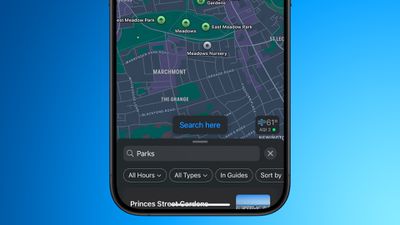
In iOS 18, Apple Maps has gained a new "Search here" button that makes it much easier to find what you're looking for in areas that aren't your current location or when you're exploring any new place on the map.
apple maps search here ios 18 2
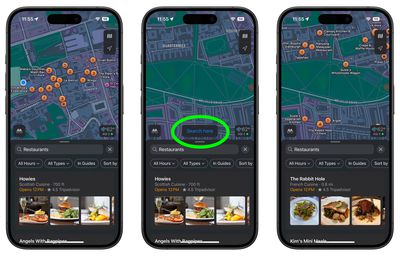
In earlier versions of iOS, if you search nearby for, say, gas stations or restaurants in Apple Maps, and then drag the map to another location with your finger, it will usually (but not always) auto-populate the new area with search results for the same request.

That behavior hasn't changed in iOS 18, but what you now get in addition is a "Search here" button that gives you more manual fine-grained control of the area in which to search. This is especially useful if you adjust the zoom level of the map, or scroll away only slightly from the original search – two instances where auto-populating results can be spotty or sometimes not appear at all.

Google Maps has had this feature for years, so it's good to see that Apple Maps has finally adopted it. iOS 18 also adds other improvements to Apple Maps, including topographic maps complete with trail networks and hikes (a feature that Apple first brought to the Apple Watch last year), as well as options to save favorite trails, download them for offline use, add notes, and get information like elevation and length.
maps
iOS 18 is currently in public beta and will be officially released in the fall, around mid-September, when the iPhone 16 series is launched.

Related Forums: iOS 18, iPadOS 18

Top Rated Comments

25 months ago
It would be nice if “add stop” would search along the route you’re already driving. Trying to find gas stations or rest stops does not work. At least not in Europe. Maps always searches far away from the highways, easily adding 15 to 25 min to the route. No idea why it’s this stupid.
Score: 12 Votes (Like | Disagree)
UltimateSyn Avatar
25 months ago
This is about 15 years overdue, but I'll (gladly) take it. Last major annoyance of Apple Maps for me gets resolved with this one.
Score: 8 Votes (Like | Disagree)
25 months ago
need to get rid of garbage that is Yelp
Score: 6 Votes (Like | Disagree)
25 months ago
Apple Maps almost never auto-populates the new map area for me. I don’t know why. I often had to switch to Google Maps because of this. So I’m very glad for this feature.

And this is more of a Siri thing, but I also really wish I could ask Siri to navigate me to a specific place in a specific city—eg. “Siri, navigate to Home Depot in West Hills”. But she never understands this, so I always have to look at a list of results on the CarPlay screen, and I don’t know if it’s just me but these are almost not useful at all. It gives me results of all locations in like a 100 mile radius, and only shows the first part of the addresses—number and street and NOT the city—and who memorizes the street number of businesses? And the location markers on the map are not tap-able and don’t seem to visually correspond to locations on the list, so I’m not actually sure what the purpose of the markers are. Nor can I zoom in on the map. So it’s often near impossible to identify which location is the one I want. So that’s the other thing—in Maps, show the more relevant information in list results, like the city location instead of reviews, and have the map location markers be tap-able or at least correspond to list results and be zoomable.
Maybe it’s just me using it wrong, but I really wonder if the engineers are actually using their product in depth.
Score: 4 Votes (Like | Disagree)
25 months ago
This was much needed, I always wondered how they didn't have this in the first place for many many years
Score: 2 Votes (Like | Disagree)
25 months ago
Great! This made sense to add about 10 years ago. Certainly 5 years ago. Now, if Apple could start labeling all businesses when searching on a map. And start tagging exit numbers on highways. Nothing major…
Score: 2 Votes (Like | Disagree)

Popular Stories

Apple Maps General

Apple Maps Flyover Gets a Visual Upgrade in iOS 27

Monday June 8, 2026 4:29 pm PDT by
Apple Maps is getting a visual update in iOS 27, with Apple planning to introduce new aerial imagery that's combined with Visual Intelligence models. Apple said everything will have sharper detail, from the "shapes of individual trees to the way light reflects off the glass of skyscrapers." Flyover is an Apple Maps view that lets users see more than 350 cities in 3D with detailed...
Apple Says iOS 27 Adds These 12 New Features to Your iPhone Feature

Apple Says iOS 27 Adds These 12 New Features to Your iPhone

Tuesday June 9, 2026 9:47 am PDT by
iOS 27's key new feature is a more intelligent and personal version of Siri, but the changes go well beyond that. In a press release, Apple outlined additional enhancements coming across Apple Maps, Find My, Apple Wallet, Apple Music, and more. Apple Maps has gained an enhanced Flyover experience powered by AI, enabling you to view aerial imagery in "stunning detail" for select cities. In ...
liquid glass app icon

Apple Maps to Get These 10 New Features in iOS 27

Thursday June 11, 2026 5:45 am PDT by
Apple Maps is getting a range of new features in iOS 27, headlined by an upgraded Flyover experience that uses AI to improve the realism and detail of its aerial imagery. Flyover is a longstanding feature of Apple Maps and lets users explore more than 350 cities in 3D with detailed landmarks, roads, parks, and buildings. Apple described the enhanced Flyover in iOS 27 as combining aerial...