

In iOS 14.2 and later, Apple includes a new Shazam Music Recognition toggle for the Control Center, giving iPhone, iPad, and iPod touch users a quick and easy way to identify what music is playing without them having to download the Shazam app. This article explains how it works and how to enable it.
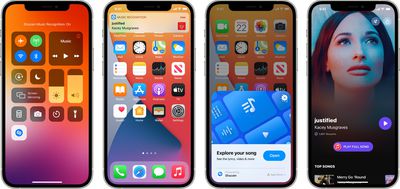
For those unfamiliar with Shazam, it's designed to listen for music that's playing, providing a song title and artist for identification purposes. Apple's iPhones and iPads have long had Shazam integration, available through the Shazam app and by asking Siri to identify a song that's playing.
After years of Siri integration, Apple acquired Shazam in 2018, and with iOS 14.2 and later, Apple's mobile devices have a system-level song recognition function. To add the Music Recognition toggle to Control Center, follow these simple steps.
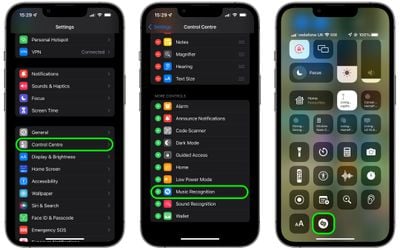
- Launch the Settings app on your iPhone or iPad.
- Scroll down and tap Control Center.
- Scroll down to the "More Controls" list, then tap Music Recognition to add it to the "Included Controls" list above it.
- Now activate Control Center: On an iPad with a Home button, double-tap the Home button; on iPhone 8 or earlier, swipe up from the bottom of the screen; and on a 2018 iPad Pro or later or iPhone X or later, swipe down from the upper right of the screen.
- When a song is playing in your environment that you want to identify, simply tap the Music Recognition button in Control Center and wait a few moments for your device to listen to the music.
If the music isn't recognized, you'll get a notification saying it was unable to find anything. But if Music Recognition identifies the song that's playing, you'll get a notification at the top of the screen providing you with the song name and artist name.
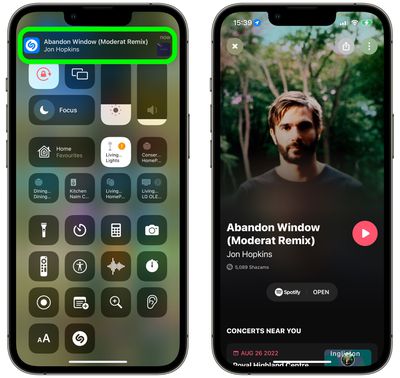
If you have the dedicated Shazam app installed on your device, tapping the notification will take you to the app where you'll be able to view more information about the artist, including if there are any concerts near you. If you've linked Shazam to your Spotify account or Apple Music, you can even play the song on your device and add it to your library.



















