

How to Use the Temperature and Humidity Sensors on HomePod and HomePod Mini - MacRumorsOpen MenuShow RoundupsShow Forums menuVisit ForumsOpen Sidebar
Skip to Content

How to Use the Temperature and Humidity Sensors on HomePod and HomePod Mini

by

In January 2023, Apple released a HomePod 16.3 software update that adds humidity and temperature sensing to the second-generation ‌HomePod‌ and all HomePod mini models. This article explains how to use the features.
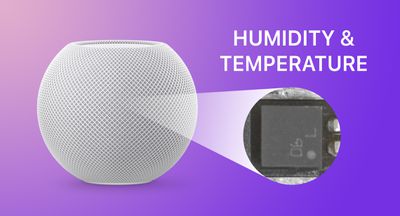
HomePod mini humiditytemperature feature
In January 2023, Apple announced a second-generation full-size ‌HomePod‌ featuring temperature and humidity sensors that can be used to measure the indoor climate, but it also released a software update that brought the same functionality to existing ‌HomePod mini‌ models.

Apple's ‌HomePod mini‌ was known to have unused temperature and humidity sensors, but now Apple has updated the software, these sensors are available features on the smaller smart speaker, too. Sadly, these sensors are not included in the first-generation ‌HomePod‌.

To get a readout from the sensors, make sure you have updated your iPhone or iPad to 16.3 or later, which should allow you to update the HomePod software to 16.3, then follow these steps.

  1. Open the Home app on your iPhone or ‌iPad‌.
  2. Select your home, and then the room in which the ‌HomePod‌ is located. Alternatively, tap the Climate button at the top of the main screen for your home.
  3. Look for the Temperature and Humidity readings at the top of the screen. If you have multiple temperature sensors in the room, it will display an average of them. (If you've just updated your ‌HomePod‌, the sensors may need a few minutes to calibrate.)
  4. Tap the readout, then tap the sensor button again to access more options.
  5. In the menu card that appears, you can change the name of the sensor, change which room it is linked to, check its status, and add an automation.
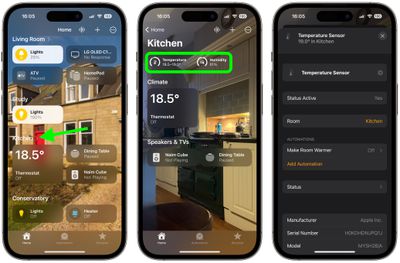
home

That's all there is to it. Note that you can also tap the Climate button in the main Home app screen to get a readout Be sure to check out the automation options, which can be handy for activating other devices in the room based on a rise or drop in temperature/humidity.
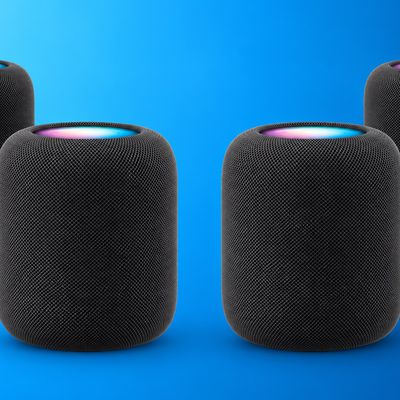

Related Roundups: HomePod, HomePod mini

Top Rated Comments

TheYayAreaLiving 🎗️ Avatar
45 months ago
Ok… this is actually pretty cool. 😮🌡️🌬️💨


Attachment Image
Score: 11 Votes (Like | Disagree)
zombitronic Avatar
45 months ago

I have two HomePod Mini’s in my Guest Bedroom, and two in my Master Bedroom.

After updating all HomePod Mini’s to 16.3, neither of the rooms (or any of the HomePod Mini’s) show the temperature or humidity readings, and the related options are missing from all.
I updated all 3 of mine hours ago and still have absolutely no indication that there any temp or humidity sensors.

EDIT: When in doubt, restart. I restarted each HomePod from Accessory Details, waited about a minute after it came back online, and each one gave me temp and humidity info.
Score: 8 Votes (Like | Disagree)
RulinSmoove Avatar
45 months ago

I don’t see any sensors on 4 HomePods mini.
I have two HomePod Mini’s in my Guest Bedroom, and two in my Master Bedroom.

After updating all HomePod Mini’s to 16.3, neither of the rooms (or any of the HomePod Mini’s) show the temperature or humidity readings, and the related options are missing from all.
Score: 8 Votes (Like | Disagree)
jeme Avatar
45 months ago
Not working for any of my HomePods. Anyone else?
Score: 8 Votes (Like | Disagree)
SFjohn Avatar
45 months ago

Will Siri tell the temperature or humidity?
Yes, just ask your iPhone for either and include the location of the HomePod Mini. For example if I ask my iPhone what the temperature is in my bedroom (where I have a HomePod Mini) it tells me it’s 74°… 👍🏻
Score: 6 Votes (Like | Disagree)
Razorpit Avatar
45 months ago
So did Apple ever say why it took over 2 years to turn this feature on? Makes no sense.
Score: 5 Votes (Like | Disagree)

Popular Stories

HomePodandMini feature green

iOS 27 Brings New Functionality to HomePod

Wednesday June 10, 2026 3:02 am PDT by
With the launch of iOS 27 and HomePod Software 27, Apple is adding support for AutoMix, Apple's AI-powered Apple Music feature that blends songs using matching key and tempo. Apple says it has improved AutoMix's underlying algorithms to generate new transition types, making for more seamless blends between tracks, so this should also benefit the newly introduced feature for HomePod....
apple price hike

Apple Just Increased Prices on MacBooks, iPads, and More

Thursday June 25, 2026 5:44 am PDT by
Apple today dramatically increased device prices across multiple product lines. Subscribe to the MacRumors YouTube channel for more videos. After temporarily taking it down earlier today, Apple's online store is back up with a series of product price increases. The changes are as follows: HomePod mini: $129, up from $99 (+$30) HomePod: $349, up from $299 (+$50) Apple TV: $199, up from...
HomePod mini and Apple TV Sage

Apple TV and HomePod Just Went Up in Price Amid Wait for New Models

Thursday June 25, 2026 8:04 am PDT by
While the Apple TV, HomePod, and HomePod mini have not been updated in several years, all three products received price increases worldwide today. Here is a summary of the price changes for these products in the United States:Apple TV (Wi-Fi): $129 → $199 Apple TV (Wi-Fi + Ethernet): $149 → $249 HomePod: $299 → $349 HomePod mini: $99 → $129Apple also raised prices on Macs, iPads, and more,...















