

How to Use the macOS Help Menu - MacRumorsOpen MenuShow RoundupsShow Forums menuVisit ForumsOpen Sidebar
Skip to Content

How to Use the macOS Help Menu

by

The ever-present Help menu in your Mac's menu bar is an easily overlooked aspect of macOS, but it's home to some surprising and extremely handy features that every user can benefit from.

how to use macos help menu
Apart from being a useful first port of call for any queries you may have about the application in use or your Mac in general, it also serves as a menu navigator. Let's take a closer look.

How to Use the Mac Help Menu

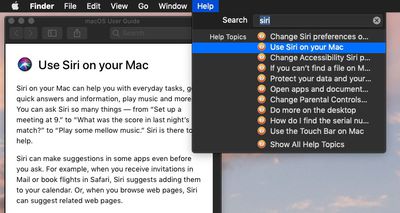
You can use the keyboard shortcut Command-Shift-/ to quickly access the macOS Help Menu. At the top of the Help menu is a Search field for typing in the subject you need help with. Below this, you'll also see a direct link to the help documentation for the currently active application, which is useful for looking up topics manually.
how to use macos help menu 2
If it's an Apple app you're using, search results come from the official macOS User Guide, while the direct help link below the search field takes you straight to the relevant section of the guide, or in the case of Finder, the main contents page.
how to use macos help 3
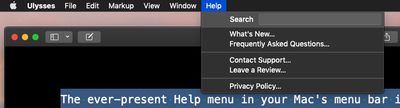
It's important to remember that if the active app is a third-party one, the contents of the Help menu can differ depending on how much effort the developer has put into it. For example, some apps may include FAQs, manuals, or links to online help, while others may offer very little.

How to Use Help's Action Search Feature

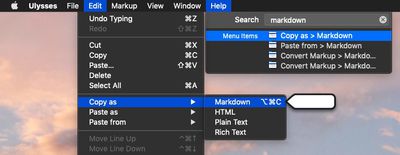
Another neat built-in feature of the Help menu is its ability to point to available actions in other menus for the currently active app.
how to use macos help menu 4
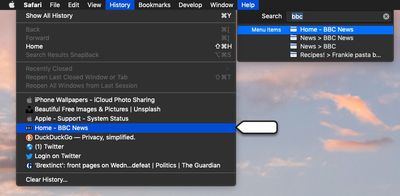
Next time you type into the Help menu's Search field, check to see if the results include any Menu Items. Hover over one of these with your mouse, and macOS will locate the action for you by pointing an arrow at it in the corresponding menu. Hit Enter, and the action will be performed for you.
how to use macos help menu 5

Depending on the app, this feature can even extend to contextual menu functions. For instance, you can use Safari's Help field to search your bookmarks and recent browsing history for keywords to quickly navigate back to web pages. Next time you're in your favorite app, try out its Help menu functions to see how deeply they've been implemented.


Top Rated Comments

96 months ago
How to call Apple Support.
How to read MacRumors help articles.
How to read English.
Don't bash. When I first got a Mac In 07, after graduating hs, I had no one to show me how to do the simplest of tasks. And I know my way around a computer.

Tips like these are valuable to almost anyone. If they're not to you, there's no reason to be rude.
Score: 6 Votes (Like | Disagree)
MacHiavelli Avatar
96 months ago

You can use the keyboard shortcut Command-Shift-/ to quickly access the macOS Help Menu. At the top of the Help menu is a Search field for typing in the subject you need help with. Below this, you'll also see a direct link to the help documentation for the currently active application, which is useful for looking up topics manually.
According to Apple, you're inadvertently giving key commands incorrectly. For Help, it should be COMMAD QUESTION MARK, not COMMAND SHIFT SLASH. This (1) makes sense as the user wants to ask a question in looking for help, and (2) the slash and the question mark aren't always positioned together on all keyboards, so telling people to type COMMAND SHIFT SLASH might well lead them up a blind alley.

https://developer.apple.com/design/human-interface-guidelines/macos/user-interaction/keyboard/


Attachment Image
Score: 3 Votes (Like | Disagree)
sailmac Avatar
96 months ago
These articles may seem trivial to users who already know the commands, tips, and tricks being explained. In my case, I've been using Macs regularly since 1990 and appreciate learning things I didn't know, along with reminders about things I've forgotten. Thanks, MR.
Score: 3 Votes (Like | Disagree)
ArtOfWarfare Avatar
96 months ago
How to call Apple Support.
How to read MacRumors help articles.
How to read English.
Score: 3 Votes (Like | Disagree)
szw-mapple fan Avatar
96 months ago
The help menu search is one of my favorite things about macOS. You can just hit the keyboard shortcut and start typing what you want. Really handy when you want something quickly without knowing which menu it’s under.
Score: 2 Votes (Like | Disagree)
96 months ago
I know how to use a search box.
I didn't know the keyboard shortcut.
I didn't know about showing menu items.

It sounded like a lame article, but it was worth the read for me.
Score: 1 Votes (Like | Disagree)

Popular Stories

Apple Card iPhone 16 Pro Feature

Apple Card Promo to Offer Free AirPods Pro 3

Friday May 15, 2026 8:59 am PDT by
Starting as early as next week, customers who sign up for an Apple Card at Apple's retail stores in the U.S. will receive $249 cash back when they purchase AirPods Pro 3, according to Bloomberg's Mark Gurman. The promotion has yet to be officially announced by Apple, so exact terms and conditions are not available at this time. AirPods Pro 3 are priced at $249 in the U.S., so customers who...
Apple WWDC25 iOS 26 CarPlay Light mode 250609

Six Popular iPhone Apps Now Available on CarPlay

Thursday May 14, 2026 9:10 am PDT by
Apple's CarPlay system for accessing iPhone apps on a vehicle's dashboard screen has received six popular apps in recent weeks: ChatGPT, Perplexity, Grok, Google Meet, WhatsApp, and the indie artist streaming platform Audiomack. Make sure you have the latest version of each app and they will automatically appear on CarPlay. ChatGPT Starting with iOS 26.4, CarPlay supports voice-based...
ipad mini 7 blue

OLED iPad Mini: Release Date, Pricing, and What to Expect

Thursday May 14, 2026 5:08 am PDT by
According to the latest rumors, Apple is close to launching its next-generation iPad mini. So what should we expect from the successor to the iPad mini 7 that Apple released over a year ago? Read on to find out. Processor and Performance Apple is working on a next-generation version of the iPad mini (codename J510/J511) that features the A19 Pro chip, according to information found in code...













