

Wi-Fi 6E, the latest advancement in Wi-Fi technology, offers several benefits when enabled on your iPhone or Mac, but it can also cause problems. This article explains what Wi-Fi 6E is, which Apple devices support it, and how to turn it off if you encounter issues.

What is Wi-Fi 6E?
Wi-Fi 6 operates on the 2.4GHz and 5GHz bands, while Wi-Fi 6E also works over the 6GHz band for increased bandwidth. Wi-Fi 6E offers faster wireless speeds, lower latency, and less signal interference, so long as a supported device is connected to a Wi-Fi 6E router, which are available from brands like TP-Link, Asus, and Netgear.
Wi-Fi 6E can handle more simultaneous connections without a decrease in performance, making it ideal for environments with many connected devices, such as smart homes and modern offices.
Does My Apple Device Support Wi-Fi 6E?
As Wi-Fi 6E is relatively new, not all devices support it yet. This means you might not be able to take full advantage of its features if other devices in your network are not Wi-Fi 6E compatible. Apple devices that support the standard are as follows:
- iMac (24-inch, Nov 2023)
- MacBook Pro (14-inch, Nov 2023)
- MacBook Pro (16-inch, Nov 2023)
- MacBook Pro (14-inch, 2023) or MacBook Pro (16-inch, 2023)
- Mac mini (2023)
- Mac Studio (2023)
- Mac Pro (2023)
- iPhone 15 Pro or iPhone 15 Pro Max
- iPad Pro 11-inch (4th generation) or iPad Pro 12.9 inch (6th generation)
Using Wi-Fi 6E Networks
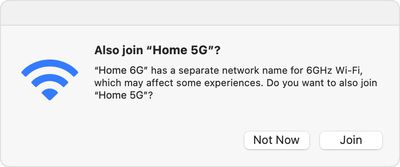
To use a Wi-Fi 6E network with an Apple device, you need a Wi-Fi 6E router that also has its 2.4GHz or 5GHz bands enabled. For the best Wi-Fi performance, Apple recommends using a single network name across the router's 2.4GHz, 5GHz, and 6GHz bands. Otherwise, your Apple device will identify the network as having "limited compatibility," and the overall experience with some activities over the network might not be as expected.
Disabling Wi-Fi 6E Networks
The 6 GHz frequency band can have a shorter range and less ability to penetrate walls and other obstacles compared to the lower 2.4 GHz band. This might require more strategic placement of routers or the use of range extenders in larger spaces. Additionally, if your Mac is experiencing the "limited connectivity" issues described above, it may potentially lead to increased power consumption on your Mac, which could impact battery life.
Fortunately, if you experience any issues with a Wi-Fi 6E network, you can turn off Wi-Fi 6E mode for that network, and your Apple device will no longer use that network's 6GHz band.
On Mac
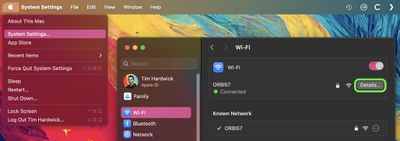
- Click the Apple logo () in the menu bar and select System Settings.
- Click Wi-Fi in the side column.
- Click Details next to the name of the Wi-Fi 6E network you're connected to.
- From the pop-up menu next to "Wi-Fi 6E Mode," choose Off.
On iPhone and iPad
- Open the Settings app and tap Wi-Fi.
- Tap the name of the Wi-Fi 6E network you're connected to.
- Tap Wi-Fi 6E Mode, then tap Off.
Note that Wi-Fi 6E is not available in China mainland, while in Japan, Wi-Fi 6E requires iOS 16.2 or later or macOS 13.2 or later.
















Top Rated Comments
This is WRONG, I do wifi for a living. Wifi 6E actually reduces power consumption with a feature called TWT or target wake time. compared to 24/5. disabling wifi 6e on the router wont make a difference for the clients power. When the client is connected to an SSID that has 24/5/6 enabeld yes the client will check for roam candidates (aka another AP to go to if you need to roam) but 80211k neighbor lists fixes that.
so really confused with the above statement.
Upgrading routers is like buying a water heater. What a hassle.
as in 320bonding 6Ghz channels compared to 180 bonding, 4k QAM compared to 1K QAM (you only get the higher one being closer). the big thing is Multi-Link Capabilities where it can connect to 2 bands and send data on them both like being connected to 5/6 at the same time. (still have to see it in practice though)