

How to Fix Wi-Fi 'Blocking Encrypted DNS Traffic' Warning Message on iOS - MacRumorsOpen MenuShow RoundupsShow Forums menuVisit ForumsOpen Sidebar
Skip to Content

How to Fix Wi-Fi 'Blocking Encrypted DNS Traffic' Warning Message on iOS

by

Since iOS 14, Apple has supported encrypted DNS, which in a nutshell makes it much harder for snoopers on the same Wi-Fi network as you to see the domain names of the websites you are visiting.
settings
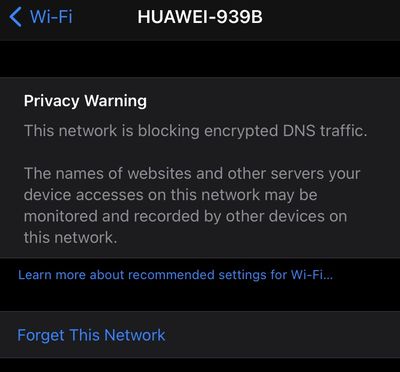
Because Apple's mobile operating system supports domain name encryption, sometimes you might see a warning that the Wi-Fi network you're connected to is blocking encrypted DNS traffic.

This privacy warning appears in the information screen for a Wi-Fi network in Settings -> Wi-Fi. (You can get to this screen by tapping on the circled 'i' next to a listed network).

If you see the warning message, don't panic -- it's actually normal behavior if the network you're connected to doesn’t meet the security standards recommended by Apple.

Given that there are many different Wi-Fi routers and network setups, it's difficult to offer the specific steps involved in changing settings for your particular situation to make the warning message go away. That said, some users have found one of the following actions to work for them:

  • Restart your iOS device.
  • Opt to Forget This Network on your iOS device, then reconnect.
  • Restart your Wi-Fi router.
  • Make sure your router's firmware is up-to-date.

If you're comfortable digging into the settings on your Wi-Fi router using an app or a browser, Apple maintains a support article called "Recommended settings for Wi-Fi routers and access points" that's worth referencing. If you set up your router in alignment with Apple's recommendations, you shouldn’t see the encrypted DNS warning message on your iOS device again.


Popular Stories

Aston Martin CarPlay Ultra Screen

Apple Says CarPlay Ultra is Coming to These Vehicle Brands

Thursday May 21, 2026 11:53 am PDT by
Last year, Apple launched CarPlay Ultra, the long-awaited next-generation version of its CarPlay software system for vehicles. Nearly a year later, CarPlay Ultra is still limited to Aston Martin's latest luxury vehicles, but that should change fairly soon. In May 2025, Apple said many other vehicle brands planned to offer CarPlay Ultra, including Hyundai, Kia, and Genesis. CarPlay Ultra...
iphone 18 pro blue%402x

iPhone 18 Pro: Dark Cherry, Light Blue, and Dark Gray Chassis Leaked [Update]

Thursday June 4, 2026 5:18 am PDT by
Update: Since publication, new information has come to light suggesting the images have been AI-manipulated and are not in fact iPhone 18 Pro chassis parts. The original article follows. The color options Apple is reportedly planning for the upcoming iPhone 18 Pro and ‌iPhone 18 Pro‌ Max have appeared online today in the form of images of chassis parts of unknown authenticity....
iOS 27 All the New App Features

iOS 27: All the Rumored App Features

Wednesday June 3, 2026 3:48 pm PDT by
Siri is getting a major overhaul in iOS 27, but Apple also has some big updates planned for apps like Camera, Photos, and Wallet. There are multiple new AI features in the works, plus some non-AI upgrades. Camera Apple is moving Visual Intelligence from the Camera Control button to the Camera app in iOS 27, according to Bloomberg. There will be a Siri mode that will be available alongside...















