

Adonit recently announced the launch of a new version of its popular Bluetooth-enabled Jot Script stylus, featuring a rechargeable battery, a revamped body, and iPad Air 2 support. When Adonit asked if we'd like to review the new stylus, we jumped at the chance because our last stylus review covering the Adonit Jot Pro and Jot Mini was popular with MacRumors readers.
The Jot Script 2 Evernote Edition is one of Adonit's higher-end styluses, connecting to an iPhone or iPad over Bluetooth. It's a digital stylus, so it's able to offer the accuracy of a regular rubber-tipped stylus with a tip that's only 1.9mm, giving it a pen-like feel.
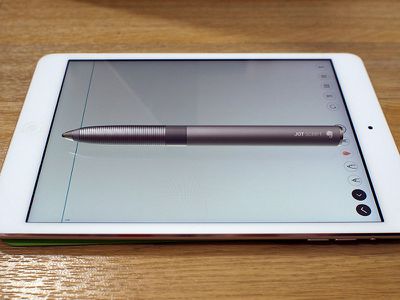
Adonit's Jot Script 2 improves upon the original Jot Script with a redesigned slimmer body that has a better grip, an upgraded Pixelpoint tip, and longer battery life. It's been launched in partnership with Evernote, so it works with Evernote's Penultimate app, and it comes with six months of Evernote's premium service.
Apple introduced new display technology with the iPad Air 2, breaking a lot of digital styluses, including Adonit's previous Jot Script. Older styluses don't work as well with the iPad Air 2, resulting in a lot of missing contact. The Jot Script 2 is one of the first styluses that works well with Apple's newest tablet.
What's in the Box and Setup
The Adonit Jot Script 2 comes in a slim box that contains the Jot Script 2 in a plastic casing and a small magnetic USB charger, which is used to keep it charged through a Mac. It also includes a voucher for six months of access to Evernote's premium service.

Connecting the stylus to an iPad or iPhone is easy to do. Turn on Bluetooth on the device you want to use the Jot Script 2 with, download a compatible app like Penultimate, and hold down on the silver button located in the center of the stylus while touching the tip to the display of the iPad or iPhone when prompted to do so.

Design and Features
The Jot Script 2's body is made of a gray aluminum that's lighter than the aluminum of the silver iPad and similar in color to the Space Gray iPad. It's 140mm or 5.5 inches, or about the size of a standard pen, and it's 10.5mm in diameter, smaller than most fountain pens, but thicker than the average ballpoint pen.
If you're familiar with the original Jot Script, the new version is slimmer because it does away with the need for an AAA battery, instead incorporating a rechargeable battery. It has the same grooved grip to keep the stylus from sliding and shifting in your hand while writing.

For most people, the slimmer size of the Jot Script 2 should make it comfortable to hold in the hand, even for longer periods of time. We took notes for over an hour and a half without feeling writing fatigue or soreness in the hand, but ideal pen width varies from person to person so your own results may vary.
Width and weight are both important factors when it comes to how a pen or a stylus feels in a hand, and the Jot Script 2 is just heavy enough to make writing smooth while preventing hand strain.

The standout feature on the Jot Script 2 is its 1.9mm tip, which is one of the smallest stylus tips on the market. It uses what Adonit calls "Pixelpoint technology" to combine Bluetooth LE, accelerometer data, and the capacitive screen of an iOS device to ensure the ink point on the display is directly under the stylus tip for better precision.
This tiny tip results in accurate lines and letters that are drawn where the stylus tip is placed, for a writing experience that's not unlike writing on paper with a real pen. Adonit says the plastic tip was created to mimic the drag of pen on paper, but when it comes to feel, writing with the Jot Script 2 on an iPad display still feels like plastic on glass and not ink on paper.

The battery in the Jot Script 2 delivers power to the tip when turned on, which is why such a small tip is possible. Without power, stylus tips need to be much larger (like the size of a fingertip) to be registered on the screen. When turned on, the Jot Script 2 works in any app as any standard stylus would.
Below the plastic tip, there's a grip that we previously mentioned, and below that, there's a plastic ring that houses the button that turns the stylus on and allows it to connect to various apps. The rest of the stylus is made from a smooth aluminum, and there's a magnet at the bottom that allows it to charge through an included USB dongle.

The USB dongle plugs into a Mac's USB port, and the stylus stands upright on the charging pad, held in place by a magnetic connection. It's an elegant charging solution, but we worry that the small USB charging dongle might get lost.
A rechargeable battery is a major new feature in this version of the Jot Script, because the previous version required AAA batteries. Battery life varies from 20 to 50 hours depending on iPad model:
- iPad 4 - 20 hours
- iPad Air 2 - 30 hours
- iPad Air 1 - 50 hours
- iPad Mini - 50 hours
Depending on your usage habits, the battery could last for a week of in class notes or for a month of occasional note taking and sketching. It takes 45 to 50 minutes to recharge the Jot Script 2. You'll know if the battery is low if you see a flashing red light, and you can also check the charge level in the Penultimate app.

The Jot Script 2 requires Bluetooth 4.0 to function, so it is limited to the fourth-generation iPad and newer, all iPad mini models, and the iPhone 4s and newer.
Writing Experience
Adonit's Jot Script 2 paired with an iPad Air 2 provides a writing experience that's akin to a pen on paper. With the small tip, writing and sketching with the Jot Script 2 is precise and accurate -- words on the screen go exactly where the tip of the pen is located. With bigger-tipped styluses, it can be difficult to fully see the screen, impeding writing and drawing.
There was no offset between where the tip touched the screen and where a mark showed up in the apps that we tested, and we were impressed with the Jot Script 2's precision. Knowing exactly where digital ink is ending up on digital paper makes for a much more comfortable writing experience, and that level of accuracy is also perfect for digital art. It should be noted, though, that writing with the Jot Script 2 didn't improve our digital handwriting -- overall results were similar to using a standard stylus -- but being able to write with more accuracy did boost iPad writing speed.

There are some downsides to the Jot Script 2. When taking writing quickly, as one might do during a lecture or meeting, we noticed some lag between when we would write a letter and when it would appear on the screen. Letters still appeared where we wrote them, but that slight delay was noticeable and mildly distracting.
When writing or drawing, as with any plastic-tipped stylus, there's an unavoidable clicking sound against the screen as the tip hits the glass display of the iPad. This is something that you can get used to, but it can still be irritating, especially in a quiet room.
Evernote Integration
The Adonit Jot Script 2 was created as an Evernote companion, so it works best with the Evernote ecosystem through Evernote's Penultimate note taking app. With Penultimate and the Jot Script 2, you get a built-in palm rejection feature, which lets you rest your hand on the screen while you write.
One of the most exhausting aspects of taking notes with an iPad is having to hold your hand up to avoid touching the screen, so palm rejection is always a welcome feature in note taking apps. Penultimate's palm rejection feature works satisfactorily, but it's not perfect. Every few paragraphs, palm rejection failed and interfered with writing, resulting in a repositioning of the wrist and a pause in writing, but it did seem to work as well or better than palm rejection in other note taking apps.
In Penultimate, there are different settings for wrist position, so it works with left and right handed users. One thing to note -- you'll need to turn off multitouch gestures to use palm rejection.
Penultimate has full support for the Jot Script 2 and it worked well on the iPad Air 2, with smooth writing, no shakiness, and no wavy lines. Penultimate has poor reviews in the App Store as it's undergone a lot of changes since it was purchased by Evernote, so it may not be the first-choice note-taking app for some users. In our experience, the app worked well (aside from some qualms with palm rejection), but the Zoom feature, which scrolls along continuously, won't be popular with all users, nor will the available toolset.
If you're going to buy the Jot Script 2 to use with Penultimate, we recommend giving the app a try ahead of purchase, because getting full functionality out of the Jot Script 2 is reliant on Penultimate.
The Jot Script 2 includes six months of Evernote Premium, enabling features like optical character recognition to make it possible to search through handwritten notes in the Penultimate app. In our experiments, optical character recognition in Penultimate worked well, picking up most words even when written in different handwriting styles.
Your handwritten notes from Penultimate are also uploaded to Evernote, where they're also searchable on iOS or the Mac through the Evernote apps.
Third-Party App Integration
The Adonit Jot Script 2 works with all of the apps that the original Jot Script worked with, so it's compatible with several drawing and note taking apps in addition to Penultimate. Many of the apps support Jot Script 2 features like palm rejection and better accuracy.
Compatible drawing apps: Forge (by Adonit), Illustrator Line (Adobe), Photoshop Sketch (Adobe), Procreate, Zen Brush, Concepts, Animation Desk, Sketch Club, AutoDesk Sketchbook, and Ink.
Compatible note-taking apps: Penultimate, Noteshelf, Goodnotes 4, Explain Everything, NoteLedge, and Zoomnotes.
You're going to need to pair the stylus with each app and each pairing process is a bit different depending on the app, so getting connected to apps can be kind of a hassle. Adonit has a walkthrough detailing how to pair with each supported app on its website. The process usually involves opening a settings menu, holding down the pairing button on the Jot, and touching the tip to the screen.

Sometimes reconnecting the stylus to an app was finicky, even with the Penultimate app that has easy integration. At times it took several minutes for a connection to be established because the app wasn't seeing the stylus even though it was turned on.
The selection of apps that work with the Adonit Jot Script 2 is somewhat limited, but the stylus works within other note taking and drawing apps too. Performance isn't always as solid as in supported apps and you lose out on features like palm rejection, so it's better to stick to supported apps when possible.
The good news is that of the supported apps, there are a couple that have a great feature set and may be able to replace the existing sketching and note taking apps that you use. Noteshelf is one of the more popular note taking apps and it supports all Jot Script features, as does Procreate, a popular and feature-rich drawing app.
We were a bit surprised to find that Adonit's recommend list of apps that include Jot Script support was outdated and included some apps that have changed significantly or are no longer in the App Store. It's also somewhat confusing because the Jot Script and the Jot Script 2 do not support pressure sensitivity and shortcuts, but the page does not make it clear that those are features limited to Adonit's Jot Touch.
Who's It For?
If you want a digital note-taking experience that mimics the experience of writing on a pen with paper, the Jot Script 2 is a solid choice. It's accurate and it works well for taking copious amounts of notes, despite some slight lag when writing quickly. It's accuracy is also useful for making design drawings, mockups, and sketches.

Someone who needs to use a stylus on a regular basis like an artist or a student will undoubtedly appreciate the Jot Script 2's precision, and frequent use will make it worth its $75 purchase price. iPad Air 2 owners will want to pay special attention to the Adonit Script Jot 2, as it's one of the first digital styluses that works really well with Apple's newest tablet.
Pros:
- Precise writing
- Pen-like feel
- Excellent Evernote integration
- Rechargeable battery
Cons:
- Full functionality limited to handful of apps
- Third-party app page is outdated and unclear
- Expensive
- Lags when writing quickly
- No pressure sensitivity
How to Buy
The Evernote Jot Script 2 stylus can be purchased from the Adonit website for $74.99. Six months of Evernote Premium is included in the purchase.





































Top Rated Comments
If you look through the Adonit forums, there are lots of very upset users. I'd take them to fair trading for deceptive marketing if I had the time.
I've gone through 3 of the original Script sylus(es?). They have a significant "offset" in that the line does not appear beneath the tip that they advertise as "pixel perfect". What's worse, if you change the angle you hold the pen, the offset shifts - so left handed vs. right handed moves the offset by up to a FULL CENTIMETRE from the actual tip. It doesn't seem like a big deal if you use it for a breif period, but it basically makes it impossible to write neatly unless you use giant lettering. The angle of your pen changes as you write, so the offset changes, so you don't get the shapes your pen is actually making.
Have they fixed it yet? There's an easy way to test, draw a vertical line, then trace that line exactly with the pen on a 45 degree angle to the right, then repeat with a 45 degree angle to the left. The old pens would give you three lines spanning nearly a full centimetre on the page...
... or own a new MacBook LOL!
I've got a 5-port USB charger I usually have lying on its side (so the ports are vertical) and it had no trouble hanging on. The magnet on the charger is pretty strong (almost to the point of being ridiculous).
Got it last week, I'm pretty happy with it. I'm using it on an iPad Air 2, and as has been said Penultimate really isn't the best for demonstrating it (far more lag than GoodNotes). GoodNote's compatibility when paired is a little iffy at the moment but the developer says an update will be available shortly with Adonit's latest SDK. Works fine as a "dumb" stylus at the expense of some tip precision.
In Penultimate I can trace a line with near perfect precision at multiple angles, as long as I don't go so far as to shift the pen to a left-handed angle (which I would never do while writing anyway). I can go pretty far the other way though. So I'm guessing they improved it quite a bit (though it is still assuming you aren't switching from right-to-left handed on the fly).
I see the effect you describe when it isn't paired though, so the Bluetooth is definitely involved in accommodating for that.
I didn't notice any offset when testing this particular stylus, it seemed pretty precise to me. I just did this line test and I'm also not seeing offset (in Penultimate on an iPad Air 2). For what it's worth, my writing quality with this stylus is about the same as with any other similar small-tipped stylus. I can write the same size I would write if I were writing on a paper.
I tried their trouble shooting steps and it didn't change a thing. I was ready to send it back and then read some of the support forums. Everyone blamed Penultimate. I tried Noteshelf and GoodNotes today, night and day difference. Great precision and wrist protection works well with those apps. Much more like writing on paper and they kept up taking meeting notes.
So,, the pen itself is pretty good. Its Penultimate that sucks.