

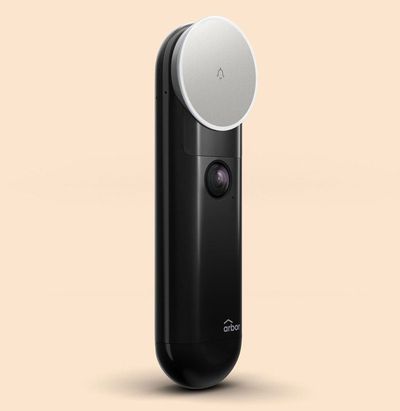
Available on Indiegogo, the wire-free Arbor Instant Video Doorbell from Arbor Home lets you keep an eye on your packages from shipment to delivery, and it lets you see just who's at your door when the bell rings.
Prior to the Arbor, I hadn't used a video doorbell, and I wasn't sure if I needed one, but ironically, waiting for the delivery of the video doorbell itself taught me how valuable these products can be.
Arbor shipped me a video doorbell on May 21, and on May 22, I got a notification from FedEx that the package had been delivered. There was just one problem -- there was nothing on my doorstep. I got in touch with FedEx, as did Arbor, but there was no sign of the package.
Right around the same time, I had a package from Amazon go missing. It too was marked delivered but never made it to my doorstep. I've had problems with both FedEx deliveries and deliveries made by Amazon's in-house delivery service in the past so I don't know if this was a case of two shipments gone wrong, or if I had a package thief.


I won't know what happened to those packages, but with the Arbor Video Doorbell, there are no more mysteries.
I can see exactly who comes to my door throughout the day, from delivery people to solicitors, and while I haven't had another package go missing, if there is a package thief haunting my apartment complex, I'll have footage of the perpetrator.
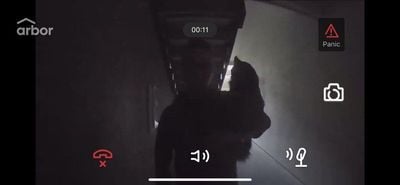
Speaking of solicitors, this is another area where the Arbor Video Doorbell has come in handy. Just a few days before it was delivered, someone in a safety vest knocked on my door. I thought it might be a construction worker from my apartment building, but no, it was someone attempting to sell gas insurance who had worn the vest to attempt to look authoritative.
I had to deal with this in person, but using a video doorbell, I can now screen who is at the door and send them away without an awkward situation where I have to listen to a sales spiel. It's also just nice to have the peace of mind of constant monitoring of my front door.
Design
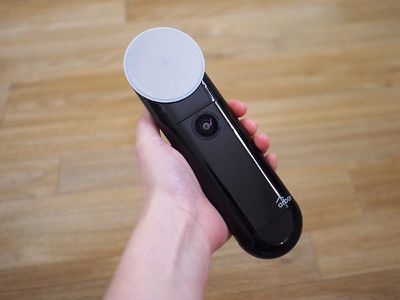
Design wise, the Arbor Video Doorbell looks a bit odd, especially compared to more traditional doorbell-style video options like the Ring. There's a big button at the top of the device, which is what you press to ring the doorbell, and underneath that, there's a built-in 1080p camera.
The entire Arbor enclosure is made from plastic with the exception of a black metal mounting plate, and it's available in either black/silver or all black. While this looks fine outside of my apartment, it is a bit modern looking and may not match some home styles.
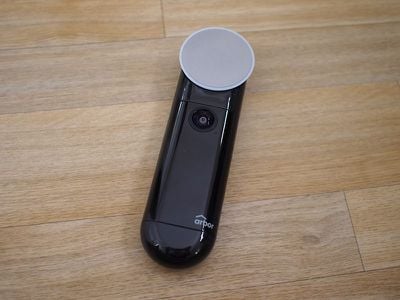
Compared to other video doorbells, the Arbor is taller and narrower. This is an entirely wire-free video doorbell option (which means you can't replace an existing wired doorbell with it), so it's powered by batteries, which are inserted into a removable battery pack at the bottom of the device.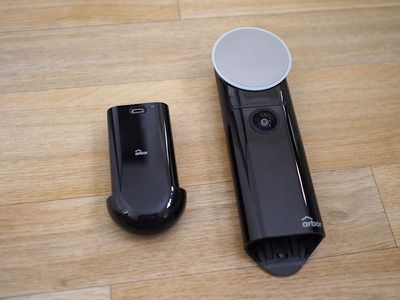
Arbor says the batteries should last for about a year with a "standard use case," but with about 15-20 activation events per day, my battery is down to 80 percent after a couple of weeks. At that rate, it's not going to last a year. I do, however, have a pre-production unit, so battery life could be improved in the final version.
I asked about battery life and was told that the app indicator is not 100 percent accurate yet. Software and hardware are being optimized based on feedback from beta users.
You can pull the battery pack out of the bottom of the Arbor when it needs to be charged without detaching it from the door, and charging it is done with a micro-USB cord, so it's simple enough.

In addition to the standard outdoor doorbell component, the Arbor Video Doorbell comes with a WiFi Hub & Chime, which makes sure your WiFi extends to the Arbor Doorbell and produces a chiming sound indoors when the doorbell is pressed.
The WiFi Hub extends WiFi up to 700 feet, which is a nice addition for homes that may not have adequate WiFi coverage that extends to the front door. The hub plugs into any power outlet, and should be placed where you can hear it ring. Mine is in my kitchen not too far from the door, which has worked well.
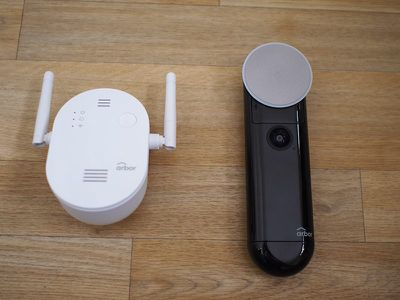
There is one major caveat with the WiFi Hub -- it emits a high-pitched electronic whine from the speaker built into it.
I can hear this whine from several feet away in my kitchen, and it's what bothered me most about the Arbor and the reason why I won't leave it installed at the conclusion of this review.
My kitchen is quiet and I would say that I have an above average sensitivity to these kinds of sounds, so users might not hear it in noisier areas or may not be as bothered by it.
I asked Arbor about this high-pitched whine, and I was told that it doesn't appear to be affecting all units at this time. Arbor engineers tested several and while some were quiet, a similar whine was detected "about a foot or so away" with some units.
Arbor told me that this is something that the team will work on optimizing before the device ships out to customers, so I'm not sure if the final version will have this problem.
Aside from the high-pitched sound, the interior WiFi Hub and Chime worked well, with a loud, audible chime sounding almost instantaneously after the doorbell was pressed.
Installation
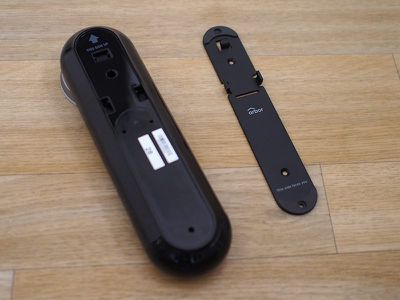
According to the instructions, the Arbor Video Doorbell can be installed using screws or with adhesive. There's a metal mounting plate and the wedge-shaped spacers for a custom fit, and it comes with screws and anchors so it can be drilled into a range of materials.
I don't have a traditional doorframe and it's just stucco on either side of my door, so I opted to try out the adhesive for testing purposes before going with a more permanent installation route.
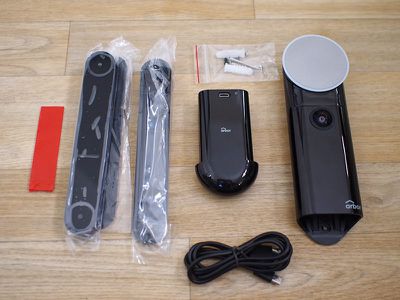
The adhesive is quite strong, and I did screw the doorbell to its mounting plate, but someone could still just rip it from the door with enough force. I live in a safe neighborhood and not many people are near my door, but I did have the aforementioned missing packages, so I'm honestly not sure if the Arbor is going to be safe with just adhesive long-term. It's worked all right during the testing period, though.
Even though adhesive is an option, screw-based installation is superior because it makes it harder for someone to walk off with your camera. Many apartment buildings likely won't allow for drilling into the doorframe or the wall, though, so adhesive may be the only option for some.
For the record, Arbor, like Ring, has a stolen device replacement program, and when I asked, Arbor said that so long as the user follows the official installation guide and sends in an official theft report, Arbor will replace a stolen doorbell regardless of whether it was mounted with screws or adhesive.
Because I don't have a standard doorframe for my door and because I didn't want to put it too close to my neighbor's door, I put the Arbor on the door itself for testing purposes, but that's not how you're going to want to install a video doorbell in most cases. It should go on the doorframe or on the wall next to the door so it's in a logical doorbell spot and so it doesn't move when you open the door.
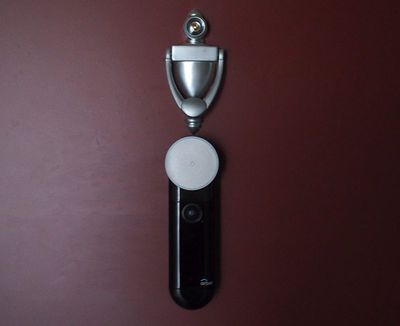
If you're in a situation like mine where you need to use adhesive and don't have an adhesive-appropriate surface to work with, it seems to do fine on the door itself. In general, though, given the size and narrowness of the Arbor (7.1 inches by 2.2 inches), it should work well with most standard frames.
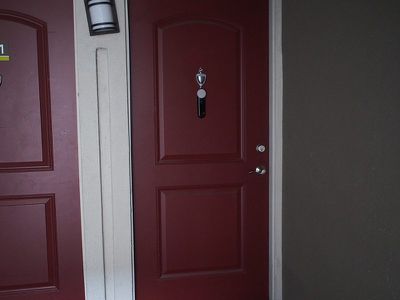
Installing via adhesive consisted of screwing the Arbor to its metal mounting plate and then sticking the adhesive to the back and then to the door, so it was a simple process, but with only a few screws, the screw-in option is just as hassle free.
Cost
Pre-ordering the Arbor will cost you $159 ($199 at release), but there's no fee after that. It comes with 48 hours of free cloud video storage, with 30 second clips captured for each event, which includes motion detection or when the doorbell is rung.
There are no monthly fees associated with the Arbor.
App and Monitoring
The Arbor Video Doorbell includes a 1080p camera, which is a higher quality camera than most competing doorbells offer. In my experience, the video is crisp and clear, especially the recorded snippets, but the Arbor did struggle somewhat with my lighting situation.
My door is at the end of a short hallway, and while the Arbor's camera could see everything in that hallway, the bright lighting of the area beyond combined with the dimmer hallway lighting prevents me from seeing to the end of the hallway during the day. At night, it's too dark to see that far.
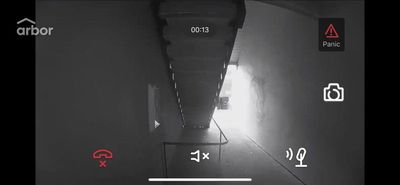
While the Arbor camera doesn't do well with complex lighting situations, I can see the area just in front of my door clearly, and that's really all I need to see. The hallway area is clearly visible both during the day and at night thanks to the night vision camera, and I was always able to get a clear picture of who was at my door. 5x digital zoom is available if needed, but digital zoom always results in degraded quality.

The 160 degree angle of the camera was also sufficient to give me a full view of the entire area outside of my door.
The camera in the Arbor doorbell starts recording when the doorbell is pressed or, if motion detection is on, when it senses motion. With either situation, you get a notification that the doorbell has detected either an incoming ring or the motion of a person at the door.
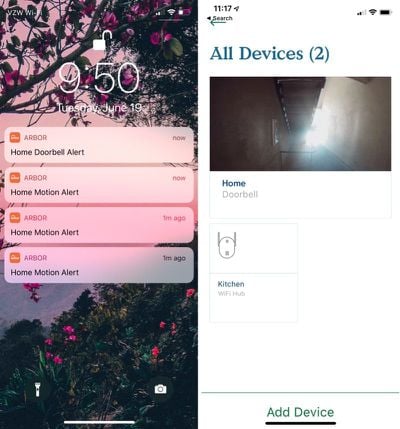
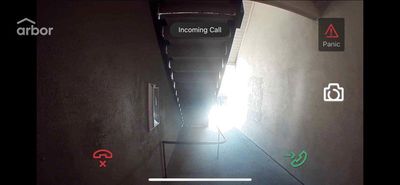
When someone presses the doorbell, you'll see the aforementioned alert, and when you open the Arbor app, there's a call interface where you can tap to speak to the person using the built-in two-way microphone and speaker in the Arbor.
In my experience, the two-way speaker functionality was slow to kick in, so when I answered the incoming "call," the person on the other end couldn't hear me talking for a few seconds, which garbled the first part of whatever I was saying. Audio quality was not the clearest, but Arbor tells me that audio is its "top focus to improve" and the Arbor team is "working hard to create a great experience" before the doorbell begins shipping out.
Though I had some issues with sound, notifications came instantly. As soon as the doorbell rang, I had a notification on my phone with little delay. I did notice, though, that with motion detection, it was slow to start recording. For example, the delivery person who brings my weekly fruit and vegetable box comes at night and does not ring the bell.
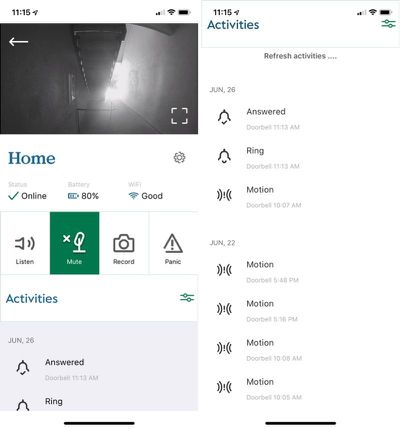
I got a motion detection notice at 12:06 a.m. when the box was delivered, but the recorded video that went along with it only caught the tail end of the delivery -- the person walking away.
The Arbor app is still under development, but there are some promising bells and whistles. You can set a motion detection zone for the motion detection feature, as well as a timer for when it should come on, and options to manually record video when desired.
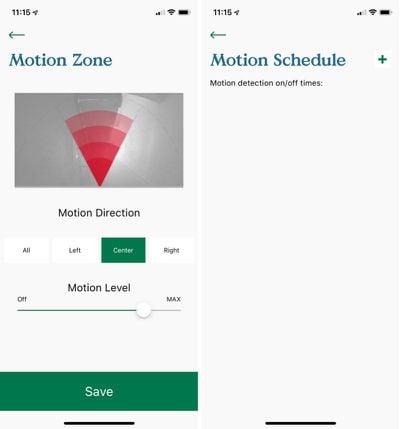
Many features still need to be added or improved. There's no way for me to download video clips from the iOS app at this time - Arbor requires me to use the web portal - and the timer feature for automating motion detection is limited. I can't, for example, set it to record from 7:00 p.m. to 4:00 p.m. the next day, cutting out the three hours between 4:00 p.m. and 7:00 p.m. when my neighbor's kids are out near my door nonstop.
One other complaint relates to the WiFi Hub. There's a panic feature that you can activate to set off a 115 decibel alarm to "scare off package thieves," but the doorbell doesn't ring, the inside WiFi Hub does. So depending on where you have the hub situated, a person who is outside your door might not hear it at all.

While most video doorbell products on the market integrate with one smart home platform or another, the Arbor does not. There is no HomeKit support (though Arbor says "it is on the table"), and Alexa integration has not been included, though this is listed as a stretch goal (that's been achieved) on the Arbor Indiegogo page.
Bottom Line
Because I have an unfinished, pre-production unit, it's difficult to judge the Arbor since it's still in development, but I do think it's a promising product for those who want inexpensive, high-quality video monitoring with no-hassle wire-free installation.
Arbor is competitively priced at $159 during the Indiegogo ordering period, and even at the retail price of $199, it is on par with competing products. 1080p video monitoring beats many other video doorbells, and free 48 hour cloud storage for 30 second video clips makes the Arbor an appealing choice.
There are some software kinks that need to be worked out, but those are all improvements that can be introduced through over-the-air updates. My major concern with the Arbor is the high-pitched noise emitted from the WiFi Hub, but that's a problem Arbor is looking to solve and it's also an issue that may not bother some users.
How to Buy
The Arbor Instant Video Doorbell can be pre-ordered on Indiegogo for $159. Arbor Home plans to begin delivering Arbor orders to customers starting in August 2018.
Note: Arbor provided MacRumors with an Arbor Video Doorbell for the purpose of this review. No other compensation was received.














































Top Rated Comments
* You have to be home.. and looking out your door.
On a more serious note, this looks great, but I have to say that satellite-dish ringer button would confuse me as a visitor looking for a button. Perhaps it looks more like a button in person, but from the photos, it seems very non-button like.