

Recent advancements in Thunderbolt technology have brought the ability to include multiple downstream Thunderbolt ports on various docks and hubs, and CalDigit's Thunderbolt 4 Element Hub introduced earlier this year does just that in the form of a compact dock supporting Thunderbolt 4 and USB4.
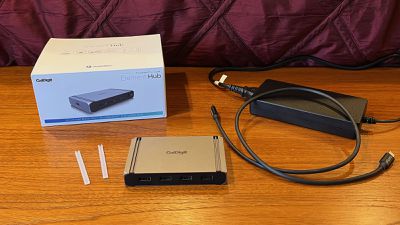
I've long been a fan of CalDigit's Thunderbolt hubs, and I've been using the company's TS3 Plus as my main docking station for many years now. The Element Hub doesn't offer as many dedicated features as some of CalDigit's other docking stations such as an SD card slot or Ethernet port, but if you've got multiple Thunderbolt/USB-C devices and maybe a few USB-A peripherals, the new Element Hub could be a great option.
With Thunderbolt 4 support, the Element Hub offers up to 40 Gb/s transfer speeds overall, which means it can drive up to a 6K display at 60Hz, including dual 4K displays when used with an M1 Pro/Max or Intel Mac (M1 Mac and iPad Pro models are limited to one external display). Windows users can even drive an 8K display via the Element Hub, but only at 30Hz.
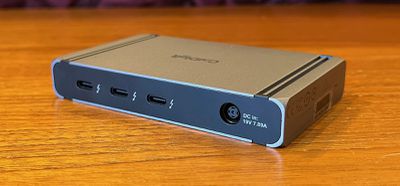
The flexibility of Thunderbolt 4 means that with an appropriate adapter, you can take advantage of just about type of external display, including Thunderbolt 2/3/4, USB-C, HDMI, DisplayPort, Mini DisplayPort, VGA, and DVI.
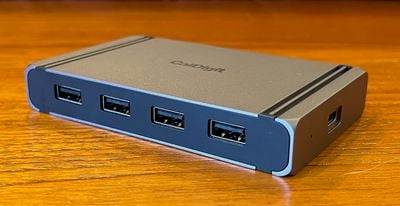
The Element Hub features a total of eight ports plus a DC-in port for powering the dock. There are four Thunderbolt 4/USB4 ports, which include one upstream port for connecting to the host computer and three independent downstream ports, each of which can support a full 40 Gbps of data transfer, though obviously not all simultaneously. On the opposite side of the dock are four USB-A 3.2 Gen 2 ports that support up to 10 Gbps of data transfer.
While the Element Hub is certainly a compact docking solution, it does require an external 150-watt power brick that's significantly larger than the dock itself. Fortunately, most users should be able find a place to hide the adapter away and leave a clean, uncluttered look on their desks, but this really isn't a docking solution you're going to want to take on the road.
Even with the large power brick, the Element Hub is limited to 60 watts of charging power, so it won't be enough to power a bigger MacBook Pro unless you're using it under a light load. But for a smaller MacBook Pro, a MacBook Air, or an iPad Pro, the Element Hub will work just fine, and CalDigit notes that the dock is capable of delivering a full 60 watts of power regardless of other loads, so if you have other Thunderbolt devices drawing power (up to 15 watts from each Thunderbolt port and 7.5 watts from each USB-A port) from the hub, it won't reduce charging power to your computer as some other docks do.
Since it charges the host computer over USB-C, it won't offer the fast charging capabilities available with a MagSafe connection on Apple's latest MacBook Pro models, but as a desktop hub it's more likely to be used for continuous power rather than quickly recharging a depleted notebook anyway. And if you have one of the bigger M1 Pro/Max MacBook Pro models, you'll probably want to connect up MagSafe anyway since the Element Hub tops out at 60 watts.
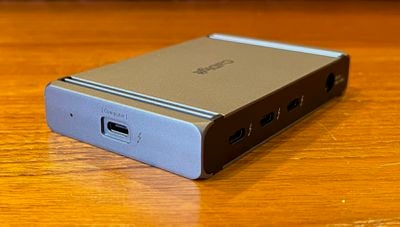
One neat design feature of the Element Hub is that it can be flipped over depending on which side of the computer you want it to be placed. The top and bottom of the dock are essentially identical, with the same matte aluminum finish and subtle CalDigit branding. The two long faces of the hub where most of the ports are located are matte black plastic, but they too look good and sit flush and solid with the aluminum body.
It's a simple design, but it's a solid build that gets the job done. Pairs of grooves cut into the surface on each side add a little bit of design flair but also serve as mounting points for the included rubber feet strips that can be easily applied and removed.
With its external power source, the Element Hub supports offline charging, so all of the ports on the hub can be used to charge connected devices even when the hub isn't connected to a computer. The Element Hub also supports Apple's SuperDrive, using CalDigit's custom driver to deliver enough power to support the slim CD/DVD drive. And finally, CalDigit's macOS Docking Station Utility quietly lives in your menu bar and lets you easily eject any storage devices attached to the hub all at once.
I appreciate the flexibility the Element Hub offers, with the Thunderbolt 4 ports offering lots of options, whether it be direct connections of Thunderbolt or USB-C cables or with adapters for even more connectivity. And the USB-A ports offer easy legacy support for those older devices still using the fading standard.
I ran some speed tests using Blackmagic Disk Speed Test and a Sandisk G-Drive Pro SSD that uses Thunderbolt for maximum speeds. The drive is advertised to support up to a maximum of 2,800 MBps read speed, and I get fairly close to that when the drive is connected directly to my 2021 MacBook Pro, with read speeds coming in at over 2,500 MBps and write speeds approaching 2,000 MBps.
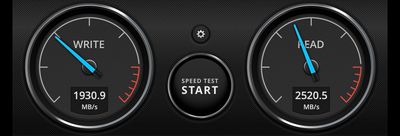 External Thunderbolt SSD connected directly to MacBook Pro
Connecting the drive to the MacBook Pro via the Element Hub with no other accessories attached to the hub, I saw very little in the way of a speed penalty, with the read speed coming in at essentially identical to the direct connection and the write speed dropping down to the 1,750 MBps range.
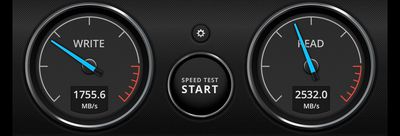 External Thunderbolt SSD connected to Element Hub with no other accessories
While the Element Hub features three downstream Thunderbolt 3 ports each capable of supporting a theoretical maximum of 40 Gbps, it's important to remember that they're all sharing a single Thunderbolt connection to the computer, so if you have multiple devices connected to the hub, performance can be impacted.
This is evident when both the SanDisk SSD and one of my LG UltraFine 5K displays are connected to the Element Hub. The 5K display requires a significant amount of that Thunderbolt bandwidth going from the computer to the hub, so write speeds on the SSD drop to under 800 MBps in my testing. Given the primarily unidirectional aspect of display connectivity, read speeds for the SSD remain unaffected, coming in above 2,500 MBps.
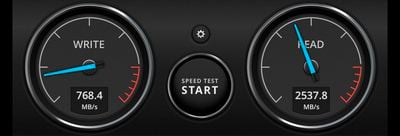 External Thunderbolt SSD and 5K display both connected to Element Hub
Even with that performance hit, the availability of three downstream Thunderbolt ports offers maximum flexibility when connecting multiple peripherals, and the Element Hub's additional four USB-A ports means it can serve as an excellent docking station for many users. It will require some dongles if you have HDMI or DisplayPort external displays though, and if you require more features like an Ethernet port, SD slot, or 3.5mm audio, you might want to look at some other options.
Given high demand and chip shortages, CalDigit has had significant trouble keeping the Element Hub in stock, and at the moment the best availability is through Amazon, where it's priced at $249.99. A 0.8-meter Thunderbolt 4 cable is included in the box, while CalDigit offers several different USB-C adapters for connecting various displays.















































Top Rated Comments
And I don't know about it fading in the real world, only in the Apple world. It's like we've just added another connector (USB-C) not replaced USB A with C.
M1 Pro/Mac and Intel Macs can support two displays from Thunderbolt.
The hub can connect two displays.
No hub allows an original M1 Mac to use two monitors unless it is using DisplayLink or something similar (not a real GPU driven display).
Yes, any Thunderbolt device in a chain can drive one or two displays (depends on the device) but the total number of displays in a Thunderbolt chain is still dependant on the number of displays supported by the host's Thunderbolt port.
The LG UltraFine 5K is a dual tile display and therefore counts as two displays when working properly at 5K 60Hz - is a Thunderbolt device that uses two DisplayPort connections - one for the left half and one for the right half of the display.
So you cannot connect two of those.
Now for a single tile display: a 5K 60Hz display (assuming 16:9 aspect ratio) requires ≈22.2 Gbps for 8bpc and 27.8 Gbps for 10bpc or HDR. There's no way to connect two of those to a single Thunderbolt port (34.56 Gbps for DisplayPort except the Apple Pro Display XDR which uses up to 39 Gbps) unless you reduce the refresh rate or the bpp. DSC can reduce the bpp from 24 or 30 down to 12 (or maybe 8 with a macOS preference modification). Chroma sub sampling can reduce the bpp from 30 down to 20 or 15 or from 24 down to 16 or 12. The minimum bpp that could allow two 5K60 displays from Thunderbolt is 18.
That's just a USB-C hub. USB-C hubs are less expensive than Thunderbolt. But they are limited to 12.96 Gbps DisplayPort bandwidth, down from 34.56 Gbps for Thunderbolt. USB-C is limited to a single DisplayPort connection (unless it's using DisplayLink for additional connections but that uses USB instead of a real GPU connection). This USB-C hub appears to use an MST Hub for additional displays but Macs don't support MST for multiple displays, so this hub can only connect one display. I'm not sure if this USB-C hub supports DSC or relies on chroma sub sampling to allow two HDMI 4K30 displays. One or the other has to be used.
M1 Mac mini only allows one display from Thunderbolt, just like the other original M1 Macs. Think of the HDMI port as corresponding to the built-in display of the original M1 MacBooks.
Just another Thunderbolt 4 dock. The problem with Thunderbolt 4 hubs/docks (or Thunderbolt 3 docks that use Titan Ridge) is that everything internal is USB so the max portion of the Thunderbolt 40 Gbps bandwidth that can be used by a Thunderbolt 4 dock/hub is 10 Gbps - more of the 40 Gbps can be used only by downstream displays or Thunderbolt devices. Internally, these Titan Ridge or Goshen Ridge docks have a single PCIe USB controller with a single USB port which has a USB hub connected to it. Most Thunderbolt 4 hubs have one USB hub. The Element Hub has two USB hubs connected together (I like it because it adds more ports without increasing the size much). Thunder 4 docks will have three USB hubs with a bunch of USB adapters for audio, SD card, Ethernet.
The situation is worse for USB4 hosts like the M1 Macs - in that case USB tunnelling is used to bypass all the USB controllers in the chain of Thunderbolt 4 docks/hubs - so the max bandwidth for all USB devices connected to all Thunderbolt 4 docks/hubs in the chain is 10 Gbps. You can put a Thunderbolt 3 device between the host and the Thunderbolt 4 chain to disable USB tunnelling so then all the USB controllers in the Thunderbolt 4 chain can have their own PCIe connection - and the Goshen Ridge USB controller is superior to the USB controller of the M1 Macs (except maybe the ASM3142 controller in the 4 port M1 iMacs for the non-thunderbolt ports).
The TS3+ is old and uses Alpine Ridge instead of Titan Ridge or Goshen Ridge, so it can use all of the Thunderbolt data bandwidth (up to 22-25 Gbps) for its devices (the rest of the 40 Gbps can only be used up by displays). Internally, it has 5 PCIe devices: the Thunderbolt controller itself including the Alpine Ridge USB controller and 4 other devices connected to it: three USB controllers (two FL1100 and one ASM1142), and an Intel Ethernet controller.
Goshen Ridge has 1 lane of PCIe (for an additional 8 Gbps of possible Thunderbolt bandwidth), but no-one uses it because a PCIe device wouldn't be usable if the Thunderbolt 4 hub/dock was connected to a USB-C (non-Thunderbolt) host. But if CalDigit want's to do something new (and maybe they do - the TS3+ and Element Hub are different designs compared to other Thunderbolt 3 docks and Thunderbolt 4 hubs), then using some PCIe would be interesting. And in fact, they could pair a Thunderbolt 4 controller with a Thunderbolt 3 controller to get the benefit of having additional downstream Thunderbolt ports and to have superior PCIe controllers (especially for Ethernet - no-one likes USB Ethernet) which can use more than 10 Gbps of the Thunderbolt bandwidth.
and up to the capacity of the M1 Pro/Max - which is 2.
But only one from Thunderbolt. The other must be connected to HDMI.