

Last month, CalDigit debuted a pair of Thunderbolt 3 mini Docks, offering the ability to connect dual 4K 60Hz displays, Ethernet, and USB all from one travel-sized accessory that doesn't require its own external power source. Available in dual DisplayPort and dual HDMI versions, CalDigit's Thunderbolt 3 mini Docks are a convenient way to make sure you can easily connect to multiple high-resolution displays wherever you go.
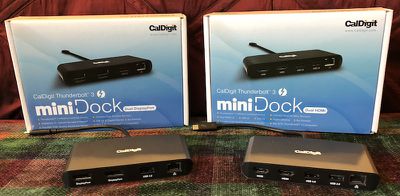
I've had an opportunity to test out both versions of the dock, and I came away impressed with their performance, compactness, and usefulness in making sure you have the connectivity you need available away from your usual workplace.
Design
Both versions of the Thunderbolt 3 mini Dock have the same primarily aluminum design with plastic on the two long edges where the ports line one side and the short built-in Thunderbolt 3 cable exits the other side. The aluminum is an attractive gray that's significantly darker than Apple's Space Gray shades, and there is a CalDigit logo on the top of the dock. The bottom includes a pair of non-skid strips to help keep the dock stable.
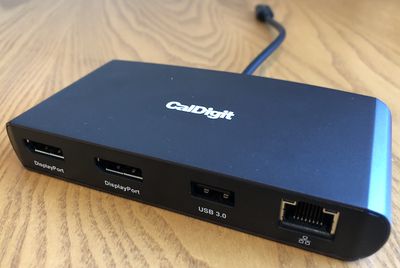
Both docks measure just under 5 inches long by about 2.5 inches deep and 0.75 inches thick. That makes them just a bit smaller but considerably thicker than an iPhone 8, and at a little over 5 ounces they're just about the same weight as an iPhone 8 as well. Overall that makes them much smaller and lighter than a desktop Thunderbolt 3 dock, and they don't require a massive power brick (or any external power beyond the Thunderbolt cable), so they're very transportable.
The two versions each include a Gigabit Ethernet port, a 5 Gbps Type-A USB 3.0 port, and a pair of either DisplayPort 1.2 or HDMI 2.0 ports. The HDMI model also includes a second Type-A USB port, although it is limited to 480 Mb/s USB 2.0.
Performance
I tested the performance of both docks using an array of accessories and found solid performance. Both the DisplayPort and HDMI versions offered smooth video performance while connected to dual 4K displays running at 60 Hz with no lag or visual artifacts. You'll want to choose the version that best fits your display needs, but keep in mind that the DisplayPort model can also drive non-DisplayPort monitors such as DVI, Mini DisplayPort, or VGA, as long as you don't mind dongles for your dongle.
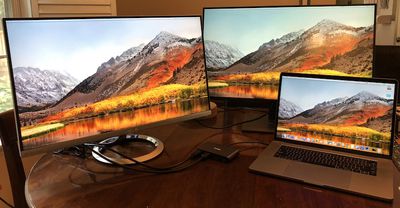
USB 3.0 speeds were fast, with a CaDigit Tuff external SSD registering speeds of 360 MB/s read and 340 MB/s write when connected to a MacBook Pro through the docks. That's a little slower than a direct connection to a 5 Gbps USB port on a Mac, but in line with performance seen when connecting through other docks and hubs. You'll be lucky to get much more than one-tenth of those speeds when connecting over the USB 2.0 port on the HDMI version of the mini dock, so you'll want to limit that port to mice, keyboards, and other peripherals where you're not trying to move a lot of data quickly.
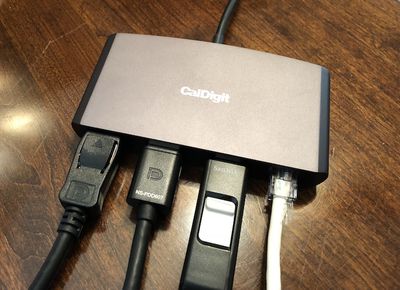
While there are a number of bus-powered USB-C hubs and docks on the market that offer an array of ports and other options, CalDigit has opted to use Thunderbolt 3's capabilities to focus on the external display connectivity and include only a bare minimum of additional ports.
CalDigit says this is in part an effort to remain within the Thunderbolt 3 power specifications, which limit bus-powered devices to a total of 15 watts of draw. USB-C adapters can in some cases be limited to 7.5 watts total, but with so many available ports on many of these docks, it's easy to hit that figure and cause potential power issues. The USB 3.0 port on CalDigit's mini docks can provide up to 4.5 watts, while the USB 2.0 port on the HDMI model can deliver up to 2.5 watts.
Wrap-up
These Thunderbolt 3 mini Docks meet a specialized need, catering to those who need to connect to multiple high-resolution external displays on the go, but they do their job well. If you're primarily looking to expand the available ports on your MacBook Pro, you'll likely want to look at other options that offer a greater number and variety of ports and can perhaps run over USB-C. These port-focused USB-C hubs also tend to come in at cheaper price points, with $60 being a common figure.
But CalDigit's solution is great for users who need solid display connectivity that cheaper USB-C hubs can't match, while also offering a couple of handy extras in the form of Ethernet and USB ports. Compared to traditional desktop Thunderbolt 3 docks, CalDigit's mini docks are cheaper, easily portable, and don't require external power, so they're handy for on-the-go use.
CalDigit is currently offering the DisplayPort version of the Thunderbolt 3 mini Dock for $99.99, while the HDMI model is priced at $109.99, both a $30 discount over their eventual regular prices although CalDigit tells me it plans to offer the promotional pricing for an extended period of time. Both models are also available through Amazon, although they're priced $10 higher than buying directly from CalDigit, coming in at $109.99 for DisplayPort and $119.99 for HDMI.
Note: CalDigit provided the Thunderbolt 3 mini Docks to MacRumors free of charge for the purposes of this review. No other compensation was received. MacRumors is an affiliate partner with Amazon and may earn commissions on purchases made through links in this article.




















Top Rated Comments
You get up for any reason, your screen must be locked. Open floor plan seating sucks.