

CalDigit's Thunderbolt Station 4 (TS4) is a dock with 98W charging power and an impressive array of 18 ports, ideal for Mac setups with a wide range of connection requirements.
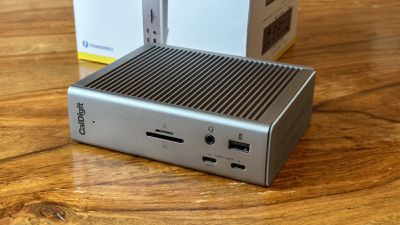
The dock comes with a price tag of $399.99, reflective of its high-speed data transfer, expansive connectivity, and powerful charging abilities. While it may not be the most budget-friendly option on the market, its performance and convenience make a compelling case for professionals with demanding workloads and complex Mac setups. In this review, we delve into the TS4's capabilities to determine whether its cost is justified, and help you understand if it is the right fit for your specific needs.
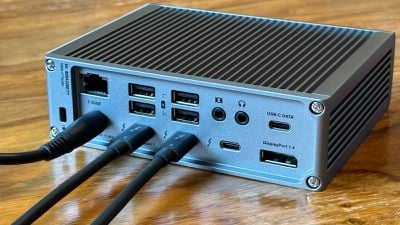
The dock comes with a 0.8m Thunderbolt 4 Cable, two rubber feet strips, one power cord, one 230W power supply, and a two-year CalDigit warranty.
Design
The CalDigit TS4 dock features a high-quality, durable aluminum design. Its overall footprint is reasonably compact, measuring 141mm x 42mm x 113mm, meaning that it avoids taking too much space on a desk. If that is too tall for your desktop, just slide on the included pair of rubber strips for cushioning and tip the dock over on its side. The aluminum casing has a ribbed design that gives it a more industrial look while also offering some extra surface area for effective heat dissipation.
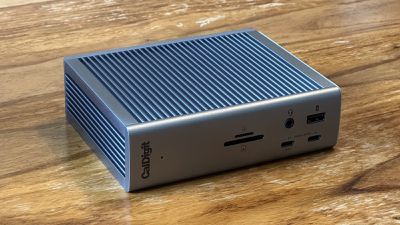
The TS4's design, despite its compactness, does not compromise on functionality. It houses an impressive total of 18 ports that are logically divided between the front and rear of the dock. The front features easily accessible USB-C, USB-A, and SD card slots, alongside an audio input and output port. The back, meanwhile, is equipped with the remaining ports, including Thunderbolt 4, USB-C, USB-A, DisplayPort, and Ethernet.
The dock is accompanied by a large power brick that, while necessary for its function, detracts slightly from the portability of the device and is an important consideration in terms of cable management.
USB Ports
The dock is outfitted with a total of eight USB ports, split between USB-C and USB-A variants. There are three 10Gb/s USB-C ports (two located conveniently on the front and one at the back), offering high-speed data transfer rates and power delivery. The dock also features five 10Gb/s USB-A ports to accommodate slightly older hardware. Four of these ports are located on the back of the device, and one is placed on the front for easy access.
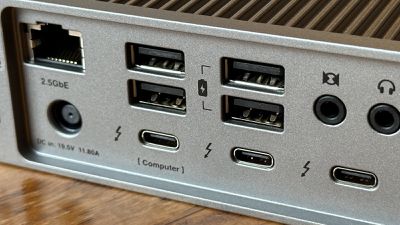
One notable advantage is that the USB ports also deliver power sufficient for charging. One of the front USB-C ports delivers 20W, suitable for a MagSafe charger or even a HomePod mini. The two rear Thunderbolt ports can supply 15W, while the remaining USB-C and USB-A ports offer 7.5W. This means that even in the absence of the host computer, many of the ports will continue to supply power to your devices, effectively turning the TS4 into a handy charging station.
SD Card Slots
Two slots accommodate both full-size SD and microSD cards, with UHS-II support ensuring adequate data transfer rates for photographers or videographers. The positioning of these slots on the front of the TS4 is another thoughtful touch, enabling easy access and the quick swapping of cards.
It is worth noting that these slots are UHS-II and not the latest UHS-III specification, which means they will not offer the absolute highest transfer speeds available on the market for users with UHS-III cards. Despite this, UHS-II is still more than fast enough for the vast majority of users.
Display Support
The CalDigit TS4 offers comprehensive support for external displays, a feature that is particularly valuable for professionals who require multiple monitors for their workflow. The dock supports up to two 6K, 60Hz screens when connected via the Thunderbolt 4 ports, offering ample screen real estate. Moreover, if your requirements are focused on refresh rates, the TS4 can support up to 240Hz at a 1440p resolution. This makes it a perfect fit for graphic designers, video editors, and others who require high-resolution multi-monitor Mac setups.
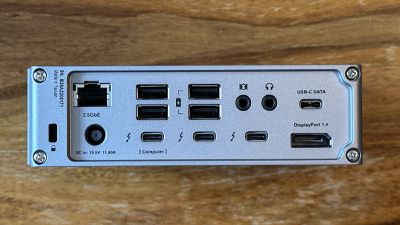
In addition to the Thunderbolt 4 ports, the TS4 also includes a DisplayPort 1.4 port. DisplayPort 1.4 supports high resolutions and refresh rates, as well as features like HDR, making it an excellent choice for a wide range of displays. However, an HDMI port is noticeably absent on the device, which may be a drawback for those who rely on HDMI for their display setup, such as those using smaller OLED TVs as monitors.
Ethernet
A 2.5 Gigabit Ethernet port promises substantially faster data transfer rates compared to standard Gigabit Ethernet, offering solid performance. During use of the CalDigit TS4, the Ethernet port provided exceptional performance, delivering the highest speeds observed from the router, even when the other selection of ports were virtually maxed-out.
Audio
The CalDigit TS4 Thunderbolt dock comes equipped with three audio ports, including a 3.5mm audio in port, a 3.5mm audio out port, and a 3.5mm combo jack. This trio of audio ports allows for a versatile set of use cases, catering to both input and output needs.
The 3.5mm combo port on the front is especially handy for quickly connecting headphones. The separate 3.5mm audio input and output ports offer even more flexibility, accommodating for standalone microphones and speakers. For instance, you can connect an external microphone for better voice capture quality during video calls or audio recordings. The dedicated output port allows you to connect speakers without having to frequently unplug your headphones.
During testing, the audio ports on the CalDigit TS4 delivered clear and high-quality sound with no noticeable distortion or noise interference. The ease of access and the quality of the audio signal make these ports an excellent feature for those needing multiple audio connectivity options on their Thunderbolt dock.
Final Thoughts
Overall, the CalDigit TS4 offers best-in-class connectivity as a Thunderbolt dock with an extremely versatile selection of ports. With its convenient port placement, charging capabilities, and discreet design, it is a standout choice for those seeking a multitude of connection options. The ability to connect a single Thunderbolt cable to a MacBook and instantly activate two external displays and connect to over a dozen peripherals, and even charge devices regardless of whether a computer is attached, is extremely useful.
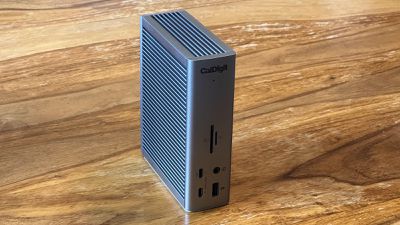
While its bulky power supply and the omission of an HDMI port may be off-putting to some users, it still offers a wide variety of features that make it a strong competitor in the market. It is easy to recommend the TS4 to any Mac user looking to level-up their setup and meet a wide range of connectivity needs.
How to Buy
The CalDigit Thunderbolt Station 4 is available for purchase directly from CalDigit's website, as well as other online retailers like Amazon. The price at the time writing is $399.99, though prices may vary depending on the retailer and any ongoing promotions or sales.
Note: CalDigit provided MacRumors with a Thunderbolt Station 4 for the purpose of this review. No other compensation was received.















































Top Rated Comments
Unfortunately, I bought it as a “one cable solution” to be used with my personal MacBook and my work-provided Microsoft Surface Laptop.
As the Surface Laptop 3 and 4 only have USB-C connectivity (no Thunderbolt) I knew that only one 4K60 monitor would work, as per CalDigit’s documentation. In reality, however, I could only get 4K30.
I tried two different Surface Laptops. Upgraded drivers, downgraded drivers. Checked all firmware levels. Purchased brand new, certified, cables. I went through everything and could not get 4K60 working on a single monitor.
I contacted EU support, who passed the issue to US support who eventually escalated it to the engineering team. The issue went unresolved and I ended up returning the dock.
I don’t know if these issues are resolved in the TS4. Potentially great products but they’re certainly not perfect and may not fit all use cases.
i wish more manf realized that people have these things in their bedrooms and to give an option to turn it off.
I see no reason to upgrade, for me TB3 is doing the job, I would need to have more TB4 accessories to make it worthwhile. However, I really hope that when I upgrade at some point they will have fixed the display connection issue.