Casetify Apple Watch Band Review - MacRumorsOpen MenuShow RoundupsShow Forums menuVisit ForumsOpen Sidebar
Skip to Content

Review: Casetify's $70 Apple Watch Bands Can Be Customized With Any Design

by

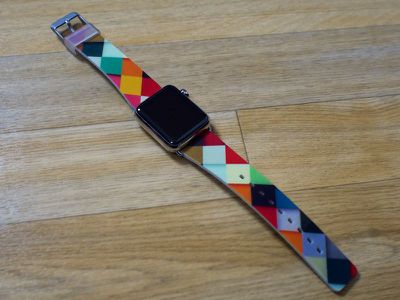
Casetify, a company that makes customizable iPhone, iPad, and MacBook cases, has also begun selling Apple Watch bands, which can be printed with any design. Available for both the 38 and 42mm Apple Watches and in two finishes, bands can be customized with photographs or artwork or ordered from Casetify's pre-designed artist collection.
casetifybandopen

Fit

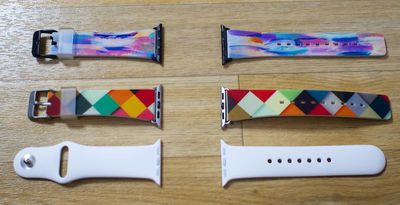
Casetify's Apple Watch bands are made from polycarbonate and are closest in nature to the Apple Watch Sport bands. I've been wearing a 38mm Casetify Apple Watch band for just over a week and while it is comfortable, the material of the band is not as soft, flexible, or as thin as the fluoroelastomer the Apple Watch Sport bands are constructed from.
casetifybandcomparedtoapplewatchsportband
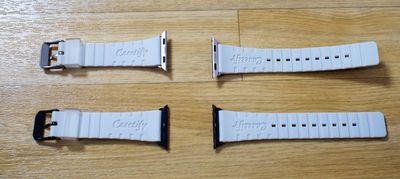
Bands come in two sizes, one for each watch. The 38mm band fits wrists sized 140 to 200mm, while the 42mm band fits wrists sized 150 to 210mm. The underside of each band is ridged, with the Casetify logo printed on each side.
casetifybandsunderside
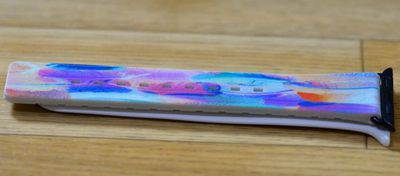
At about an eighth of an inch thick, Casetify's bands seem to be approximately a third thicker than the Apple Watch Sport (there's maybe about a millimeter of difference between the two). That's not a huge thickness disparity, but it is noticeable when wearing the Casetify band after wearing a Sport band, especially on a small wrist.
casetifybandthickness
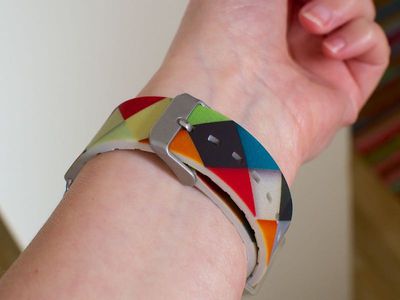
My wrist is under 5.5 inches in circumference so the Casetify looks and feels a bit bulky on my arm, but this may be less of an issue for people with bigger wrists. Part of the reason for the bulk is that I need to wear the band on its second to last loop, so there's a lot of extra band at the underside of my wrist.
casetifybandonwristback
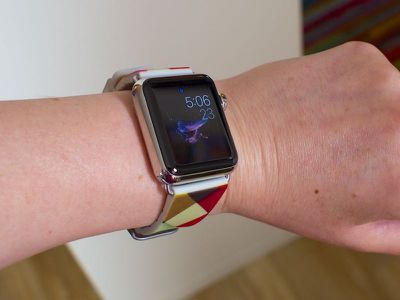
It's definitely thicker and less flexible than the Apple Watch sport band, but the Casetify band has still been comfortable to wear all day long, even during exercise and when it gets wet. The band has a lot of holes to adjust the fit, so it's going to fit well on a lot of different wrist sizes.
casetifybandonwrist
Most Apple Watch bands are relatively easy to put on one-handed, this band from Casetify is not. It's a standard buckle watch, so it takes some maneuvering to get it on your wrist with one hand.

Hardware

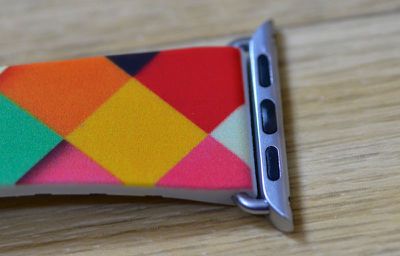
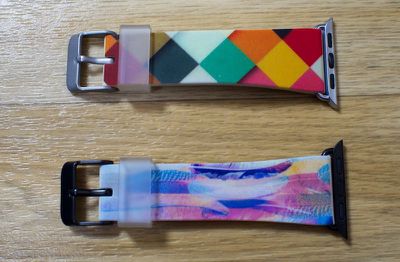
The Casetify bands attach to the Apple Watch using stainless steel adapters, in either a matte silver or a matte black finish, and each watch has a matching stainless steel buckle.
casetifyadapter
Bands attach much like any other Apple Watch band, sliding into the groove on the side of the Apple Watch until it snaps in place. The Casetify bands don't slide in and out of the Apple Watch as smoothly or as easily as Apple's own bands, but they do lock into place in the same way.
casetifybandswithbuckle
One of the bands that I received from Casetify was assembled backwards, causing it to not slide in properly or lock, so that's something to watch out for if you order one of these. Fixing it would require unscrewing the adapter and turning the band around.

I have a stainless steel Apple Watch and the matte silver of the adapter does not match the shiny finish of the Apple Watch, but when wearing the watch, the difference in finish isn't overly noticeable from a distance. If someone's close to your wrist, though, the difference is easy to see.
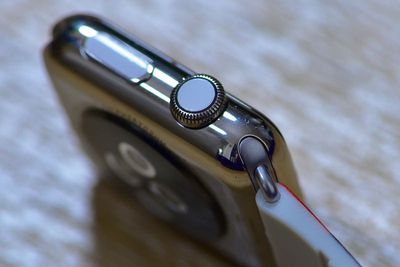
casetifyadaptercolordifference
The matte silver also does not quite match the aluminum of the Apple Watch Sport, and the mismatching finishes is definitely going to be a deal breaker for some people when it comes to the Casetify bands. The incongruity between the band adapter and the Apple Watch is what bothered me most about the Casetify band, but no one seemed to notice but me.
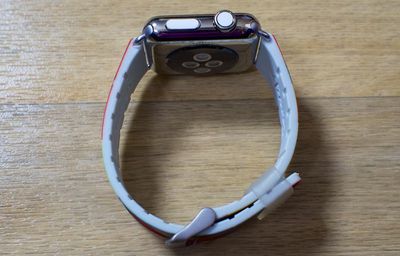
casetifybandattachedtoapplewatch
Casetify provided me with a band that has matte black adapters, but I didn't have access to a Space Black or Space Gray Apple Watch to make a fair comparison on color. I did notice a tiny bit of chipping on the matte black Casetify adapter after I put it on my Apple Watch, so I am concerned that people who buy the matte black version might have similar problems with it. Casetify says that the chipping I saw is uncommon.
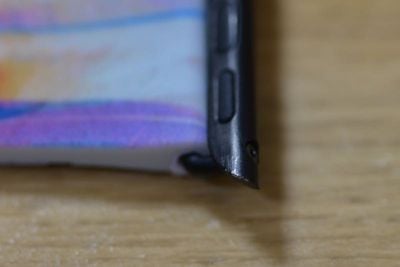
spaceblackchipping

Printed Designs

Customizability is the key feature in Casetify's Apple Watch bands, and designing a band that precisely fits your style and specifications is the main reason to purchase one of these bands. Casetify sells pre-designed Apple Watch bands in a range of colors and patterns, but you're also able to create your own using any image.
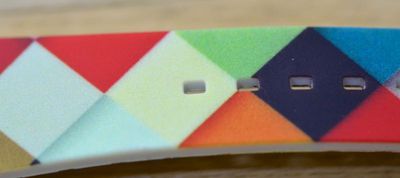
casetifyprinting2
You can upload an image or connect to Facebook or Instagram to use a photo from one of those services. Bands designs can use one, two, or five photos, and built-in tools on the site and in the app let you resize and move photos as necessary to create a desired design.
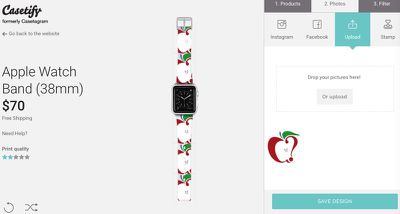
casetifybandcreator
Design wise, the possibilities are nearly endless. You can create a band with photos of kids, pets, or favorite cartoon characters, or use a more abstract design or photo. Things like flowers and sunsets turn out particularly well. A high resolution image is necessary for the best print quality, especially when using only a single image.

It's also worth taking a look through Casetify's artist's gallery for designs that have been created by others. There are a lot of whimsical, colorful designs that are fun to browse through.

Print quality on the Casetify bands is good, but it's not something that I'd describe as crisp. Up close, designs look a bit fuzzy due to the pixelated printing process, as you can see in the photo below.
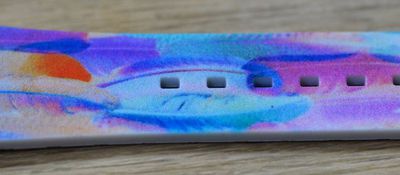
casetifyprinting
At a reasonable distance, Casetify's band designs look quite nice, but I wouldn't choose a photo that has a lot of very fine detail for the printing process. Printing only covers the front of the band. The sides of the band are a light gray color, as is the back of the band.
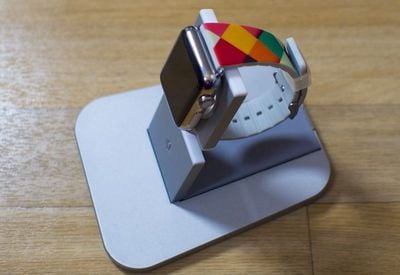
casetifybandprintingdistance
So far, the design on my band has held up well over a week of heavy use and through attempts to damage the printing through scrubbing, twisting, bending, and rubbing. I have not been able to test the band over a long period of time, but the printing seems reasonably durable, as does the band -- it can stand up to a lot of abuse since it's made of polycarbonate.

Bottom Line

Casetify's bands are more expensive than the Apple Watch Sport band and have some caveats like their thickness and adapters that don't quite match the Apple Watch, but they're also the only Apple Watch band that's customizable, and that makes up for a lot of minor flaws.

If you want a band that's more colorful and has more personality than what you can get from Apple, or if you want to wear a band that's outfitted with pictures of your cat, Casetify's Apple Watch bands are the way to go. $70 is a lot to shell out for a band that's not quite as high-quality as the Apple Watch Sport band, but the tradeoff for customizability is worth it for Apple Watch owners who want something that stands out.
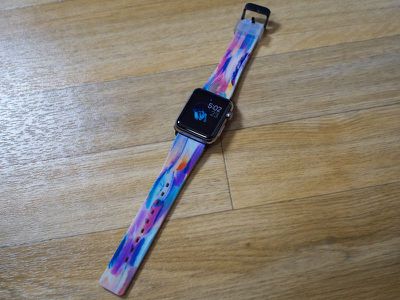
casetifybandspacegray2
One thing to keep in mind - there aren't many third-party Apple Watch bands on the market yet, and that's because Apple hasn't solidified its "Made for Apple Watch" program. Apple has published guidelines on band and adapters (lugs) for third-party accessory designers, but it's not yet approving accessories. Casetify's bands, like all current third-party bands are not "Made for Apple Watch" approved.

In the coming months, we may see a lot more band options hitting the market. For the time being, third-party bands are few and far between, so it's nice to have options like Casetify that let the Apple Watch be better customized to fit different styles and tastes.

Pros:

  • Comfortable to wear
  • Customizable -- endless designs
  • Waterproof/sweatproof
  • Fits a wide range of wrist sizes

Cons:

  • Thicker, less flexible than Apple Watch Sport band
  • Adapter's matte silver doesn't quite match Apple Watch finish
  • Matte black version coating chips easily
  • Printed designs aren't crisp

How to Buy

Casetify's Apple Watch bands can be ordered from the Casetify website or the Casetify iOS app for $70.


Related Roundup: Apple Watch 12
Buyer's Guide: Apple Watch (Buy Now)
Related Forum: Apple Watch

Top Rated Comments

testcard Avatar
148 months ago
Those bands scream "cheap and nasty".
Score: 3 Votes (Like | Disagree)
148 months ago
Thank you for the review. You told me everything I had wanted to know about the Casetify bands.
Score: 3 Votes (Like | Disagree)
148 months ago
I find these straps rather fun.

However, I don't have an Apple Watch, so they're lost on me.
well for just an additional $395, you could rectify this problem. :D
Score: 2 Votes (Like | Disagree)
iBlazed Avatar
148 months ago
Overpriced for what it is. You can get a third party leather band for $25. And the buckle is ugly.
Score: 2 Votes (Like | Disagree)
Mr Fusion Avatar
148 months ago
Overpriced for what it is. You can get a third party leather band for $25. And the buckle is ugly.
Agreed. This product is so ******, just by looking at it you can almost hear the company thinking aloud, "Hey, let's take the most basic band design and cheapest materials possible and price it at extortion levels because it has something to do with Apple."
Score: 1 Votes (Like | Disagree)
inscrewtable Avatar
148 months ago
Wow, they're craptastic. I can't imagine anyone who would put such a badly matched product on an Apple item that is famed for it's fit and finish. What the hell is the point of making a product like this if they aren't going to have the lugs fit as well as an original Apple band, unless they were selling for $10.

Score: 1 Votes (Like | Disagree)

Popular Stories

apple watch series 3 design

Apple Offers Steps to Fix Daylight Saving Time Bug on Apple Watch

Sunday November 1, 2026 3:34 am PST by
Apple has published a support document describing what to do if your Apple Watch continues to show time that's off by one hour after daylight savings time changes. "This incorrect time appears only on the Always On display when your wrist is down," says Apple. "When you activate the display by tapping it or raising your wrist, the time changes to the correct hour." To fix the issue, Apple says ...

siri recap live rewind

watchOS 27.3 Brings Live Rewind and Siri Recap to Apple Watch

Tuesday November 3, 2026 10:35 am PST by
With the first beta of watchOS 27.3, Apple is introducing new Audio Intelligence features it previewed for the Apple Watch Series 12 and Ultra 4 earlier this year. Powered by the S11 chip, Audio Intelligence includes Live Rewind, Siri Recap, Sound Recognition, and Shazam Music Recognition. Sound Recognition and Shazam are already on the watch, but Live Rewind and Siri Recap are now available ...
apple watch series 3 design

Apple Watch Users in Europe Report Daylight Saving Glitch

Monday October 26, 2026 5:26 am PDT by
Some Apple Watch users running watchOS 27 are reporting a daylight saving glitch after clocks went back in the UK and Europe on Sunday. In a MacRumors forums thread, five users – several in the UK and central Europe – say their watch shows the correct time when activated, but the Always-On display keeps showing summer time, leaving it an hour fast. The problem has also been reported in...
Latest Stories
Siri AI Rumored to Become 'More Like an Agent' as Early as Next Year
4 hours ago
Apple Taking New Approach to Developing iOS 28 and macOS 28
5 hours ago
Early Apple Black Friday Deals on Apple Watch, MacBook Air, and More
1 day ago
'Backglow' Lets You Customize New MacBook Pro's Glowing Apple Logo
1 day ago
Top Stories: Apple Product Launches, iOS 27.3 Beta, and More
1 day ago
More Fun iPhone Duo Apps: 30 New Picks to Try
2 days ago
Hands-On With Apple's New OLED Touchscreen MacBook Pro
2 days ago
Apple Store With All-New Design Opening Soon in Southern California
2 days ago
Control the Glowing Apple Logo on Your New MacBook Pro
2 days ago
Apple Shares New 'Apple Card: Apply and Use in Minutes' Ad
2 days ago
Apple Says More Than 100,000 Apps Optimized for iPhone Duo, Here's What's Still Missing
2 days ago
Early Black Friday Deals Kickoff With Steep Discounts on Apple Watch Ultras and More
2 days ago
The MacRumors Show: iOS 27.3 Looks Like a Huge Update
2 days ago
Best Buy's Black Friday Event Begins With Sitewide Savings on Apple, TVs, More
2 days ago
Apple Releasing Yet Another Two New Products Next Week
2 days ago
MacBook Air Drops to Lowest Price in Months With Amazon's $250 Discount
2 days ago
Apple Rumored to Drop the iPhone's Action Button Next Year
2 days ago
Apple's Extended Return Policy Now in Effect for 2026 Holiday Season
2 days ago
Apple Music Classical Updated With New Icon and Refreshed Design
2 days ago
OLED iPad Mini, M6 iMac, and New MacBook Pros Available From Today
2 days ago
Apple Surveys iPhone Duo Buyers About Crease and Camera
3 days ago
Apple's First Touchscreen Mac is Now Arriving to Customers
3 days ago
Claude Gets Personal Finance Feature With Bank Account Linking
3 days ago
Apple Arcade Adds Crossy Road Rush and NBA 2K27
3 days ago
Apple's New HomeView Smart Home Hub: Here's How Much RAM It Has
3 days ago
iPad Mini vs. iPad Air Buyer's Guide: Now Just $50 Apart
3 days ago
First iOS 27.3 and macOS Golden Gate 27.3 Public Betas Now Available
3 days ago
Apple Announces a New Mac Sales Record
3 days ago
Paid $200 for Logic Pro? Apple Says You Won't Get This New Feature
3 days ago
Instagram's Edits Video Editor is Now Available on Mac
3 days ago







































