

DJI, best known for its line of drones, today announced the launch of the Power 2000, a portable power station. DJI already offers the Power 1000, and the Power 2000 is a larger, more capable version of the Power 1000.
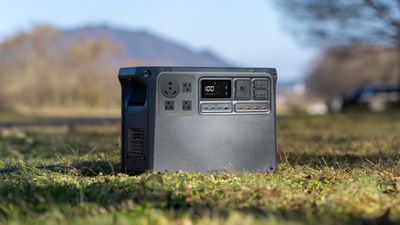
I was able to test the Power 2000 before launch, to provide insight into the product for those who might be looking for a large power station option.
DJI's Power 2000 has a 2048Wh capacity with an LFP battery, double the capacity of the Power 1000. It's designed to power multiple devices or large appliances and equipment in emergencies, when off-grid, or when no traditional power source is available such as in a van living situation. It's $1,299, so it's not cheap, but it does seem to be priced competitively.
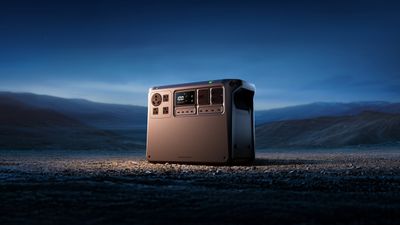
DJI describes the Power 2000 as compact, and it is compared to some competing products with similar capacities, but it stretches the definition of portable. The Power 2000 weighs approximately 50 pounds, so while it is a device that works well at home as a backup, in a vehicle, or in an off-grid situation where you have the ability to transport it, it's not something that's ideal for carrying around.
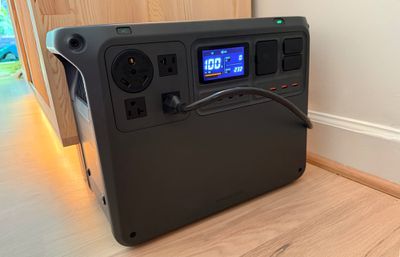
Most people aren't going to want to lug a 50-pound device out for a day at the park or the beach, and it's not going to work for camping when a vehicle isn't available, such as in a hike-in situation. There are other, smaller power banks that are better for that purpose, but the Power 2000 is ideal as a home backup unit or for vehicle living situations. If you need even more power, the Power 2000 does support up to 10 Power Expansion Battery units (each 2048Wh) for a total capacity of 22,528Wh.
DJI included two carrying handles on either side of the Power 2000, but it could have done better. Anker's power banks of this size come with a set of wheels and an extendable handle so you can more easily transport them, and including something similar would have made the Power 2000 much easier to move from place to place. Even bringing it to different rooms and moving it outside to test charging was a chore during the review due to the weight, though size is a different story. It's heavy, but it is smaller than I would have expected. It measures in at 17.5 inches by 13 inches by 9 inches.
All of the ports are at the front of the Power 2000 for easy access. There are four AC ports that accommodate standard plugs, four USB-C ports, four USB-A ports, two bidirectional "smart" DC ports, and two 1/4" threaded ports for DJI accessories, solar panels, and other devices. All of the ports can be used at once, for charging multiple devices at the same time. Two of the USB-C ports support 140W and were able to charge my MacBook Pro at full speed with the USB-C to MagSafe cable, while the other two ports support 65W.
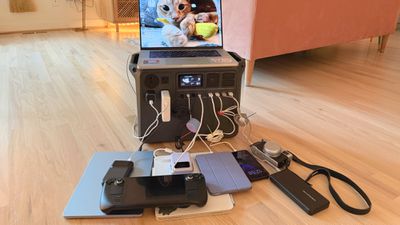
There's a power button that activates the Power 2000 when you hold it down for two seconds, and a separate AC button that turns on the AC ports. A display at the front tells you what's drawing power and how long the battery will last, or how much power the device is drawing from an outlet and the time to recharge.
The Power 2000 can handle a total of 3,000 watts, so it is powerful enough to run most appliances and devices in the home. It can handle refrigerators (even full-sized), heaters, microwaves, portable AC units, medical devices, and power tools. While it's useful to have a device like the Power 2000 on hand for power outages, I find the large batteries useful in situations where I need to use a tool in a spot where there's no outlet.
I can put the Power 2000 in my Gorilla Cart and plug in whatever I need. I've done this when sanding, using a pressure washer, using a heat gun, powering a shop vac, and more. My brother keeps a similar large power bank in his car for emergencies, and I've also used one for backup power. If you've ever had a multi-hour or multi-day power outage because of a weather event, you're aware of the utility of a large power bank or backup generator.
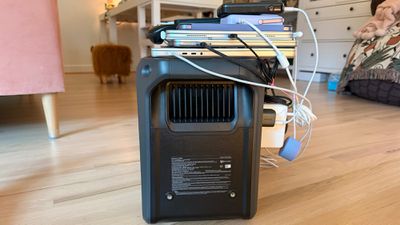
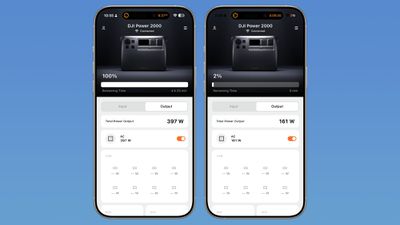
The Power 2000 has enough capacity to power my router and my cable modem for longer than an 8-hour workday, so if the electricity is out, I can still get online with AT&T fiber. I plugged in my PlayStation 5, 65-inch TV, Apple TV, and some lights. Power draw was 400W, give or take, and it was able to run everything for over four hours.
Charging my MacBook Air dropped the Power 2000's battery from 100 percent to 95 percent, and it dropped a percent charging my iPhone 16 Pro Max from zero to 80 percent. I can't test how many times I can charge my MacBook or iPhone because it would take forever, but based on the test charges, it should handle charging a MacBook Air around 20 times and an iPhone 16 over 100 times. It can also charge my camera battery over 100 times, and of course it can charge DJI drones.
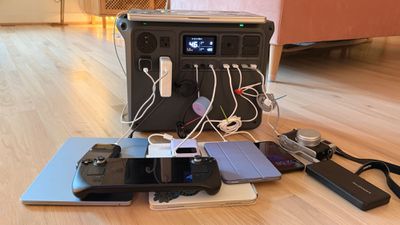
I don't have medical equipment, but these kinds of batteries can be useful for CPAP machines, oxygen concentrators, and other devices that need power even when there's an outage. The Power 2000 has an option for an uninterruptible power supply mode. It can be plugged into a wall outlet, a device can be plugged into the Power 2000, and then if the power goes out, the device will remain on with no interruption. It also offers passthrough charging, so you can use it as a charging station that expands the number of devices that can run from a single outlet.
DJI suggests that the Power 2000 can run a router for 152 hours, a projector for 80 hours, a car refrigerator for 38 hours, an electric fan for 18 hours, and a lamp for 180 hours. A DJI drone should be able to charge 24 times.
I drained and charged the Power 2000 several times over the testing period. I haven't had it long enough to determine how long it holds a charge, but in my experience, these kinds of batteries will stay charged for months. You usually have to use them every three to six months for optimal health, and you won't want to store it with a full charge. The Power 2000 uses a lithium iron phosphate battery that DJI says will retain 80 percent capacity after 4,000 cycles, and that it is able to maintain power for months due to its power management features.
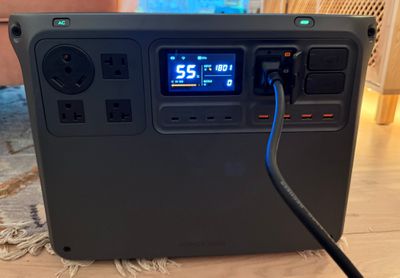
DJI's app works with the Power 2000, so you can check the remaining battery and get a readout of how long the accessory will last based on what's plugged in (this is the same readout that's on the display). DJI's remaining battery estimates were accurate, and were within about 20 minutes of the actual battery life in my testing. When I did drain the battery to zero twice, it had a zero readout before it was entirely out of power, so I had a grace period before it shut off.
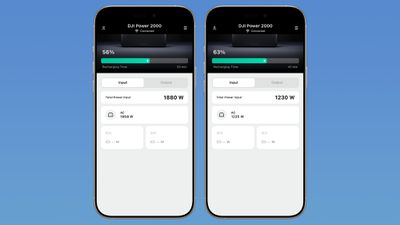
The best part about the Power 2000 is how quickly it can charge. With a super charging mode, it can accept up to 1,800 watts to charge from 0 to 80 percent in 55 minutes. I did blow a fuse doing that, so it does need to charge from an outlet with nothing else on the circuit if you have 15-amp circuits. I have a 20-amp circuit for a kiln, which supported more power draw for the faster charging.
The standard charging is about 1200W, and that takes under two hours to charge, which is plenty fast enough for me. The Power 2000 is able to charge with a solar panel, and DJI sent a 100W model for testing. At 100W, it's going to take over a day to charge the Power 2000 to 100 percent even in full sun, so you're going to want a serious solar panel array if you plan to recharge the Power 2000 with solar. It's summer where I am, and we've had sunny, 90-degree weather, but I'm not typically getting the full 100W because of tree cover, and the fact that the sun moves throughout the day. Even partial sun or a cloudy day will give a little bit of power, so you won't be entirely without charge.
To connect a solar panel to the Power 2000, DJI has a $60 Solar Panel adapter. It only connects to DJI-certified Zignes solar panels, and it supports plugging in three panels for a maximum of 400W per adapter. The Power 2000 can be used with other solar panels, but a converter is required to connect the solar panel to the adapter module. Other batteries like this have built-in ports for solar panels, so I'm not sure why DJI went the adapter route.
You can also charge from a car at up to 1000W, though that requires the DJI Power Super Fast Car Charger. Charging via a car charges the battery to full in 145 minutes, plus there's a car and solar combo for faster charging, and an option to pair AC and DC charging. You can plug the Power 2000 in and also draw power from a solar panel or car charger, at up to 2200W total.
Charging was quiet, and I could barely hear the Power 2000 when it was plugged in. DJI says that with standard charging, the sound is no higher than 30dB, and I couldn't hear it unless I was right next to it. I didn't feel it get warm when charging devices or charging up itself.
DJI says there are 26 built-in temperature sensors and 21 fuses to detect anomalies, preventing overcharging, overvoltage, overcurrent, and other safety issues. The device is made of flame-retardant material and it has a load-bearing capacity of up to a ton, plus it has internal protections against accidental water exposure and outdoor condensation. It can operate normally in temperatures up to 113°F.
There is a three year warranty, and DJI offers extended warranties to customers who register on the DJI website.
Bottom Line
DJI's Power 2000 has a competitive price point and an attractive array of ports and features, so it is worth considering if you're looking for a battery with a 2000Wh capacity. The app is useful for keeping an eye on power transfer, and I appreciated the high-power USB-C ports.
I do wish DJI added wheels and a handle for easier transportation, and there are also quite a few add-ons and accessories that are needed if you want to charge the battery with a car or with solar. You'll need to take those add-ons into account when comparing the DJI Power 2000 to competing products.
How to Buy
The DJI Power 2000 can be purchased from the DJI website for $1,099 thanks to a current sale. Retail price is expected to be $1,299.
Note: DJI provided MacRumors with a Power 2000 for the purpose of this review. No other compensation was received.










































Top Rated Comments