Review: Griffin's BreakSafe Cable Provides Handy Magnetic USB-C Charging, but With a Few Drawbacks - MacRumorsOpen MenuShow RoundupsShow Forums menuVisit ForumsOpen Sidebar
Skip to Content

Review: Griffin's BreakSafe Cable Provides Handy Magnetic USB-C Charging, but With a Few Drawbacks

by

Although Apple recently refreshed its 12-inch MacBook lineup with a faster SSD, new sixth-generation Skylake processors, and longer battery life, the Retina Macbook's USB Type-C input remains the notebook's single port, apart from a 3.5mm headphone jack. Similar to the launch of the first generation device in 2015, many fans lament not only the inability to use traditional USB 3.0 inputs without carrying around an adapter, but the safety issues present in a charging cable lacking Apple's trusty MagSafe technology.

To that end, at CES this year Griffin Technology introduced a third-party solution to the lack of a magnetic charging cable on the 12-inch MacBook, called the BreakSafe Magnetic USB-C Power Cable. The $39.99 kit comes with a six-foot cable and small metal dongle, which is about 3/4 of an inch long. Setup is simple: the cable is capped by a USB-C output, which users plug into Apple's packaged-in wall outlet brick. The dongle is plugged into the USB-C slot on the MacBook, so users can then charge the notebook using BreakSafe's quick-release magnetic connection.
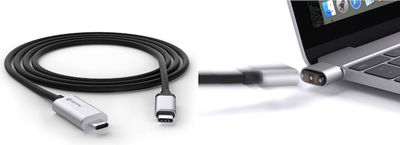
Griffin BreakSafe 1
Similar to MagSafe, BreakSafe's purpose is largely to prevent the MacBook from tumbling down off of furniture -- or kicked along the floor -- when something snags the charging cable connected to a wall outlet and the computer itself. The messaging is focused on computers (and charging power only, as data and video are not supported), but the company does note that the idea transfers to USB-C supported smartphones and tablets as well.

Design

The dongle side of Griffin's new accessory hews closely in size to the Satechi Type-C USB Adapter I reviewed last year, but with the added bonus of a more ergonomic design. With its rounded edges, the BreakSafe comes out ahead of Satechi's adapter in feel, although Griffin is limiting users to one universal silver color that was slightly lighter than my Space Gray MacBook. Users with a Gold, or the new Rose Gold, color option might be bothered more by the dongle's clashing color so close to their preferred MacBook colorway.
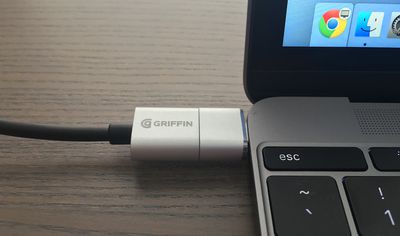
Griffin BreakSafe 2
The dongle has a mark on the top side to remind users which side goes up when plugging it into the MacBook, although USB-C does allow reversible inputs so it doesn't much matter (a small Griffin logo resides on the opposite side). That gray line does have to line up with a similar engraving on the charging cable; otherwise the BreakSafe's reverse polarity pushes the two magnetic ends apart and fails to induce a charge to the MacBook.

That's the first minor issue -- of only a few -- with Griffin's MagSafe alternative. Apple's proprietary technology allows users to plug their MagSafe cables into their notebooks in either orientation; even the later-generation L-shaped MagSafe could be attached in reverse, albeit with the power cable blocking a few USB ports.
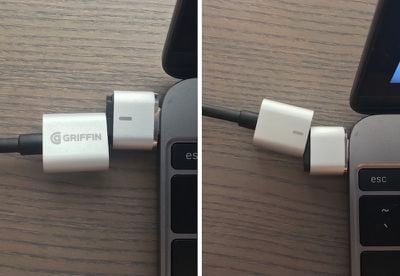
Griffin BreakSafe 6

When aligned incorrectly, the two ends fail to click and magnetize together

BreakSafe doesn't provide such a feature and as such isn't as slickly easy to use as the first-party alternative. Griffin informed me that the major reason behind its decision to not make BreakSafe reversible was its attempt to keep the connector as small as possible, while still managing to provide magnetic attraction and charge to the MacBook.

The company described the small markings on the cable and dongle, and the reverse magnetic push users receive when aligned incorrectly, as integrated "safety features" of BreakSafe, helping accustom users to regularly aligning the cable and connector. The system is a step above needing to look or feel for the MacBook's USB-C port to connect the cable, but it's also a step below Apple's seamlessly reversible MagSafe function.

Daily Use

Griffin's rough-and-tumble cable design, which is guaranteed for life by the company, helps make up in areas where the accessory lacks. I've only been using BreakSafe for a week so I can't refer to its long-term durability, but in direct comparison to Apple's, the third-party cable is far thicker and more resilient to annoying coiling prevalent in Apple's thin white cable. It is slightly shorter at 6ft (1.8m), compared to Apple's 6.5ft (2m) cable.
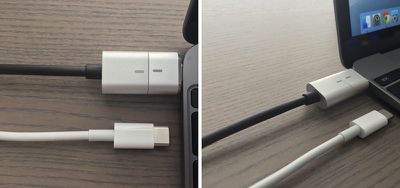
Griffin BreakSafe 7
Powered off of Apple's 29-watt USB-C Power Adapter that's included with every 12-inch MacBook, Griffin's 60-watt BreakSafe cable has shown reliably fast charging speeds when the MacBook is both close to dying, and just in need of a quick top-off. I ran a charging speed test over the weekend to compare it with Apple's and, expectedly, the two came in around the same time. BreakSafe fueled the MacBook from 35 percent to 100 percent in 1 hour and 27 minutes, while Apple's included USB-C cable completed the same battery test in 1 hour and 25 minutes.

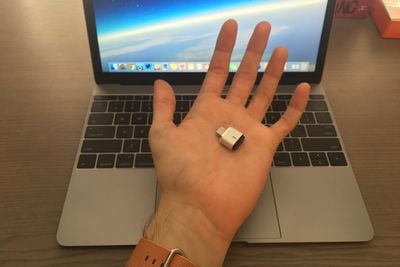
What will be the deciding factor on Griffin's BreakSafe cable for many users is the introduction of another minuscule accessory (12.8mm long to be exact) that needs to be kept track of to be able to fully use its features. The dongle is small in form factor, but recognizably thicker in comparison with Apple's charger. When inserted into the MacBook, there's a a definite protrusion and even a slight amount of wiggle when touching the BreakSafe plug, which gave me some hesitation about keeping it attached when not in use.
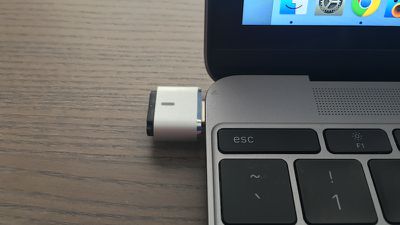
Griffin BreakSafe 9
Of course, removing the dongle when not in use would negate the entire reason for its existence, since every time you plug it back in you return to the original problem of correctly aligning a USB-C plug into the MacBook. To replicate a MagSafe-like experience on the 12-inch Retina MacBook, you would have to keep the BreakSafe dongle plugged into your MacBook at all times.

Such a decision comes down to personal preference, but as someone who's by-and-large gotten accustomed to daily USB-C charging, the idea of adding yet another Type-C accessory to a growing list of necessities needed for my year-old 12-inch MacBook, especially when traveling, just isn't worth the hassle.
Griffin BreakSafe 8
Griffin's alternative also feels tangibly less magnetic than MagSafe. That means BreakSafe will successfully disengage when users place enough pressure on the cable, but I also found it to disconnect unintentionally without me even knowing. In the first test, I left the cable plugged in and returned intermittently to check my MacBook's charge level, and discovered twice that the two correctly aligned magnetic ends were touching, but not fully connected.

This might be an individual issue (my MacBook was placed on a standing desk which was raised and lowered a few times during the test), but the thickness of BreakSafe's cable seems to generate one negative in this regard, occasionally pulling on the slightly-weaker-than-MagSafe connection and disrupting charge to the MacBook.

Bottom Line

Someone who is just joining the USB-C world that Apple is forging with the Retina MacBooks could find Griffin's cable a decent alternative to using Apple's included charging cable, and users who routinely use their machines in environments where the charging cord is likely to be pulled or tripped over will appreciate the peace of mind BreakSafe brings.

It's a quality accessory in any capacity, and running for $39.99, BreakSafe is also largely competitive with Apple's $29.99 USB Type-C cable. It's not without some drawbacks, the biggest one being its lack of magnetically reversible charging, so if you've already gotten used to the USB-C setup it may not be worth the effort and expense to switch back to a magnetic interface.

How To Buy

Griffin is currently selling the BreakSafe Magnetic USB-C Power Cable from its website for $39.99.


Related Forum: MacBook Neo

Top Rated Comments

137 months ago
This only works if we don't have to carry an accessory. It sucks that Apple moved away from the magsafe technology. It saved our powerbook and MacBook devices on many occasions. But I guess now it is more important to Apple that your laptop crash to the floor and has to be replaced.

Score: 12 Votes (Like | Disagree)
137 months ago
I think they should put the new iPad Pro Smart Connector on MacBooks and make that the new MagSafe. Power and data transfer.
Score: 5 Votes (Like | Disagree)
MLMcMillion Avatar
137 months ago
So they managed to take a reversible cable and make it non-reversible? Well done.
Score: 5 Votes (Like | Disagree)
justperry Avatar
137 months ago
I said it before and say it again, magsafe does't work on light(er) devices, the Macbook is too light for this to work perfectly well, I think Apple knew this and that's the sole reason for not using the Macsafe.
Score: 4 Votes (Like | Disagree)
137 months ago
In the 6 years I've owned my MBP I can't think of a single instance where the MagSafe came in handy. It's a nice idea, but in reality I don't think it's all that important. In fact, it's been causing me issues in age. I think the contacts have worn down to the point where they intermittently make contact. I can have it plugged in but if it gets wiggled it stops charging.
I can think of a number of instances.
Score: 2 Votes (Like | Disagree)
137 months ago
In the 6 years I've owned my MBP I can't think of a single instance where the MagSafe came in handy.
Before MagSafe, I had the cat destroy a G3 MacBook's display by dashing across the cable. After MagSafe, the cats have tried but failed. Thus MagSafe has a proven value to me of around $1k, way more than just "handy".
Score: 2 Votes (Like | Disagree)

Popular Stories

apple pro tell logo

Apple Launching Five New Products Today

Thursday November 5, 2026 12:59 am PST by
Apple is launching five new products on Friday, November 6, following pre-orders that opened last week, including its first touchscreen MacBook Pro models. The following new products will be available from today: iPad mini with OLED display and A20 Pro chip iMac with M6 chip 14-inch MacBook Pro with M6 chip 14-inch MacBook Pro with OLED touchscreen 16-inch MacBook Pro with OLED...
duo aquarium

More Fun iPhone Duo Apps: 30 New Picks to Try

Friday November 6, 2026 3:27 pm PST by
When the iPhone Duo launched, we shared a list of some of the fun apps developers created for the new form factor. Two weeks out, developers are continuing to come up with fresh ideas, so we thought we'd share some of our favorites. Games Marbles Unhinged ($2.99) - Marbles Unhinged is a marble maze designed for the Duo. When you fold it, the floor turns into a ramp. If you stand the top...
silver iphone 18 pro

Apple Rumored to Drop the iPhone's Action Button Next Year

Friday November 6, 2026 6:07 am PST by
Apple plans to merge the iPhone's Action button with the Camera Control starting next year, according to the leaker known as "Instant Digital." In a new post on Weibo, the leaker claimed that a single press of the combined button would open the camera, while a long press would trigger the function assigned to the Action button. They explicitly clarified that the dedicated Action button would ...
Latest Stories
Siri AI Rumored to Become 'More Like an Agent' as Early as Next Year
47 minutes ago
Apple Taking New Approach to Developing iOS 28 and macOS 28
2 hours ago
Early Apple Black Friday Deals on Apple Watch, MacBook Air, and More
21 hours ago
'Backglow' Lets You Customize New MacBook Pro's Glowing Apple Logo
21 hours ago
Top Stories: Apple Product Launches, iOS 27.3 Beta, and More
1 day ago
More Fun iPhone Duo Apps: 30 New Picks to Try
2 days ago
Hands-On With Apple's New OLED Touchscreen MacBook Pro
2 days ago
Apple Store With All-New Design Opening Soon in Southern California
2 days ago
Control the Glowing Apple Logo on Your New MacBook Pro
2 days ago
Apple Shares New 'Apple Card: Apply and Use in Minutes' Ad
2 days ago
Apple Says More Than 100,000 Apps Optimized for iPhone Duo, Here's What's Still Missing
2 days ago
Early Black Friday Deals Kickoff With Steep Discounts on Apple Watch Ultras and More
2 days ago
The MacRumors Show: iOS 27.3 Looks Like a Huge Update
2 days ago
Best Buy's Black Friday Event Begins With Sitewide Savings on Apple, TVs, More
2 days ago
Apple Releasing Yet Another Two New Products Next Week
2 days ago
MacBook Air Drops to Lowest Price in Months With Amazon's $250 Discount
2 days ago
Apple Rumored to Drop the iPhone's Action Button Next Year
2 days ago
Apple's Extended Return Policy Now in Effect for 2026 Holiday Season
2 days ago
Apple Music Classical Updated With New Icon and Refreshed Design
2 days ago
OLED iPad Mini, M6 iMac, and New MacBook Pros Available From Today
2 days ago
Apple Surveys iPhone Duo Buyers About Crease and Camera
3 days ago
Apple's First Touchscreen Mac is Now Arriving to Customers
3 days ago
Claude Gets Personal Finance Feature With Bank Account Linking
3 days ago
Apple Arcade Adds Crossy Road Rush and NBA 2K27
3 days ago
Apple's New HomeView Smart Home Hub: Here's How Much RAM It Has
3 days ago
iPad Mini vs. iPad Air Buyer's Guide: Now Just $50 Apart
3 days ago
First iOS 27.3 and macOS Golden Gate 27.3 Public Betas Now Available
3 days ago
Apple Announces a New Mac Sales Record
3 days ago
Paid $200 for Logic Pro? Apple Says You Won't Get This New Feature
3 days ago
Instagram's Edits Video Editor is Now Available on Mac
3 days ago









































