

Several months ago, Hyper introduced a series of accessories under the "HyperDrive Next" family, bringing a variety of options for USB-C hubs and other products. I've recently spent some time testing out some of these accessories, and I've found them to offer an assortment of capabilities across price points to suit a variety of users.
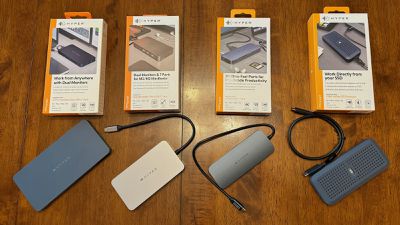
USB4 NVMe SSD Enclosure
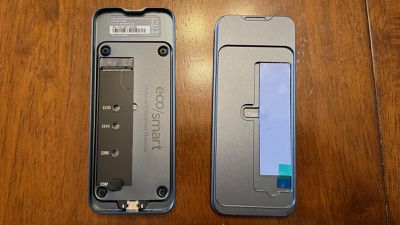
Priced at $119.99, Hyper's USB4 NVMe SSD Enclosure offers support for a speedy external drive inside a robust aluminum enclosure protected by a silicone bumper to cushion against impacts and provide IP55 dust and water resistance. The enclosure supports M.2 NVMe PCIe Gen 4/3 SSDs up to 16 TB with a snap-in installation process that requires no screws. SSDs in 2230/2240/2260/2280 sizes are supported.
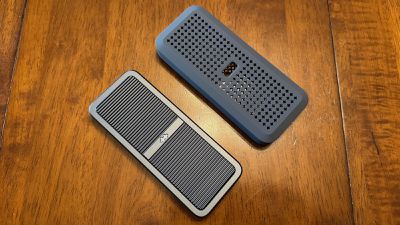
For testing, I paired Hyper's enclosure with a 2TB WD_BLACK SSD that supports up to 7,300 MB/s transfer speeds, allowing me to push the enclosure to its limits without being capped by the SSD. The installation process was as simple as advertised, and all I had to do was pop open the enclosure by hand, slide the SSD into the drive slot, secure it with a rubber secure grip, peel off the protective film on a preinstalled thermal pad, and close everything back up. An extra thermal pad and secure grips are provided in the box in case you need them.
A 0.5-meter USB4 cable is included with the enclosure, and upon plugging the enclosure in to my MacBook Pro, I was able to quickly format it for APFS with Disk Utility to work with macOS. An illuminated Hyper logo on the enclosure shines through an opening in the silicone bumper, giving you some information about drive status. The logo shines a steady white when the enclosure is powered on and the drive is idle, and it blinks while data is being read from or written to the SSD. The logo will blink red if detects an SSD is not connected.
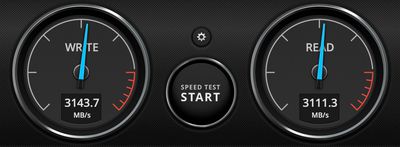
Hyper says the enclosure supports up to 3,800 MB/s transfer speeds, and in my testing with a 16-inch M1 Pro MacBook Pro I saw both read and write speeds registering around 3,100 MB/s with the WD SSD. That's plenty fast for most users, allowing for fast file transfers and even the ability to work with large projects directly from the external drive. I was able to copy a ~28 GB folder with roughly 17,500 items in it to the drive in around 15 seconds.
The enclosure gets slightly warm even when not in active use, with the finned aluminum design of the enclosure and small Hyper logo-shaped holes in the silicone bumper helping move heat away from the drive. The heat was not a concern in any of my testing, as it remained comfortable to touch.
Overall, I was pleased with the performance of the enclosure, and it's a convenient solution for backing up data or just adding extra storage. At $119.99 before adding in the cost of the SSD itself, it's pricier than some other solutions, but when you consider the higher-end specs it offers, it's within the same price range as many other options from trusted brands.
Hyper is currently sold out of the SSD enclosure on its own site, but does have it available through Amazon.
10 Port USB-C Hub
At the low end of Hyper's USB hub range is the 10 Port USB-C Hub priced at $99.99. It includes support for a single external display at 4K60Hz over HDMI while offering a pair of 10 Gbps USB-C ports, two USB-A ports (one at 10 Gbps and one at 5 Gbps), SD and microSD 4.0 card slots supporting up to a theoretical maximum of 312 MB/s, Gigabit Ethernet, and a 3.5 mm combo audio jack.
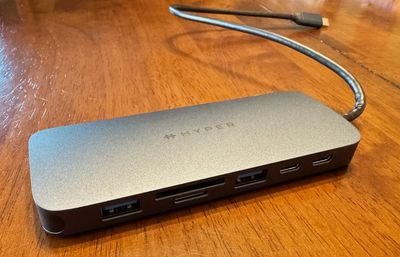
There's also a USB-C port with PD support at up to 140 watts, allowing for passthrough power to your computer if you hook up an external power adapter. Otherwise, the hub will run in bus-powered mode off of your computer. The hub connects to the attached computer over an integrated USB-C cable, which ensures you always have the proper cable with you but introduces a potential failure point for the whole accessory. The cable does feel fairly thick and sturdy with some strain relief reinforcement around where it enters the hub, so hopefully it will remain durable over the long term.
This is a compact, lightweight (97 grams) hub in a very dark gray or almost midnight aluminum finish, and in my testing it's proven to be a solid option for on-the-go use cases. It slips easily into a computer bag or sleeve and offers a really nice selection of ports to help you make use of a wide variety of accessories you might run across.
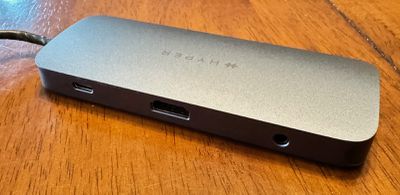
With support for a single external display, this may not be for true power users, but the vast majority of people are likely to only need to connect to a single display, especially in travel environments where this hub excels. A more powerful dock with additional display support and even more ports would likely suit these users better at more fixed home and office locations.
Hyper is currently sold out of the 10 Port USB-C Hub on its own site, but it is available through Amazon and Best Buy.
Dual 4K HDMI 7 Port USB-C Hub
Hyper's mid-range Dual 4K HDMI 7 Port USB-C Hub priced at $149.99 offers fewer ports than the lower-end model but with enhanced display support. It includes two HDMI ports (one HDMI 2.0 at 4K60Hz and one HDMI 1.4 at 4K30Hz), a pair of 10 Gbps USB-C 3.2 Gen 2 ports, a single 10 Gbps USB-A port, a 3.5mm combo audio jack, and a USB-C port allowing you to optionally connect a PD 3.0 power adapter of up to 100 watts for passthrough charging of up to 85 watts to a connected computer. If you don't want to connect a power adapter, the hub will run in bus-powered mode from the attached computer, so no external power brick is needed.
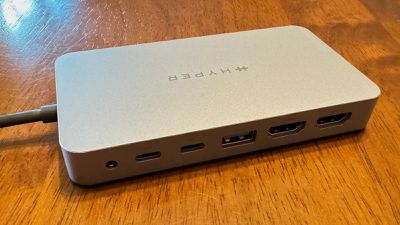
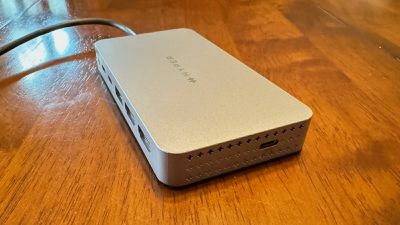
The design is an unobtrusive space gray plastic with subtle Hyper branding on the top. An integrated USB-C cable on one side connects to the host computer, while the available USB-C passthrough power port is on the opposite side. All other ports are on the rear of the hub, allowing for a relatively clean look on a desk. There are several rows of tiny Hyper logos on the ends of the hub, with the top row on each end being ventilation holes. The integrated cable is convenient for ensuring your cable is always at hand, but if it frays or otherwise breaks, the hub is rendered useless. It does appear quite durable based on my time with it though.
Given that this is a hub rather than a wall-powered desktop dock, it's ideal to take on the go to connect to displays and other devices as needed. While dual external displays are supported over the HDMI ports, it's important to note that USB bandwidth limitations means that only one of the displays can run at 60Hz, with the other running at 30Hz. This is likely fine for less demanding productivity tasks, but definitely something to be aware of if you're hoping to drive displays with heavier demands.
The inclusion of two USB-C ports with 10 Gbps transfer speeds is nice for connecting external drives and other modern devices, while the USB-A port offers legacy connectivity. I prefer a couple of USB-A ports on my full-time desktop dock due to a number of accessories I use that have integrated USB-A cables or proprietary charging connectors that use USB-A at the other end, but for a portable solution, this hub does the trick just fine.
I connected the USB4 NVMe SSD Enclosure via this hub, and it unsurprisingly impacted performance of the SSD as it was now sharing bandwidth other accessories, potentially including displays. I was still able to get write speeds of around 975 MB/s and read speeds of 850 MB/s, which should be sufficient for most users' needs.
The Dual 4K HDMI 7 Port USB-C Hub offers a number of connectivity options primarily aimed at users on the go, but you'll need to ensure it suits your needs. It's on the pricier side of USB hubs at $149.99, so make sure you need all of its capabilities and can't get away with a cheaper and simpler option. But on the flip side, the display limitations mean demanding users may want to look at other solutions such as separately connecting multiple displays to their computers for maximum performance.
Hyper is currently listing the Dual 4K HDMI 7 Port USB-C Hub as on sale for $104.99 on its own site, though it is currently out of stock. Amazon has it available for the regular price of $149.99, but hopefully Hyper gets this model back in stock soon at the sale price.
10 Port Business Class USB-C Dock
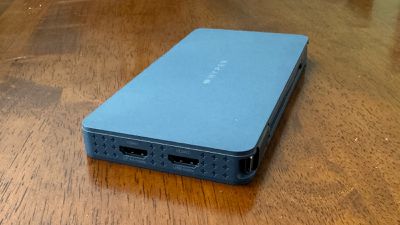
For those looking for more capabilities, Hyper offers the $199.99 10 Port Business Class USB-C Dock. While this dock has the same dual display capabilities of one HDMI 2.0 port at 4K60Hz and one HDMI 1.4 port at 4K30Hz, it offers a different combination of other ports. As a business-focused dock, there's a heavier emphasis on legacy connectivity such as two USB-A ports, both of which run at up to 10 Gbps. The extra USB-A port is offset by the inclusion of only a single downstream USB-C port, which also runs at 10 Gbps.
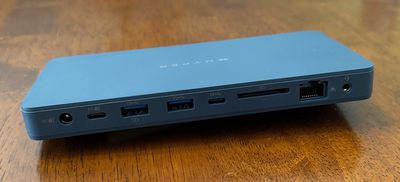
In addition to the same 3.5mm combo audio jack as on the 7-port hub, the 10-port model includes a Gigabit Ethernet port and an SD 4.0 card slot supporting transfer speeds up to 312 MB/s, In another nod to the business market, Kensington and Kensington Nano lock slots are included to help physically secure the dock.
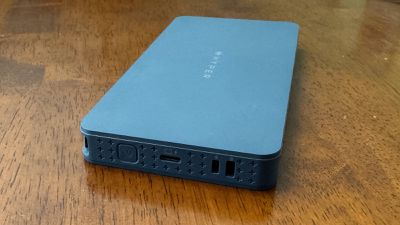
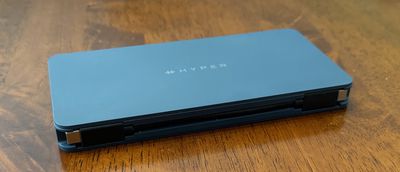
The dock connects to the host computer via a short detachable USB-C to USB-C cable, which conveniently snaps into the edge of the dock for travel, so this is a great balance of convenience and repairability. While the dock can be bus powered over this connection, you can also provide external power to the dock that can pass through to your laptop. The dock allows for power input via either USB-C or a DC barrel connector, but an external power adapter is not provided with the dock.
I experienced no issues in my testing, with the dock reliably driving two displays, keeping in mind that the 30Hz refresh rate on the second display may be insufficient for some uses. Productivity users are, however, unlikely to notice any issues due to that limitation. Ethernet and USB connectivity worked as advertised.
SD card reader speeds also appeared as advertised, with my test card nearing its maximum specs at write speeds of 125 MB/s and read speeds of around 220 MB/s.
While the 10 Port Business Class USB-C Dock is priced at $199.99 at Hyper, Best Buy is currently offering it for a discounted price of $159.99.
Wrap-up
Overall, Hyper offers a nice selection of USB-C hubs and docks to suit a variety of needs. While they don't have quite the capabilities of a Thunderbolt dock, they can provide good options for port expandability both on the go and in a desktop situation.
The USB4 SSD Enclosure supports the latest USB standard for high read and write speeds that should satisfy almost all users, and it comes in a compact package ideal for extra portable storage. Just make sure the SSD you're using can take advantage of the speeds the enclosure has to offer.
Note: Hyper provided MacRumors with the hubs, dock, and SSD enclosure for the purposes of this review. No other compensation was received. MacRumors is an affiliate partner with Hyper, Amazon, and Best Buy. When you click a link and make a purchase, we may receive a small payment, which helps us keep the site running.















































Top Rated Comments
Funny that it proves my point even more clearly: Hyper lied through their teeth for months about their dangerous products.
https://www.theverge.com/2022/9/30/23380019/hyper-stackable-gan-chargers-refund-overheating-fire-hazard-65w-100w-130w-usb-c-battery-pack
However, it’s a bit expensive at $120 and not sold on Europe yet.
Anyways, it’s a good purchase if you’re getting an SSD before they rise their prices. I already have four Samsung T5/T7 SSDs: 512GB, 1TB SSD, 2TB and a T7 Shield of 4TB. And I think I have enough storage for now…
https://www.theverge.com/2022/6/28/23186796/hyper-sanho-targus-stackable-gan-usb-c-charger-overheating-issue
I believe most TB3 enclosures present the NVMe drive basically natively meaning the drive can be managed same as if it was mounted internally and as such SMART status comes across.
However, I understand that USB3 and below enclosures present under a USB protocol such that getting SMART status and similar is nonstandard and varies by the enclosure's chipset (meaning no builting MacOS support and unlikely 3rd party support).
However, unclear to me about USB4 -- as the seeming merger of Thunderbolt 3 and USB3 -- is it presenting NVMe drives natively like Thunderbolt 3 or like a generic USB storage device?
You can watch this:
40Gbps is the total USB4/TB4 bandwidth, part of it is reserved for display.
Around 3200 MB/s read/write is maximum for USB4/TB4 and 900-1000 MB/s is maximum for USB3.2 .
There is also USB3.2 Gen2 2x2 (20Gbps) but it's not supported on Macs.